crwdns2933423:0crwdne2933423:0
crwdns2947577:0crwdnd2947577:0crwdne2947577:0

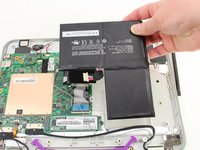
One Education Infinity Battery Replacement

crwdns2869540:0crwdne2869540:0: 821

crwdns2959988:0crwdne2959988:0

crwdns2959990:0crwdne2959990:0
2
crwdns2959992:0crwdne2959992:0
7
crwdns2959994:0crwdne2959994:0
52
crwdns2959996:0crwdne2959996:0
821
crwdns2955950:0crwdne2955950:0: 0

crwdns2959998:0crwdne2959998:0

crwdns2960000:0crwdne2960000:0
crwdns2959984:0crwdne2959984:0: 0

crwdns2959956:0crwdne2959956:0

crwdns2959986:0crwdne2959986:0: 0

crwdns2959958:0crwdne2959958:0

crwdns2955944:0crwdne2955944:0: 10 - 15 crwdns2931279:0crwdne2931279:0
crwdns2955970:0crwdne2955970:0: crwdns2937799:0crwdne2937799:0
crwdns2862633:0crwdne2862633:0

crwdns2862634:0crwdne2862634:0

One Education Infinity Battery Replacement

crwdns2915892:0crwdne2915892:0

crwdns2959928:0crwdne2959928:0 ↓

This guide will detail how to safely remove the battery from the One Education Infinity laptop. The model number for the Infinity is A03. This device can be recognized by its dark grey exterior, light grey interior, purple carrying handle, and rotating camera above the screen.

The Infinity was released in Spring 2019 and is NOT the same as the Infinity: One.

crwdns2959930:0crwdne2959930:0

crwdns2943215:0crwdne2943215:0

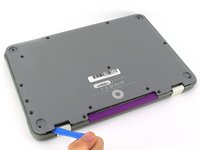
    1. One Education Infinity Battery Replacement, Back Case: crwdns2935265:01crwdnd2935265:01crwdnd2935265:03crwdne2935265:0 One Education Infinity Battery Replacement, Back Case: crwdns2935265:01crwdnd2935265:02crwdnd2935265:03crwdne2935265:0 One Education Infinity Battery Replacement, Back Case: crwdns2935265:01crwdnd2935265:03crwdnd2935265:03crwdne2935265:0
      • Always power off your device before beginning disassembly.

      • Remove the screw covers and rubber feet from the bottom of the laptop with a metal spudger.

      crwdns2952109:0crwdne2952109:0

      crwdns2917038:0crwdne2917038:0

    2. One Education Infinity Battery Replacement: crwdns2935265:02crwdnd2935265:01crwdnd2935265:02crwdne2935265:0 One Education Infinity Battery Replacement: crwdns2935265:02crwdnd2935265:02crwdnd2935265:02crwdne2935265:0
      • Using a Phillips #00 screwdriver, remove the sixteen 5.0 mm black screws from the back panel.

      crwdns2952109:0crwdne2952109:0

      crwdns2917038:0crwdne2917038:0

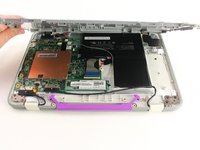
    3. One Education Infinity Battery Replacement: crwdns2935265:03crwdnd2935265:01crwdnd2935265:03crwdne2935265:0 One Education Infinity Battery Replacement: crwdns2935265:03crwdnd2935265:02crwdnd2935265:03crwdne2935265:0 One Education Infinity Battery Replacement: crwdns2935265:03crwdnd2935265:03crwdnd2935265:03crwdne2935265:0
      • Using the iFixit plastic opening tool or spudger, start near the white hinge of the device and lift along the outer edges of the device until all clips are released.

      • Lift the back case off of the device.

      • Removing the back may create a loud snapping noise.

      crwdns2952109:0crwdne2952109:0

      crwdns2917038:0crwdne2917038:0

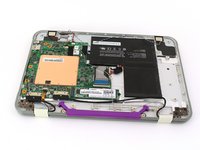
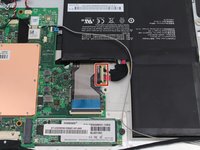
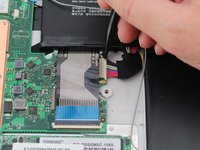
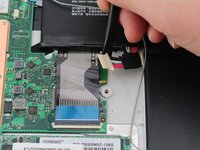
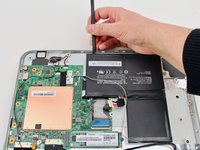
    1. One Education Infinity Battery Replacement, Battery: crwdns2935265:04crwdnd2935265:01crwdnd2935265:03crwdne2935265:0 One Education Infinity Battery Replacement, Battery: crwdns2935265:04crwdnd2935265:02crwdnd2935265:03crwdne2935265:0 One Education Infinity Battery Replacement, Battery: crwdns2935265:04crwdnd2935265:03crwdnd2935265:03crwdne2935265:0
      • There may be black tape inside your device covering components or holding down wires. This tape is unimportant for the function of the device, and can be removed.

      • Carefully wiggle the battery cable to the right and out of the port with a plastic spudger.

      crwdns2952109:0crwdne2952109:0

      crwdns2917038:0crwdne2917038:0

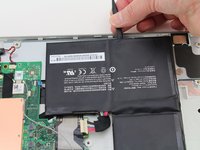
    2. One Education Infinity Battery Replacement: crwdns2935265:05crwdnd2935265:01crwdnd2935265:03crwdne2935265:0 One Education Infinity Battery Replacement: crwdns2935265:05crwdnd2935265:02crwdnd2935265:03crwdne2935265:0 One Education Infinity Battery Replacement: crwdns2935265:05crwdnd2935265:03crwdnd2935265:03crwdne2935265:0
      • Wedge a plastic spudger underneath the battery from the upper edge and slide it carefully along the length of the battery to separate it from the case.

      • There is a mild adhesive holding down the battery. Take care not to puncture or excessively bend the battery while freeing it from the adhesive.

      • Lift the battery out from the internal case.

      crwdns2952109:0crwdne2952109:0

      crwdns2917038:0crwdne2917038:0

crwdns2915888:0crwdne2915888:0

To reassemble your device, follow these instructions in reverse order.

crwdns2935221:0crwdne2935221:0

crwdns2862417:0crwdne2862417:0

crwdns2935293:0crwdne2935293:0

Jacob Barnes

crwdns2935283:010/10/19crwdne2935283:0

193 crwdns2915208:0crwdne2915208:0

crwdns2935297:02crwdne2935297:0

crwdns2935287:0crwdne2935287:0

Cal Poly, Team S11-G4, Regan Fall 2019 crwdns2935289:0Cal Poly, Team S11-G4, Regan Fall 2019crwdne2935289:0

CPSU-REGAN-F19S11G4

crwdns2931471:03crwdne2931471:0

crwdns2935297:048crwdne2935297:0

crwdns2947412:00crwdne2947412:0

crwdns2917038:0crwdne2917038:0

crwdns2936625:0crwdne2936625:0:

crwdns2936751:024crwdne2936751:0 2

crwdns2936753:07crwdne2936753:0 7

crwdns2936753:030crwdne2936753:0 52

crwdns2959996:0crwdne2959996:0 821