crwdns2933423:0crwdne2933423:0
crwdns2947577:0crwdnd2947577:0crwdne2947577:0

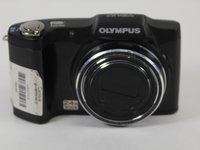
Olympus SZ-12 Lens Replacement

crwdns2942213:0crwdne2942213:0

    1. Olympus SZ-12 Lens Replacement, Back Case: crwdns2935265:01crwdnd2935265:01crwdnd2935265:02crwdne2935265:0 Olympus SZ-12 Lens Replacement, Back Case: crwdns2935265:01crwdnd2935265:02crwdnd2935265:02crwdne2935265:0
      • Remove nine 4.45mm Phillips #000 screws from the outside of the case.

      crwdns2952109:0crwdne2952109:0

      crwdns2917038:0crwdne2917038:0

    2. Olympus SZ-12 Lens Replacement: crwdns2935265:02crwdnd2935265:01crwdnd2935265:01crwdne2935265:0
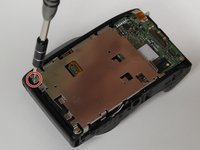
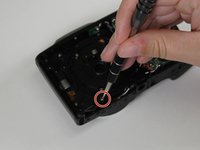
      • There are four screws to take out on the bottom of the camera.

      crwdns2952109:0crwdne2952109:0

      crwdns2917038:0crwdne2917038:0

    3. Olympus SZ-12 Lens Replacement: crwdns2935265:03crwdnd2935265:01crwdnd2935265:01crwdne2935265:0
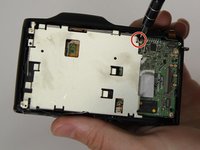
      • There are three screws to take out on this side.

      crwdns2952109:0crwdne2952109:0

      crwdns2917038:0crwdne2917038:0

    4. Olympus SZ-12 Lens Replacement: crwdns2935265:04crwdnd2935265:01crwdnd2935265:01crwdne2935265:0
      • There is one screw to take out on this side.

      crwdns2952109:0crwdne2952109:0

      crwdns2917038:0crwdne2917038:0

    5. Olympus SZ-12 Lens Replacement: crwdns2935265:05crwdnd2935265:01crwdnd2935265:01crwdne2935265:0
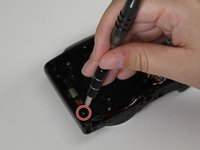
      • There is one hidden screw inside the HDMI port.

      crwdns2952109:0crwdne2952109:0

      crwdns2917038:0crwdne2917038:0

    6. Olympus SZ-12 Lens Replacement: crwdns2935265:06crwdnd2935265:01crwdnd2935265:01crwdne2935265:0
      • Using the blue plastic opening tool, wedge open and remove the case.

      crwdns2952109:0crwdne2952109:0

      crwdns2917038:0crwdne2917038:0

    1. Olympus SZ-12 Lens Replacement, LCD Screen: crwdns2935265:07crwdnd2935265:01crwdnd2935265:01crwdne2935265:0
      • Once you have the back case off, remove the LCD Screen.

      crwdns2952109:0crwdne2952109:0

      crwdns2917038:0crwdne2917038:0

    2. Olympus SZ-12 Lens Replacement: crwdns2935265:08crwdnd2935265:01crwdnd2935265:01crwdne2935265:0
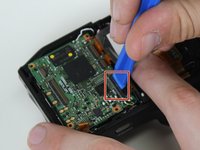
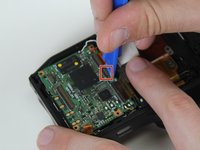
      • Using a plastic opening tool, gently lift the retaining flap on the display cable ZIF connector.

      • Pull the display cable from its socket on the motherboard.

      crwdns2952109:0crwdne2952109:0

      crwdns2917038:0crwdne2917038:0

    3. Olympus SZ-12 Lens Replacement: crwdns2935265:09crwdnd2935265:01crwdnd2935265:01crwdne2935265:0
      • Remove the LCD screen from the device.

      • Be careful not to rip the display's ribbon cable as you pull the screen away from the device.

      crwdns2952109:0crwdne2952109:0

      crwdns2917038:0crwdne2917038:0

    1. Olympus SZ-12 Lens Replacement, Lens: crwdns2935265:010crwdnd2935265:01crwdnd2935265:02crwdne2935265:0 Olympus SZ-12 Lens Replacement, Lens: crwdns2935265:010crwdnd2935265:02crwdnd2935265:02crwdne2935265:0
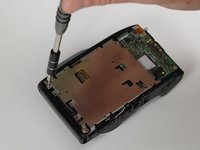
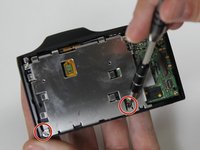
      • Remove the four 3.8mm Phillips #000 screws from the LCD frame.

      crwdns2952109:0crwdne2952109:0

      crwdns2917038:0crwdne2917038:0

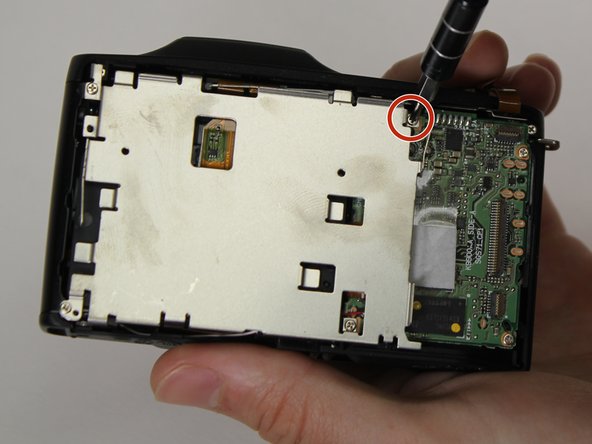
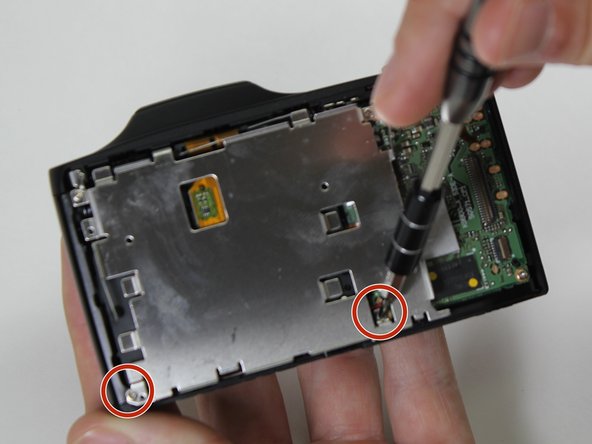
    2. Olympus SZ-12 Lens Replacement: crwdns2935265:011crwdnd2935265:01crwdnd2935265:03crwdne2935265:0 Olympus SZ-12 Lens Replacement: crwdns2935265:011crwdnd2935265:02crwdnd2935265:03crwdne2935265:0 Olympus SZ-12 Lens Replacement: crwdns2935265:011crwdnd2935265:03crwdnd2935265:03crwdne2935265:0
      • Remove the top left screw, top right screw, bottom left screw, and bottom right screw from LCD frame.

      crwdns2952109:0crwdne2952109:0

      crwdns2917038:0crwdne2917038:0

    3. Olympus SZ-12 Lens Replacement: crwdns2935265:012crwdnd2935265:01crwdnd2935265:03crwdne2935265:0 Olympus SZ-12 Lens Replacement: crwdns2935265:012crwdnd2935265:02crwdnd2935265:03crwdne2935265:0 Olympus SZ-12 Lens Replacement: crwdns2935265:012crwdnd2935265:03crwdnd2935265:03crwdne2935265:0
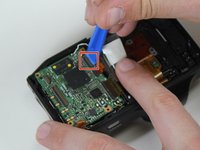
      • Lift the retaining flaps on the three remaining ZIF connectors connected to the motherboard.

      crwdns2952109:0crwdne2952109:0

      crwdns2917038:0crwdne2917038:0

    4. Olympus SZ-12 Lens Replacement: crwdns2935265:013crwdnd2935265:01crwdnd2935265:01crwdne2935265:0
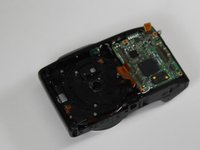
      • Remove the five 4.3mm Phillips #000 screws from the lens frame to access the lens.

      • Remove the lens frame.

      crwdns2952109:0crwdne2952109:0

      crwdns2917038:0crwdne2917038:0

    5. Olympus SZ-12 Lens Replacement: crwdns2935265:014crwdnd2935265:01crwdnd2935265:03crwdne2935265:0 Olympus SZ-12 Lens Replacement: crwdns2935265:014crwdnd2935265:02crwdnd2935265:03crwdne2935265:0 Olympus SZ-12 Lens Replacement: crwdns2935265:014crwdnd2935265:03crwdnd2935265:03crwdne2935265:0
      • Remove two 4.3mm Phillips #000 screws from black plastic piece surrounding the lens.

      • Remove the lens.

      crwdns2952109:0crwdne2952109:0

      crwdns2917038:0crwdne2917038:0

crwdns2915888:0crwdne2915888:0

To reassemble your device, follow these instructions in reverse order.

crwdns2935221:0crwdne2935221:0

crwdns2935229:03crwdne2935229:0

Samuel Hays

crwdns2935283:003/13/17crwdne2935283:0

587 crwdns2915208:0crwdne2915208:0

crwdns2935297:04crwdne2935297:0

crwdns2935287:0crwdne2935287:0

Carson-Newman University, Team S1-G1, Sobiech Spring 2017 crwdns2935289:0Carson-Newman University, Team S1-G1, Sobiech Spring 2017crwdne2935289:0

CNU-SOBIECH-S17S1G1

crwdns2931471:04crwdne2931471:0

crwdns2935297:08crwdne2935297:0

crwdns2947410:01crwdne2947410:0

Is her anything in the lens assembly that I could look for which may have dislodged showing up as a shadow on the bottom of the display screen

Deacon - crwdns2934203:0crwdne2934203:0 crwdns2950251:0crwdne2950251:0

crwdns2917038:0crwdne2917038:0

crwdns2936625:0crwdne2936625:0:

crwdns2936751:024crwdne2936751:0 2

crwdns2936753:07crwdne2936753:0 17

crwdns2936753:030crwdne2936753:0 52

crwdns2942667:0crwdne2942667:0 2,544