crwdns2933423:0crwdne2933423:0
crwdns2947577:0crwdnd2947577:0crwdne2947577:0

Nokia XL Dual Sim Front Camera Replacement

crwdns2942213:0crwdne2942213:0

    1. Nokia XL Dual Sim Front Camera Replacement, Back Cover Removal: crwdns2935265:01crwdnd2935265:01crwdnd2935265:01crwdne2935265:0
      • You will first need to separate the back cover from the device.

      • Gently pry open each side of the device at the indicated locations. It is best to use a plastic opening tool or similar tool.

      crwdns2952109:0crwdne2952109:0

      crwdns2917038:0crwdne2917038:0

    2. Nokia XL Dual Sim Front Camera Replacement, Battery Removal: crwdns2935265:02crwdnd2935265:01crwdnd2935265:02crwdne2935265:0 Nokia XL Dual Sim Front Camera Replacement, Battery Removal: crwdns2935265:02crwdnd2935265:02crwdnd2935265:02crwdne2935265:0
      • Remove the back cover.

      • Use a plastic opening tool to lift the battery. Then, remove it.

      crwdns2952109:0crwdne2952109:0

      crwdns2917038:0crwdne2917038:0

    3. Nokia XL Dual Sim Front Camera Replacement, Screen Separation part 1: crwdns2935265:03crwdnd2935265:01crwdnd2935265:02crwdne2935265:0 Nokia XL Dual Sim Front Camera Replacement, Screen Separation part 1: crwdns2935265:03crwdnd2935265:02crwdnd2935265:02crwdne2935265:0
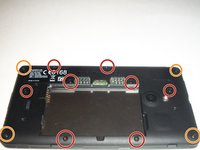
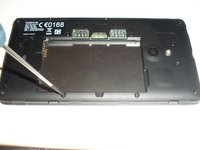
      • To access the inner components of the device, remove the various screws. Keep them separate, and organize them by size.

      • You will need a T5 Precision Torx screw driver to remove the screws.

      • The locations of the T5x3.4mm screws are indicated in the picture.

      • The locations of the T5x4.1mm screws are indicated in the picture.

      crwdns2952109:0crwdne2952109:0

      crwdns2917038:0crwdne2917038:0

    4. Nokia XL Dual Sim Front Camera Replacement, Screen Separation part 2: crwdns2935265:04crwdnd2935265:01crwdnd2935265:03crwdne2935265:0 Nokia XL Dual Sim Front Camera Replacement, Screen Separation part 2: crwdns2935265:04crwdnd2935265:02crwdnd2935265:03crwdne2935265:0 Nokia XL Dual Sim Front Camera Replacement, Screen Separation part 2: crwdns2935265:04crwdnd2935265:03crwdnd2935265:03crwdne2935265:0
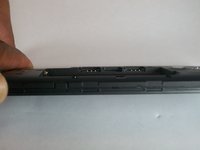
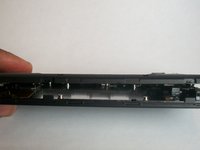
      • Use the plastic opening tool to gently pry the device apart.

      • There are flaps on both sides of the phone as indicated in the picture. This is what you will need to pry apart.

      • Please be cautious when opening the device. There are various connectors inside the device that must be handled with care.

      crwdns2952109:0crwdne2952109:0

      crwdns2917038:0crwdne2917038:0

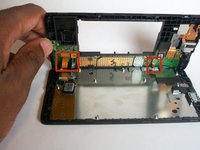
    5. Nokia XL Dual Sim Front Camera Replacement, System components: crwdns2935265:05crwdnd2935265:01crwdnd2935265:01crwdne2935265:0
      • Once the device is open, take note of all the components.

      crwdns2952109:0crwdne2952109:0

      crwdns2917038:0crwdne2917038:0

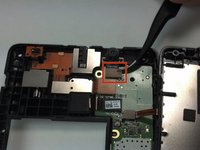
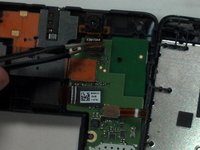
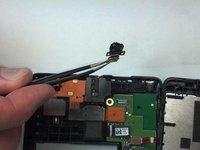
    1. Nokia XL Dual Sim Front Camera Replacement, Camera Removal: crwdns2935265:06crwdnd2935265:01crwdnd2935265:03crwdne2935265:0 Nokia XL Dual Sim Front Camera Replacement, Camera Removal: crwdns2935265:06crwdnd2935265:02crwdnd2935265:03crwdne2935265:0 Nokia XL Dual Sim Front Camera Replacement, Camera Removal: crwdns2935265:06crwdnd2935265:03crwdnd2935265:03crwdne2935265:0
      crwdns2935267:0crwdne2935267:0
      Tweezers
      $4.99
      • With Tweezers, gently unsnap the front camera motherboard connector.

      • The front camera component can now be gently removed.

      crwdns2952109:0crwdne2952109:0

      crwdns2917038:0crwdne2917038:0

crwdns2915888:0crwdne2915888:0

To reassemble your device, follow these instructions in reverse order.

crwdns2935221:0crwdne2935221:0

crwdns2935229:06crwdne2935229:0

Shadeed Bilal

crwdns2935283:009/25/14crwdne2935283:0

231 crwdns2915208:0crwdne2915208:0

crwdns2935297:04crwdne2935297:0

crwdns2935287:0crwdne2935287:0

USF Tampa, Team 1-4, Brown Fall 2014 crwdns2935289:0USF Tampa, Team 1-4, Brown Fall 2014crwdne2935289:0

USFT-BROWN-F14S1G4

crwdns2931471:03crwdne2931471:0

crwdns2935297:084crwdne2935297:0

crwdns2947410:01crwdne2947410:0

crwdns2917038:0crwdne2917038:0

crwdns2936625:0crwdne2936625:0:

crwdns2936751:024crwdne2936751:0 0

crwdns2936753:07crwdne2936753:0 10

crwdns2936753:030crwdne2936753:0 27

crwdns2942667:0crwdne2942667:0 1,466