crwdns2933423:0crwdne2933423:0
crwdns2947577:0crwdnd2947577:0crwdne2947577:0

Nokia N9 Battery Replacement

crwdns2942213:0crwdne2942213:0

  1. Nokia N9 Battery Replacement, remove top parts: crwdns2935265:01crwdnd2935265:01crwdnd2935265:03crwdne2935265:0 Nokia N9 Battery Replacement, remove top parts: crwdns2935265:01crwdnd2935265:02crwdnd2935265:03crwdne2935265:0 Nokia N9 Battery Replacement, remove top parts: crwdns2935265:01crwdnd2935265:03crwdnd2935265:03crwdne2935265:0
    • Click open the USB input protector lid and pull it from the housing.

    • Also remove the SIM card holder.

    • Remove screws from the top using the T3 torx screwdriver.

    crwdns2952109:0crwdne2952109:0

    crwdns2917038:0crwdne2917038:0

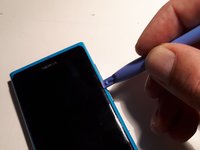
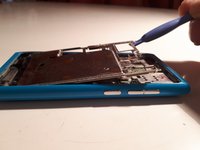
  2. Nokia N9 Battery Replacement, loosen the screen: crwdns2935265:02crwdnd2935265:01crwdnd2935265:03crwdne2935265:0 Nokia N9 Battery Replacement, loosen the screen: crwdns2935265:02crwdnd2935265:02crwdnd2935265:03crwdne2935265:0 Nokia N9 Battery Replacement, loosen the screen: crwdns2935265:02crwdnd2935265:03crwdnd2935265:03crwdne2935265:0
    • Press your screwdriver against the backside of the white pieces of plastic, and the screen will click out at the top side of the phone.

    crwdns2952109:0crwdne2952109:0

    crwdns2917038:0crwdne2917038:0

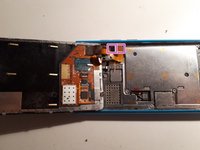
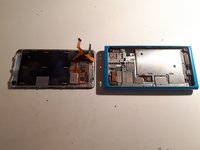
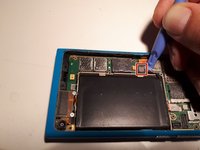
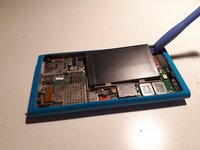
  3. Nokia N9 Battery Replacement, disconnect screen from phone: crwdns2935265:03crwdnd2935265:01crwdnd2935265:03crwdne2935265:0 Nokia N9 Battery Replacement, disconnect screen from phone: crwdns2935265:03crwdnd2935265:02crwdnd2935265:03crwdne2935265:0 Nokia N9 Battery Replacement, disconnect screen from phone: crwdns2935265:03crwdnd2935265:03crwdnd2935265:03crwdne2935265:0
    • Using a plastic tool, carefully open up the distance between the screen and the housing until the screen is only attached with 2 cables.

    • With the same plastic tool, disconnect the screen cables still attached to the phone.

    • The screen is now separated from the rest of the phone.

    crwdns2952109:0crwdne2952109:0

    crwdns2917038:0crwdne2917038:0

  4. Nokia N9 Battery Replacement, remove screws: crwdns2935265:04crwdnd2935265:01crwdnd2935265:01crwdne2935265:0
    • Unscrew the marked screws using the T4 torx screwdriver.

    crwdns2952109:0crwdne2952109:0

    crwdns2917038:0crwdne2917038:0

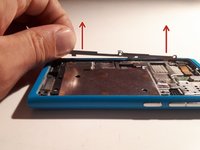
  5. Nokia N9 Battery Replacement, remove covering: crwdns2935265:05crwdnd2935265:01crwdnd2935265:02crwdne2935265:0 Nokia N9 Battery Replacement, remove covering: crwdns2935265:05crwdnd2935265:02crwdnd2935265:02crwdne2935265:0
    • You will see a strip holding the larger battery cover in place at one side.

    • Rotate the strip a quarter turn along the long axis, and lift it out.

    • Use the opening tool to lift the battery cover up and out.

    crwdns2952109:0crwdne2952109:0

    crwdns2917038:0crwdne2917038:0

  6. Nokia N9 Battery Replacement, replace the battery: crwdns2935265:06crwdnd2935265:01crwdnd2935265:02crwdne2935265:0 Nokia N9 Battery Replacement, replace the battery: crwdns2935265:06crwdnd2935265:02crwdnd2935265:02crwdne2935265:0
    • Click open the battery connector from beneath the connector.

    • Lift the battery from the phone and replace it.

    crwdns2952109:0crwdne2952109:0

    crwdns2917038:0crwdne2917038:0

crwdns2915888:0crwdne2915888:0

To reassemble your device, follow these instructions in reverse order.

crwdns2935221:0crwdne2935221:0

crwdns2935229:02crwdne2935229:0

knipwim

crwdns2935283:009/01/18crwdne2935283:0

15,474 crwdns2915208:0crwdne2915208:0

crwdns2935297:044crwdne2935297:0

crwdns2947412:00crwdne2947412:0

crwdns2917038:0crwdne2917038:0

crwdns2936625:0crwdne2936625:0:

crwdns2936751:024crwdne2936751:0 5

crwdns2936753:07crwdne2936753:0 15

crwdns2936753:030crwdne2936753:0 66

crwdns2942667:0crwdne2942667:0 4,005