crwdns2933423:0crwdne2933423:0
crwdns2947577:0crwdnd2947577:0crwdne2947577:0

Nokia N70 Display Replacement

crwdns2869540:0crwdne2869540:0: 10K

crwdns2959988:0crwdne2959988:0

crwdns2959990:0crwdne2959990:0
2
crwdns2959992:0crwdne2959992:0
28
crwdns2959994:0crwdne2959994:0
128
crwdns2959996:0crwdne2959996:0
9,985
crwdns2955950:0crwdne2955950:0: 1

crwdns2960002:01crwdne2960002:0.

crwdns2959984:0crwdne2959984:0: 9

crwdns2959974:09crwdne2959974:0

crwdns2959986:0crwdne2959986:0: 10

crwdns2959982:010crwdne2959982:0

crwdns2955944:0crwdne2955944:0: 10 - 25 crwdns2931279:0crwdne2931279:0
crwdns2955970:0crwdne2955970:0: crwdns2937801:0crwdne2937801:0
Nokia N70 Display Replacement

crwdns2959930:0crwdne2959930:0

crwdns2943215:0crwdne2943215:0

    1. Nokia N70 Display Replacement, Battery: crwdns2935265:01crwdnd2935265:01crwdnd2935265:01crwdne2935265:0
      • Orient the phone as shown.

      • Press the button with the plastic opening tool and slide the back case downward relative to the phone.

      crwdns2952109:0crwdne2952109:0

      crwdns2917038:0crwdne2917038:0

    2. Nokia N70 Display Replacement: crwdns2935265:02crwdnd2935265:01crwdnd2935265:01crwdne2935265:0
      • Remove the battery cover by lifting it away from the phone.

      crwdns2952109:0crwdne2952109:0

      crwdns2917038:0crwdne2917038:0

    3. Nokia N70 Display Replacement: crwdns2935265:03crwdnd2935265:01crwdnd2935265:01crwdne2935265:0
      • Insert the plastic opening tool into the marked space.

      • Lift up the side of the battery closest to the bottom edge of the phone using the plastic opening tool.

      crwdns2952109:0crwdne2952109:0

      crwdns2917038:0crwdne2917038:0

    4. Nokia N70 Display Replacement: crwdns2935265:04crwdnd2935265:01crwdnd2935265:01crwdne2935265:0
      • Remove the battery from the phone.

      crwdns2952109:0crwdne2952109:0

      crwdns2917038:0crwdne2917038:0

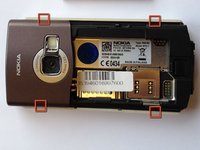
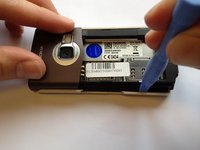
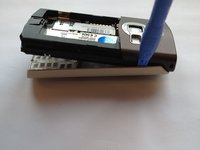
    1. Nokia N70 Display Replacement, Keypad: crwdns2935265:05crwdnd2935265:01crwdnd2935265:03crwdne2935265:0 Nokia N70 Display Replacement, Keypad: crwdns2935265:05crwdnd2935265:02crwdnd2935265:03crwdne2935265:0 Nokia N70 Display Replacement, Keypad: crwdns2935265:05crwdnd2935265:03crwdnd2935265:03crwdne2935265:0
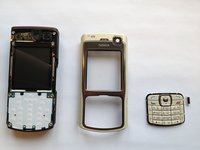
      • Insert the plastic opening tool in the marked areas in between the front and back covers.

      • Pry each corner with the plastic opening tool until the front case completely detaches.

      crwdns2952109:0crwdne2952109:0

      crwdns2917038:0crwdne2917038:0

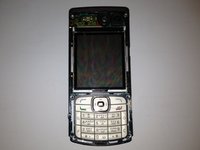
    2. Nokia N70 Display Replacement: crwdns2935265:06crwdnd2935265:01crwdnd2935265:03crwdne2935265:0 Nokia N70 Display Replacement: crwdns2935265:06crwdnd2935265:02crwdnd2935265:03crwdne2935265:0 Nokia N70 Display Replacement: crwdns2935265:06crwdnd2935265:03crwdnd2935265:03crwdne2935265:0
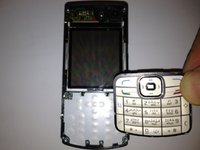
      • Orient the phone so that the keypad is facing you.

      • Remove the keypad by lifting it away from the phone.

      crwdns2952109:0crwdne2952109:0

      crwdns2917038:0crwdne2917038:0

    1. Nokia N70 Display Replacement, Display: crwdns2935265:07crwdnd2935265:01crwdnd2935265:01crwdne2935265:0
      • Using a torx T6 screwdriver remove the six 15 mm torx screws.

      crwdns2952109:0crwdne2952109:0

      crwdns2917038:0crwdne2917038:0

    2. Nokia N70 Display Replacement: crwdns2935265:08crwdnd2935265:01crwdnd2935265:02crwdne2935265:0 Nokia N70 Display Replacement: crwdns2935265:08crwdnd2935265:02crwdnd2935265:02crwdne2935265:0
      • Separate the front panel of the phone by pulling the bottom of the panel at a 45 degree angle.

      crwdns2952109:0crwdne2952109:0

      crwdns2917038:0crwdne2917038:0

    3. Nokia N70 Display Replacement: crwdns2935265:09crwdnd2935265:01crwdnd2935265:02crwdne2935265:0 Nokia N70 Display Replacement: crwdns2935265:09crwdnd2935265:02crwdnd2935265:02crwdne2935265:0
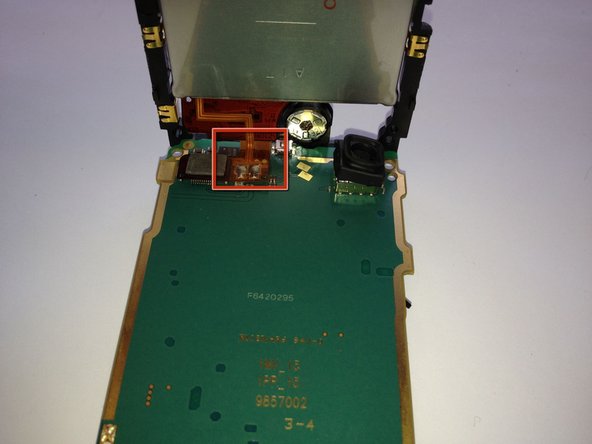
      • Lift the bottom of the display circuit board up and locate the ribbon connection located where the two circuit boards intersect.

      • Remove the ribbon connection that connects the two circuit boards.

      crwdns2952109:0crwdne2952109:0

      crwdns2917038:0crwdne2917038:0

    4. Nokia N70 Display Replacement: crwdns2935265:010crwdnd2935265:01crwdnd2935265:03crwdne2935265:0 Nokia N70 Display Replacement: crwdns2935265:010crwdnd2935265:02crwdnd2935265:03crwdne2935265:0 Nokia N70 Display Replacement: crwdns2935265:010crwdnd2935265:03crwdnd2935265:03crwdne2935265:0
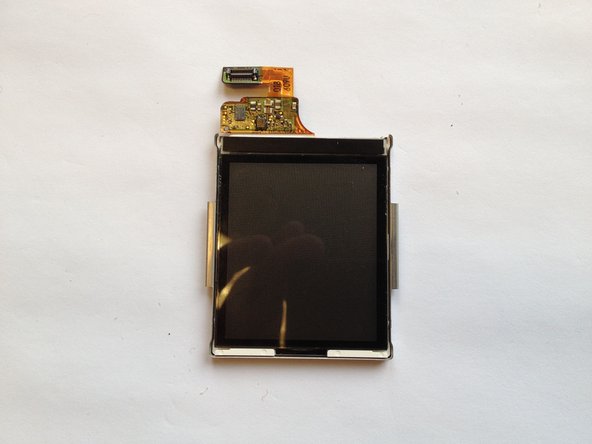
      • While pulling back each of the clamps marked in the image, lift out each side of the screen independently.

      • Be careful when using the plastic prying tool to not scratch the display.

      crwdns2952109:0crwdne2952109:0

      crwdns2917038:0crwdne2917038:0

crwdns2915888:0crwdne2915888:0

To reassemble your device, follow these instructions in reverse order.

crwdns2935221:0crwdne2935221:0

crwdns2935229:09crwdne2935229:0

Justin

crwdns2935283:010/12/11crwdne2935283:0

1,035 crwdns2915208:0crwdne2915208:0

crwdns2935297:05crwdne2935297:0

crwdns2935287:0crwdne2935287:0

Cal Poly, Team 6-2, Regan Fall 2011 crwdns2935289:0Cal Poly, Team 6-2, Regan Fall 2011crwdne2935289:0

CPSU-REGAN-F11S6G2

crwdns2931471:04crwdne2931471:0

crwdns2935297:060crwdne2935297:0

crwdns2947412:00crwdne2947412:0

crwdns2917038:0crwdne2917038:0

crwdns2936625:0crwdne2936625:0:

crwdns2936751:024crwdne2936751:0 2

crwdns2936753:07crwdne2936753:0 28

crwdns2936753:030crwdne2936753:0 128

crwdns2959996:0crwdne2959996:0 9,985