crwdns2933423:0crwdne2933423:0
crwdns2947577:0crwdnd2947577:0crwdne2947577:0

Nokia 6560 Speaker Replacement

crwdns2942213:0crwdne2942213:0

    1. Nokia 6560 Speaker Replacement, Battery: crwdns2935265:01crwdnd2935265:01crwdnd2935265:02crwdne2935265:0 Nokia 6560 Speaker Replacement, Battery: crwdns2935265:01crwdnd2935265:02crwdnd2935265:02crwdne2935265:0
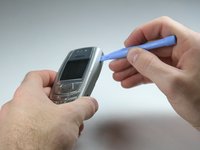
      • Remove the back cover of your cell phone by pushing the small slider with your fingernail towards the top of the phone.

      • Lift off your cell phone's back cover.

      crwdns2952109:0crwdne2952109:0

      crwdns2917038:0crwdne2917038:0

    2. Nokia 6560 Speaker Replacement: crwdns2935265:02crwdnd2935265:01crwdnd2935265:02crwdne2935265:0 Nokia 6560 Speaker Replacement: crwdns2935265:02crwdnd2935265:02crwdnd2935265:02crwdne2935265:0
      • Use your index finger to first push down and then lift up the battery as shown.

      • Remove the battery from your cell phone.

      crwdns2952109:0crwdne2952109:0

      crwdns2917038:0crwdne2917038:0

    1. Nokia 6560 Speaker Replacement, Keypad: crwdns2935265:03crwdnd2935265:01crwdnd2935265:02crwdne2935265:0 Nokia 6560 Speaker Replacement, Keypad: crwdns2935265:03crwdnd2935265:02crwdnd2935265:02crwdne2935265:0
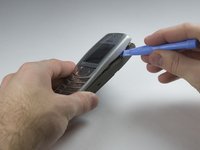
      • Open the front cover of your cell phone with the plastic opening tool or finger nail.

      • Lift the cover upwards, starting from the bottom below the keypad.

      crwdns2952109:0crwdne2952109:0

      crwdns2917038:0crwdne2917038:0

    2. Nokia 6560 Speaker Replacement: crwdns2935265:04crwdnd2935265:01crwdnd2935265:02crwdne2935265:0 Nokia 6560 Speaker Replacement: crwdns2935265:04crwdnd2935265:02crwdnd2935265:02crwdne2935265:0
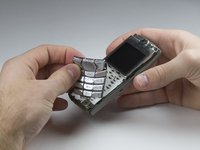
      • Lift the keypad off of the keyboard as it is not attached to the phone anymore.

      • If you want to clean your keyboard do not use chemical cleaners or too much water, instead, use a damp cloth.

      • It may be tricky to get the keypad in the right position while closing the front cover for the reassembly. Ensure they are aligned properly before closing the front cover!

      crwdns2952109:0crwdne2952109:0

      crwdns2917038:0crwdne2917038:0

    1. Nokia 6560 Speaker Replacement, Keyboard: crwdns2935265:05crwdnd2935265:01crwdnd2935265:01crwdne2935265:0
      • Unscrew the six T6 torx screws which attach the frame to the cell phone case.

      • Be careful not to scratch your display with the screw driver.

      crwdns2952109:0crwdne2952109:0

      crwdns2917038:0crwdne2917038:0

    2. Nokia 6560 Speaker Replacement: crwdns2935265:06crwdnd2935265:01crwdnd2935265:01crwdne2935265:0
      • Lift the frame off of your cell phone.

      crwdns2952109:0crwdne2952109:0

      crwdns2917038:0crwdne2917038:0

    3. Nokia 6560 Speaker Replacement: crwdns2935265:07crwdnd2935265:01crwdnd2935265:01crwdne2935265:0
      • Lift the keyboard out of the plastic frame.

      crwdns2952109:0crwdne2952109:0

      crwdns2917038:0crwdne2917038:0

    1. Nokia 6560 Speaker Replacement, Display: crwdns2935265:08crwdnd2935265:01crwdnd2935265:02crwdne2935265:0 Nokia 6560 Speaker Replacement, Display: crwdns2935265:08crwdnd2935265:02crwdnd2935265:02crwdne2935265:0
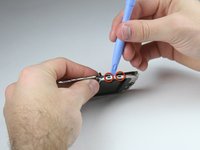
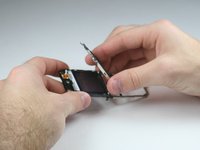
      • Use the plastic opening tool to unmount the thin metal frame at the tab connections. You must do this on both sides.

      • Lift the thin metal frame off of the plastic frame.

      • Pay attention while lifting the frame off because it can easily be bent.

      crwdns2952109:0crwdne2952109:0

      crwdns2917038:0crwdne2917038:0

    2. Nokia 6560 Speaker Replacement: crwdns2935265:09crwdnd2935265:01crwdnd2935265:03crwdne2935265:0 Nokia 6560 Speaker Replacement: crwdns2935265:09crwdnd2935265:02crwdnd2935265:03crwdne2935265:0 Nokia 6560 Speaker Replacement: crwdns2935265:09crwdnd2935265:03crwdnd2935265:03crwdne2935265:0
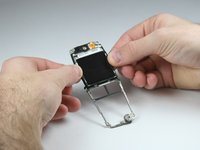
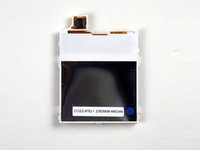
      • Pull the sides of the plastic frame apart in order to loosen the display.

      • Take the display out of the plastic frame.

      crwdns2952109:0crwdne2952109:0

      crwdns2917038:0crwdne2917038:0

    1. Nokia 6560 Speaker Replacement, Speaker: crwdns2935265:010crwdnd2935265:01crwdnd2935265:02crwdne2935265:0 Nokia 6560 Speaker Replacement, Speaker: crwdns2935265:010crwdnd2935265:02crwdnd2935265:02crwdne2935265:0
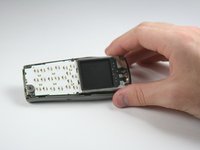
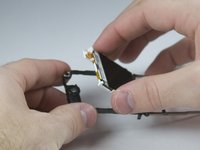
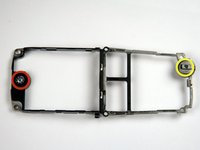
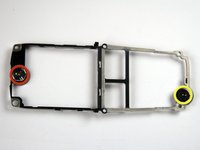
      • Now you have the bare plastic frame that holds the speaker.

      • The microphone is held at the bottom of this frame.

      • Neither the speaker nor the microphone can be repaired. You must replace the whole frame.

      crwdns2952109:0crwdne2952109:0

      crwdns2917038:0crwdne2917038:0

crwdns2915888:0crwdne2915888:0

To reassemble your device, follow these instructions in reverse order.

crwdns2935221:0crwdne2935221:0

Nathan Whitacre

crwdns2935283:001/20/10crwdne2935283:0

21 crwdns2915208:0crwdne2915208:0

crwdns2935297:02crwdne2935297:0

crwdns2935287:0crwdne2935287:0

Cal Poly, Team 3-17, Maness Winter 2010 crwdns2935289:0Cal Poly, Team 3-17, Maness Winter 2010crwdne2935289:0

CPSU-MANESS-W10S3G17

crwdns2931471:04crwdne2931471:0

crwdns2935297:072crwdne2935297:0

crwdns2947412:00crwdne2947412:0

crwdns2917038:0crwdne2917038:0

crwdns2936625:0crwdne2936625:0:

crwdns2936751:024crwdne2936751:0 0

crwdns2936753:07crwdne2936753:0 5

crwdns2936753:030crwdne2936753:0 35

crwdns2942667:0crwdne2942667:0 3,076