crwdns2933423:0crwdne2933423:0
crwdns2947577:0crwdnd2947577:0crwdne2947577:0

Nokia 6560 Logic Board Replacement

crwdns2869540:0crwdne2869540:0: 2,5 mil

crwdns2959988:0crwdne2959988:0

crwdns2959990:0crwdne2959990:0
0
crwdns2959992:0crwdne2959992:0
5
crwdns2959994:0crwdne2959994:0
31
crwdns2959996:0crwdne2959996:0
2.533
crwdns2955950:0crwdne2955950:0: 0

crwdns2959998:0crwdne2959998:0

crwdns2960000:0crwdne2960000:0
crwdns2959984:0crwdne2959984:0: 0

crwdns2959956:0crwdne2959956:0

crwdns2959986:0crwdne2959986:0: 0

crwdns2959958:0crwdne2959958:0

crwdns2955944:0crwdne2955944:0: 15 - 30 crwdns2931279:0crwdne2931279:0
crwdns2955970:0crwdne2955970:0: crwdns2937801:0crwdne2937801:0
Nokia 6560 Logic Board  Replacement

crwdns2915892:0crwdne2915892:0

crwdns2959928:0crwdne2959928:0 ↓

If you have to replace the logic board than use this installation instruction for the logic board.

crwdns2959930:0crwdne2959930:0

crwdns2943215:0crwdne2943215:0

    1. Nokia 6560 Logic Board  Replacement, Battery: crwdns2935265:01crwdnd2935265:01crwdnd2935265:02crwdne2935265:0 Nokia 6560 Logic Board  Replacement, Battery: crwdns2935265:01crwdnd2935265:02crwdnd2935265:02crwdne2935265:0
      • Remove the back cover of your cell phone by pushing the small slider with your fingernail towards the top of the phone.

      • Lift off your cell phone's back cover.

      crwdns2952109:0crwdne2952109:0

      crwdns2917038:0crwdne2917038:0

    2. Nokia 6560 Logic Board  Replacement: crwdns2935265:02crwdnd2935265:01crwdnd2935265:02crwdne2935265:0 Nokia 6560 Logic Board  Replacement: crwdns2935265:02crwdnd2935265:02crwdnd2935265:02crwdne2935265:0
      • Use your index finger to first push down and then lift up the battery as shown.

      • Remove the battery from your cell phone.

      crwdns2952109:0crwdne2952109:0

      crwdns2917038:0crwdne2917038:0

    1. Nokia 6560 Logic Board  Replacement, Keypad: crwdns2935265:03crwdnd2935265:01crwdnd2935265:02crwdne2935265:0 Nokia 6560 Logic Board  Replacement, Keypad: crwdns2935265:03crwdnd2935265:02crwdnd2935265:02crwdne2935265:0
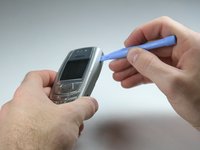
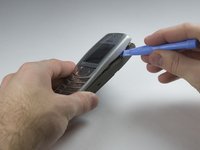
      • Open the front cover of your cell phone with the plastic opening tool or finger nail.

      • Lift the cover upwards, starting from the bottom below the keypad.

      crwdns2952109:0crwdne2952109:0

      crwdns2917038:0crwdne2917038:0

    2. Nokia 6560 Logic Board  Replacement: crwdns2935265:04crwdnd2935265:01crwdnd2935265:02crwdne2935265:0 Nokia 6560 Logic Board  Replacement: crwdns2935265:04crwdnd2935265:02crwdnd2935265:02crwdne2935265:0
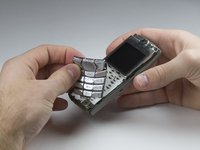
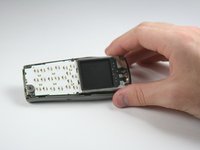
      • Lift the keypad off of the keyboard as it is not attached to the phone anymore.

      • If you want to clean your keyboard do not use chemical cleaners or too much water, instead, use a damp cloth.

      • It may be tricky to get the keypad in the right position while closing the front cover for the reassembly. Ensure they are aligned properly before closing the front cover!

      crwdns2952109:0crwdne2952109:0

      crwdns2917038:0crwdne2917038:0

    1. Nokia 6560 Logic Board  Replacement, Logic Board : crwdns2935265:05crwdnd2935265:01crwdnd2935265:01crwdne2935265:0
      • Remove six Torx 6 screws with the screwdriver.

      crwdns2952109:0crwdne2952109:0

      crwdns2917038:0crwdne2917038:0

    2. Nokia 6560 Logic Board  Replacement: crwdns2935265:06crwdnd2935265:01crwdnd2935265:01crwdne2935265:0
      • Remove the frame that holds the keyboard and the display.

      crwdns2952109:0crwdne2952109:0

      crwdns2917038:0crwdne2917038:0

    3. Nokia 6560 Logic Board  Replacement: crwdns2935265:07crwdnd2935265:01crwdnd2935265:01crwdne2935265:0
      • Lift the logic board of out the rear case of the phone.

      crwdns2952109:0crwdne2952109:0

      crwdns2917038:0crwdne2917038:0

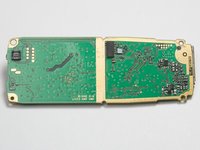
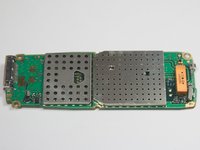
    4. Nokia 6560 Logic Board  Replacement: crwdns2935265:08crwdnd2935265:01crwdnd2935265:02crwdne2935265:0 Nokia 6560 Logic Board  Replacement: crwdns2935265:08crwdnd2935265:02crwdnd2935265:02crwdne2935265:0
      • This is the logic board of your cell phone.

      • Make sure that you get the right logic board to replace your old one by comparing the serial numbers on it.

      crwdns2952109:0crwdne2952109:0

      crwdns2917038:0crwdne2917038:0

crwdns2915888:0crwdne2915888:0

To reassemble your device, follow these instructions in reverse order.

crwdns2935221:0crwdne2935221:0

Tim Bergmann

crwdns2935283:001/18/10crwdne2935283:0

35 crwdns2915208:0crwdne2915208:0

crwdns2935297:04crwdne2935297:0

crwdns2935287:0crwdne2935287:0

Cal Poly, Team 3-17, Maness Winter 2010 crwdns2935289:0Cal Poly, Team 3-17, Maness Winter 2010crwdne2935289:0

CPSU-MANESS-W10S3G17

crwdns2931471:04crwdne2931471:0

crwdns2935297:072crwdne2935297:0

crwdns2947412:00crwdne2947412:0

crwdns2917038:0crwdne2917038:0

crwdns2936625:0crwdne2936625:0:

crwdns2936751:024crwdne2936751:0 0

crwdns2936753:07crwdne2936753:0 5

crwdns2936753:030crwdne2936753:0 31

crwdns2959996:0crwdne2959996:0 2,533