crwdns2933423:0crwdne2933423:0
crwdns2947577:0crwdnd2947577:0crwdne2947577:0

Nokia 6310i Screen Replacement

crwdns2942213:0crwdne2942213:0

  1. Nokia 6310i Screen Replacement, Battery: crwdns2935265:01crwdnd2935265:01crwdnd2935265:02crwdne2935265:0 Nokia 6310i Screen Replacement, Battery: crwdns2935265:01crwdnd2935265:02crwdnd2935265:02crwdne2935265:0
    • Press and hold the battery release button and slide the battery away from the Nokia logo

    crwdns2952109:0crwdne2952109:0

    crwdns2917038:0crwdne2917038:0

  2. Nokia 6310i Screen Replacement, SIM card: crwdns2935265:02crwdnd2935265:01crwdnd2935265:03crwdne2935265:0 Nokia 6310i Screen Replacement, SIM card: crwdns2935265:02crwdnd2935265:02crwdnd2935265:03crwdne2935265:0 Nokia 6310i Screen Replacement, SIM card: crwdns2935265:02crwdnd2935265:03crwdnd2935265:03crwdne2935265:0
    • Slide the SIM card lock away from the SIM card.

    • The SIM card pops out. Remove the SIM card.

    crwdns2952109:0crwdne2952109:0

    crwdns2917038:0crwdne2917038:0

  3. Nokia 6310i Screen Replacement, Back Cover: crwdns2935265:03crwdnd2935265:01crwdnd2935265:01crwdne2935265:0
    • Unscrew and remove the four T6 Torx screws.

    crwdns2952109:0crwdne2952109:0

    crwdns2917038:0crwdne2917038:0

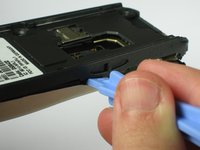
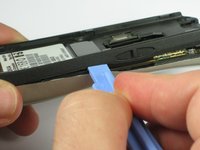
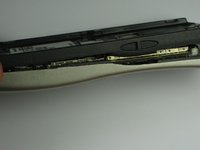
  4. Nokia 6310i Screen Replacement: crwdns2935265:04crwdnd2935265:01crwdnd2935265:03crwdne2935265:0 Nokia 6310i Screen Replacement: crwdns2935265:04crwdnd2935265:02crwdnd2935265:03crwdne2935265:0 Nokia 6310i Screen Replacement: crwdns2935265:04crwdnd2935265:03crwdnd2935265:03crwdne2935265:0
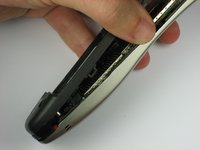
    • Insert a plastic opening tool between the faceplate and the black backplate. Gently pry them apart, working from the lower end to the upper side of the phone.

    crwdns2952109:0crwdne2952109:0

    crwdns2917038:0crwdne2917038:0

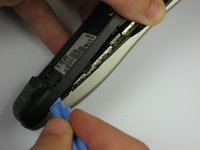
  5. Nokia 6310i Screen Replacement: crwdns2935265:05crwdnd2935265:01crwdnd2935265:03crwdne2935265:0 Nokia 6310i Screen Replacement: crwdns2935265:05crwdnd2935265:02crwdnd2935265:03crwdne2935265:0 Nokia 6310i Screen Replacement: crwdns2935265:05crwdnd2935265:03crwdnd2935265:03crwdne2935265:0
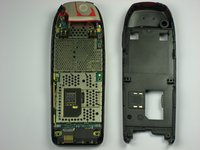
    • Use the plastic opening tool to separate the top part of the backplate.

    • The plastic clips at the top require slightly more force to separate.

    crwdns2952109:0crwdne2952109:0

    crwdns2917038:0crwdne2917038:0

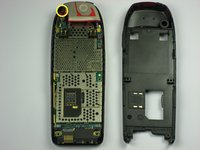
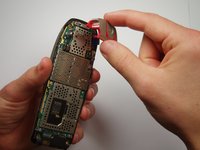
  6. Nokia 6310i Screen Replacement, Antenna: crwdns2935265:06crwdnd2935265:01crwdnd2935265:02crwdne2935265:0 Nokia 6310i Screen Replacement, Antenna: crwdns2935265:06crwdnd2935265:02crwdnd2935265:02crwdne2935265:0
    • Remove the screw holding the antenna to the circuit board.

    • Carefully lift off the antenna from the circuit board.

    crwdns2952109:0crwdne2952109:0

    crwdns2917038:0crwdne2917038:0

  7. Nokia 6310i Screen Replacement, Motherboard: crwdns2935265:07crwdnd2935265:01crwdnd2935265:01crwdne2935265:0
    • Lift off the motherboard from the faceplate.

    crwdns2952109:0crwdne2952109:0

    crwdns2917038:0crwdne2917038:0

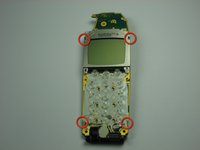
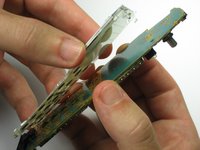
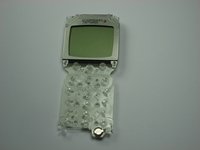
  8. Nokia 6310i Screen Replacement, Screen: crwdns2935265:08crwdnd2935265:01crwdnd2935265:03crwdne2935265:0 Nokia 6310i Screen Replacement, Screen: crwdns2935265:08crwdnd2935265:02crwdnd2935265:03crwdne2935265:0 Nokia 6310i Screen Replacement, Screen: crwdns2935265:08crwdnd2935265:03crwdnd2935265:03crwdne2935265:0
    • Remove the screen from the motherboard by carefully pushing the four tabs around the edge.

    • Carefully pull the screen away from the motherboard.

    crwdns2952109:0crwdne2952109:0

    crwdns2917038:0crwdne2917038:0

crwdns2915888:0crwdne2915888:0

To reassemble your device, follow these instructions in reverse order.

crwdns2935221:0crwdne2935221:0

crwdns2935229:05crwdne2935229:0

Spencer Silvestre

crwdns2935283:009/30/10crwdne2935283:0

116 crwdns2915208:0crwdne2915208:0

crwdns2935295:0crwdne2935295:0

crwdns2935287:0crwdne2935287:0

Cal Poly, Team 14-41, Forte Fall 2010 crwdns2935289:0Cal Poly, Team 14-41, Forte Fall 2010crwdne2935289:0

CPSU-FORTE-F10S14G41

crwdns2931471:05crwdne2931471:0

crwdns2935297:022crwdne2935297:0

crwdns2947410:01crwdne2947410:0

Thanks very helpful . Your demonstration is well presented and worked perfectly for my issue.

Darren Byrne - crwdns2934203:0crwdne2934203:0 crwdns2950251:0crwdne2950251:0

crwdns2917038:0crwdne2917038:0

crwdns2936625:0crwdne2936625:0:

crwdns2936751:024crwdne2936751:0 0

crwdns2936753:07crwdne2936753:0 11

crwdns2936753:030crwdne2936753:0 64

crwdns2942667:0crwdne2942667:0 8,305