crwdns2933423:0crwdne2933423:0
crwdns2947577:0crwdnd2947577:0crwdne2947577:0

Nokia 6310i Antenna Replacement

crwdns2942213:0crwdne2942213:0

    1. Nokia 6310i Antenna Replacement, Battery: crwdns2935265:01crwdnd2935265:01crwdnd2935265:02crwdne2935265:0 Nokia 6310i Antenna Replacement, Battery: crwdns2935265:01crwdnd2935265:02crwdnd2935265:02crwdne2935265:0
      • Press and hold the battery release button and slide the battery away from the Nokia logo

      crwdns2952109:0crwdne2952109:0

      crwdns2917038:0crwdne2917038:0

    1. Nokia 6310i Antenna Replacement, SIM card: crwdns2935265:02crwdnd2935265:01crwdnd2935265:03crwdne2935265:0 Nokia 6310i Antenna Replacement, SIM card: crwdns2935265:02crwdnd2935265:02crwdnd2935265:03crwdne2935265:0 Nokia 6310i Antenna Replacement, SIM card: crwdns2935265:02crwdnd2935265:03crwdnd2935265:03crwdne2935265:0
      • Slide the SIM card lock away from the SIM card.

      • The SIM card pops out. Remove the SIM card.

      crwdns2952109:0crwdne2952109:0

      crwdns2917038:0crwdne2917038:0

    1. Nokia 6310i Antenna Replacement, Back Cover: crwdns2935265:03crwdnd2935265:01crwdnd2935265:01crwdne2935265:0
      • Unscrew and remove the four T6 Torx screws.

      crwdns2952109:0crwdne2952109:0

      crwdns2917038:0crwdne2917038:0

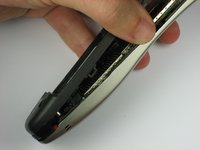
    2. Nokia 6310i Antenna Replacement: crwdns2935265:04crwdnd2935265:01crwdnd2935265:03crwdne2935265:0 Nokia 6310i Antenna Replacement: crwdns2935265:04crwdnd2935265:02crwdnd2935265:03crwdne2935265:0 Nokia 6310i Antenna Replacement: crwdns2935265:04crwdnd2935265:03crwdnd2935265:03crwdne2935265:0
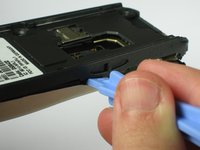
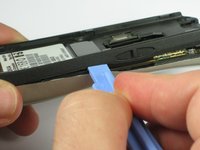
      • Insert a plastic opening tool between the faceplate and the black backplate. Gently pry them apart, working from the lower end to the upper side of the phone.

      crwdns2952109:0crwdne2952109:0

      crwdns2917038:0crwdne2917038:0

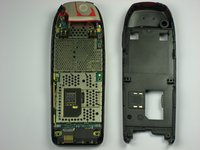
    3. Nokia 6310i Antenna Replacement: crwdns2935265:05crwdnd2935265:01crwdnd2935265:03crwdne2935265:0 Nokia 6310i Antenna Replacement: crwdns2935265:05crwdnd2935265:02crwdnd2935265:03crwdne2935265:0 Nokia 6310i Antenna Replacement: crwdns2935265:05crwdnd2935265:03crwdnd2935265:03crwdne2935265:0
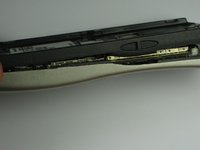
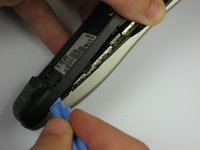
      • Use the plastic opening tool to separate the top part of the backplate.

      • The plastic clips at the top require slightly more force to separate.

      crwdns2952109:0crwdne2952109:0

      crwdns2917038:0crwdne2917038:0

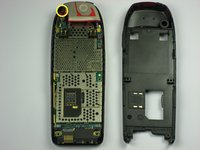
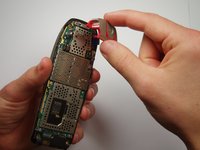
    1. Nokia 6310i Antenna Replacement, Antenna: crwdns2935265:06crwdnd2935265:01crwdnd2935265:02crwdne2935265:0 Nokia 6310i Antenna Replacement, Antenna: crwdns2935265:06crwdnd2935265:02crwdnd2935265:02crwdne2935265:0
      • Remove the screw holding the antenna to the circuit board.

      • Carefully lift off the antenna from the circuit board.

      crwdns2952109:0crwdne2952109:0

      crwdns2917038:0crwdne2917038:0

crwdns2915888:0crwdne2915888:0

To reassemble your device, follow these instructions in reverse order.

crwdns2935221:0crwdne2935221:0

crwdns2935229:03crwdne2935229:0

Wilson Tam

crwdns2935283:009/29/10crwdne2935283:0

77 crwdns2915208:0crwdne2915208:0

crwdns2935295:0crwdne2935295:0

crwdns2935287:0crwdne2935287:0

Cal Poly, Team 14-41, Forte Fall 2010 crwdns2935289:0Cal Poly, Team 14-41, Forte Fall 2010crwdne2935289:0

CPSU-FORTE-F10S14G41

crwdns2931471:05crwdne2931471:0

crwdns2935297:096crwdne2935297:0

crwdns2947412:02crwdne2947412:0

Thanks for a nice and helpful instruction.

The rubber power-on button had broken down so I just removed the damaged parts. Now using a toothpick to push the microswitch directly.

Only using the phone indoors for nostalgic reasons, playing Snake :-)

Brgrds Ove

ove.tandberg - crwdns2934203:0crwdne2934203:0 crwdns2950251:0crwdne2950251:0

Thanks for antenna help

I have had about three 6310i’s and the on/off button was the failure problem in all three.

Andrew Richards - crwdns2934203:0crwdne2934203:0 crwdns2950251:0crwdne2950251:0

crwdns2917038:0crwdne2917038:0

crwdns2936625:0crwdne2936625:0:

crwdns2936751:024crwdne2936751:0 0

crwdns2936753:07crwdne2936753:0 8

crwdns2936753:030crwdne2936753:0 35

crwdns2942667:0crwdne2942667:0 8,901