crwdns2933423:0crwdne2933423:0
crwdns2947577:0crwdnd2947577:0crwdne2947577:0

Nokia 6102i Keyboard Replacement

crwdns2942213:0crwdne2942213:0

    1. Nokia 6102i Keyboard Replacement, Battery: crwdns2935265:01crwdnd2935265:01crwdnd2935265:03crwdne2935265:0 Nokia 6102i Keyboard Replacement, Battery: crwdns2935265:01crwdnd2935265:02crwdnd2935265:03crwdne2935265:0 Nokia 6102i Keyboard Replacement, Battery: crwdns2935265:01crwdnd2935265:03crwdnd2935265:03crwdne2935265:0
      • Press and hold the button at the bottom of the back side of the phone while sliding the back plate down to remove the back cover.

      • Note: Images on the right side may be hovered over to reveal larger versions.

      crwdns2952109:0crwdne2952109:0

      crwdns2917038:0crwdne2917038:0

    2. Nokia 6102i Keyboard Replacement: crwdns2935265:02crwdnd2935265:01crwdnd2935265:01crwdne2935265:0
      • Lift up the battery from the inside of the phone.

      • Make sure to lift up from the bottom of the battery as shown.

      crwdns2952109:0crwdne2952109:0

      crwdns2917038:0crwdne2917038:0

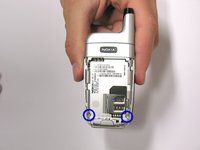
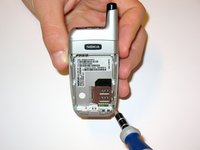
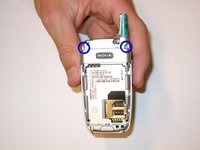
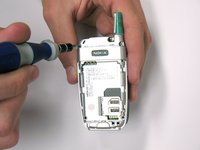
    1. Nokia 6102i Keyboard Replacement, Logic Board: crwdns2935265:03crwdnd2935265:01crwdnd2935265:02crwdne2935265:0 Nokia 6102i Keyboard Replacement, Logic Board: crwdns2935265:03crwdnd2935265:02crwdnd2935265:02crwdne2935265:0
      • Using a .208 head T-6 Screwdriver remove the two screws at the bottom of the battery cavity.

      crwdns2952109:0crwdne2952109:0

      crwdns2917038:0crwdne2917038:0

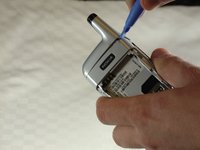
    2. Nokia 6102i Keyboard Replacement: crwdns2935265:04crwdnd2935265:01crwdnd2935265:02crwdne2935265:0 Nokia 6102i Keyboard Replacement: crwdns2935265:04crwdnd2935265:02crwdnd2935265:02crwdne2935265:0
      • Use a plastic opening tool to remove the silver cover over the antenna.

      • The covering may not pop right off. It may require some prying in different locations around the top covering.

      crwdns2952109:0crwdne2952109:0

      crwdns2917038:0crwdne2917038:0

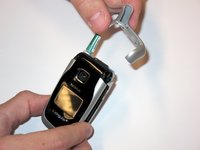
    3. Nokia 6102i Keyboard Replacement: crwdns2935265:05crwdnd2935265:01crwdnd2935265:02crwdne2935265:0 Nokia 6102i Keyboard Replacement: crwdns2935265:05crwdnd2935265:02crwdnd2935265:02crwdne2935265:0
      • Remove the two newly revealed .208 inch screws at the top using a T-6 screwdriver.

      crwdns2952109:0crwdne2952109:0

      crwdns2917038:0crwdne2917038:0

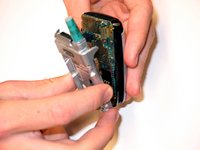
    4. Nokia 6102i Keyboard Replacement: crwdns2935265:06crwdnd2935265:01crwdnd2935265:02crwdne2935265:0 Nokia 6102i Keyboard Replacement: crwdns2935265:06crwdnd2935265:02crwdnd2935265:02crwdne2935265:0
      • WARNING: Use extreme caution when removing and handling the logic board as it is very fragile.

      • With caution, use a plastic prier to separate the back silver casing from the front of the phone. This may require force.

      • Disconnect the logic board from the small orange chip.

      crwdns2952109:0crwdne2952109:0

      crwdns2917038:0crwdne2917038:0

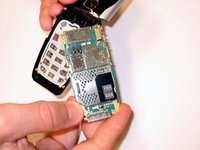
    1. Nokia 6102i Keyboard Replacement, Keyboard: crwdns2935265:07crwdnd2935265:01crwdnd2935265:02crwdne2935265:0 Nokia 6102i Keyboard Replacement, Keyboard: crwdns2935265:07crwdnd2935265:02crwdnd2935265:02crwdne2935265:0
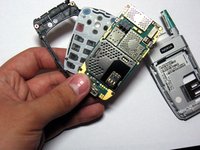
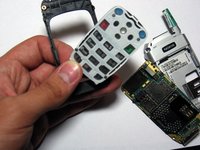
      • Pop out the keyboard from the frame.

      • Once the logic board is removed, the keypad can be easily popped out from the frame with very little force.

      • The picture is showing the three layers: the frame, the keyboard, and the logic board.

      crwdns2952109:0crwdne2952109:0

      crwdns2917038:0crwdne2917038:0

crwdns2915888:0crwdne2915888:0

To reassemble your device, follow these instructions in reverse order.

crwdns2935221:0crwdne2935221:0

Jonathan Brophy

crwdns2935283:004/14/10crwdne2935283:0

10 crwdns2915208:0crwdne2915208:0

crwdns2935297:03crwdne2935297:0

crwdns2935287:0crwdne2935287:0

Cal Poly, Team 23-78, Johann Spring 2010 crwdns2935289:0Cal Poly, Team 23-78, Johann Spring 2010crwdne2935289:0

CPSU-JOHANN-S10S23G78

crwdns2931471:04crwdne2931471:0

crwdns2935297:060crwdne2935297:0

crwdns2947412:00crwdne2947412:0

crwdns2917038:0crwdne2917038:0

crwdns2936625:0crwdne2936625:0:

crwdns2936751:024crwdne2936751:0 0

crwdns2936753:07crwdne2936753:0 5

crwdns2936753:030crwdne2936753:0 35

crwdns2942667:0crwdne2942667:0 2,277