crwdns2933423:0crwdne2933423:0
crwdns2947577:0crwdnd2947577:0crwdne2947577:0

Nokia 6086 Screen Replacement

crwdns2942213:0crwdne2942213:0

    1. Nokia 6086 Screen Replacement, Battery: crwdns2935265:01crwdnd2935265:01crwdnd2935265:01crwdne2935265:0
      • Turn off the phone.

      • Check if there is a microSD card in the slot behind the door on the side. If so, remove it by first pushing it in, then pulling it out.

      • Position the phone so that the back side is in view.

      crwdns2952109:0crwdne2952109:0

      crwdns2917038:0crwdne2917038:0

    2. Nokia 6086 Screen Replacement: crwdns2935265:02crwdnd2935265:01crwdnd2935265:03crwdne2935265:0 Nokia 6086 Screen Replacement: crwdns2935265:02crwdnd2935265:02crwdnd2935265:03crwdne2935265:0 Nokia 6086 Screen Replacement: crwdns2935265:02crwdnd2935265:03crwdnd2935265:03crwdne2935265:0
      • Remove the back battery cover.

      • Apply pressure on the cover while simultaneously sliding the cover downward.

      crwdns2952109:0crwdne2952109:0

      crwdns2917038:0crwdne2917038:0

    3. Nokia 6086 Screen Replacement: crwdns2935265:03crwdnd2935265:01crwdnd2935265:03crwdne2935265:0 Nokia 6086 Screen Replacement: crwdns2935265:03crwdnd2935265:02crwdnd2935265:03crwdne2935265:0 Nokia 6086 Screen Replacement: crwdns2935265:03crwdnd2935265:03crwdnd2935265:03crwdne2935265:0
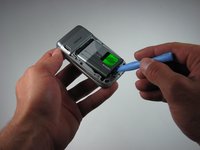
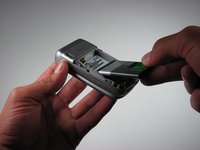
      • Insert the iPod opening tool between the base of the phone and the phone battery.

      • Position the phone so that the battery won't fall out of the phone.

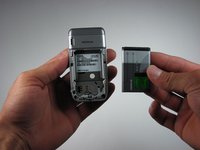
      • The battery lifts out of the phone fast and easily.

      • Carefully lift the battery out of the phone.

      crwdns2952109:0crwdne2952109:0

      crwdns2917038:0crwdne2917038:0

    1. Nokia 6086 Screen Replacement, Top Front Cover: crwdns2935265:04crwdnd2935265:01crwdnd2935265:01crwdne2935265:0
      • Close the phone.

      • Face the front cover forward.

      crwdns2952109:0crwdne2952109:0

      crwdns2917038:0crwdne2917038:0

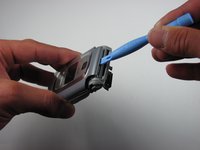
    2. Nokia 6086 Screen Replacement: crwdns2935265:05crwdnd2935265:01crwdnd2935265:02crwdne2935265:0 Nokia 6086 Screen Replacement: crwdns2935265:05crwdnd2935265:02crwdnd2935265:02crwdne2935265:0
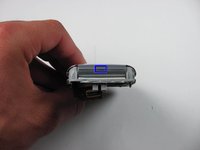
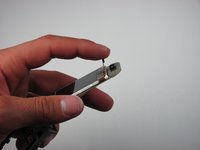
      • Locate the 4.5 mm notch at the top of the phone.

      • Place the iPod opening tool into the opening.

      • Slightly prop up the top section by lifting the tool.

      crwdns2952109:0crwdne2952109:0

      crwdns2917038:0crwdne2917038:0

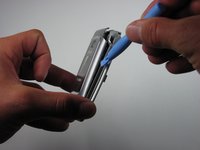
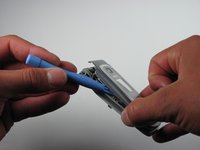
    3. Nokia 6086 Screen Replacement: crwdns2935265:06crwdnd2935265:01crwdnd2935265:03crwdne2935265:0 Nokia 6086 Screen Replacement: crwdns2935265:06crwdnd2935265:02crwdnd2935265:03crwdne2935265:0 Nokia 6086 Screen Replacement: crwdns2935265:06crwdnd2935265:03crwdnd2935265:03crwdne2935265:0
      • Wedge the iPod opening tool between the top cover and the phone.

      • Gently lift the top cover away from the phone using the iPod opening tool.

      • This unlatches each hook that connects the top cover to the phone.

      • Repeat for both the left and the right sides of the phone.

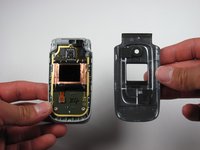
      • Place the top cover aside once the top cover is completely disconnected from the phone.

      crwdns2952109:0crwdne2952109:0

      crwdns2917038:0crwdne2917038:0

    1. Nokia 6086 Screen Replacement, Screen: crwdns2935265:07crwdnd2935265:01crwdnd2935265:03crwdne2935265:0 Nokia 6086 Screen Replacement, Screen: crwdns2935265:07crwdnd2935265:02crwdnd2935265:03crwdne2935265:0 Nokia 6086 Screen Replacement, Screen: crwdns2935265:07crwdnd2935265:03crwdnd2935265:03crwdne2935265:0
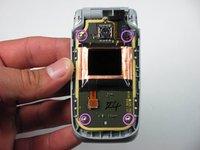
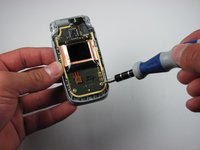
      • Locate the four screws on the phone.

      • The top right screw is located under the black connector piece.

      • To remove the connector piece gently lift it off of its connector.

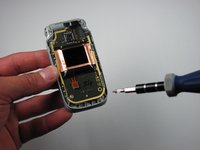
      • Take the T6 driver and remove the screws.

      crwdns2952109:0crwdne2952109:0

      crwdns2917038:0crwdne2917038:0

    2. Nokia 6086 Screen Replacement: crwdns2935265:08crwdnd2935265:01crwdnd2935265:01crwdne2935265:0
      • Carefully lift up the motherboard.

      crwdns2952109:0crwdne2952109:0

      crwdns2917038:0crwdne2917038:0

    3. Nokia 6086 Screen Replacement: crwdns2935265:09crwdnd2935265:01crwdnd2935265:02crwdne2935265:0 Nokia 6086 Screen Replacement: crwdns2935265:09crwdnd2935265:02crwdnd2935265:02crwdne2935265:0
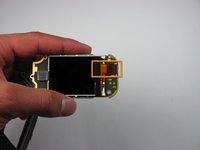
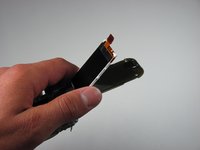
      • Find the orange slip on the motherboard.

      • Peel back the orange slip to expose the screen.

      crwdns2952109:0crwdne2952109:0

      crwdns2917038:0crwdne2917038:0

    4. Nokia 6086 Screen Replacement: crwdns2935265:010crwdnd2935265:01crwdnd2935265:03crwdne2935265:0 Nokia 6086 Screen Replacement: crwdns2935265:010crwdnd2935265:02crwdnd2935265:03crwdne2935265:0 Nokia 6086 Screen Replacement: crwdns2935265:010crwdnd2935265:03crwdnd2935265:03crwdne2935265:0
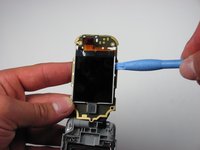
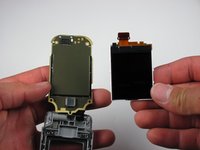
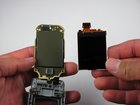
      • Place the ipod opening tool under the screen.

      • Remove the damaged screen with the ipod opening tool.

      crwdns2952109:0crwdne2952109:0

      crwdns2917038:0crwdne2917038:0

crwdns2915888:0crwdne2915888:0

To reassemble your device, follow these instructions in reverse order.

crwdns2935221:0crwdne2935221:0

crwdns2935227:0crwdne2935227:0

Caitlin Rahm

crwdns2935283:004/15/10crwdne2935283:0

78 crwdns2915208:0crwdne2915208:0

crwdns2935297:04crwdne2935297:0

crwdns2935287:0crwdne2935287:0

Cal Poly, Team 26-30, Regan Spring 2010 crwdns2935289:0Cal Poly, Team 26-30, Regan Spring 2010crwdne2935289:0

CPSU-REGAN-S10S26G30

crwdns2931471:04crwdne2931471:0

crwdns2935297:0108crwdne2935297:0

crwdns2947412:00crwdne2947412:0

crwdns2917038:0crwdne2917038:0

crwdns2936625:0crwdne2936625:0:

crwdns2936751:024crwdne2936751:0 2

crwdns2936753:07crwdne2936753:0 5

crwdns2936753:030crwdne2936753:0 39

crwdns2942667:0crwdne2942667:0 3,886