crwdns2933423:0crwdne2933423:0
crwdns2947577:0crwdnd2947577:0crwdne2947577:0

Nokia 6030 Keypad Replacement

crwdns2869540:0crwdne2869540:0: 3478

crwdns2959988:0crwdne2959988:0

crwdns2959990:0crwdne2959990:0
3
crwdns2959992:0crwdne2959992:0
16
crwdns2959994:0crwdne2959994:0
99
crwdns2959996:0crwdne2959996:0
3,478
crwdns2955950:0crwdne2955950:0: 0

crwdns2959998:0crwdne2959998:0

crwdns2960000:0crwdne2960000:0
crwdns2959984:0crwdne2959984:0: 1

crwdns2959972:01crwdne2959972:0

crwdns2959986:0crwdne2959986:0: 0

crwdns2959958:0crwdne2959958:0

crwdns2955944:0crwdne2955944:0: crwdns2931287:05crwdne2931287:0
crwdns2955970:0crwdne2955970:0: crwdns2937799:0crwdne2937799:0
crwdns2862637:0crwdne2862637:0

crwdns2862638:0crwdne2862638:0

Nokia 6030 Keypad Replacement

crwdns2915892:0crwdne2915892:0

crwdns2959928:0crwdne2959928:0 ↓

If your Nokia 6030’s keypad works inconsistently, you may need to replace the old keypad with a new one.

After extended use, cell phone keypads become unresponsive. A faulty keypad causes frustrating experiences when attempting to type something on the device or to call someone.

This guide provides step-by-step instructions on replacing your Nokia 6030’s keypad, without the need for any special skills or tools.

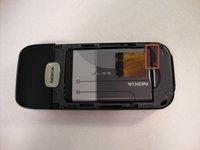
    1. Nokia 6030 Keypad Replacement, Battery: crwdns2935265:01crwdnd2935265:01crwdnd2935265:03crwdne2935265:0 Nokia 6030 Keypad Replacement, Battery: crwdns2935265:01crwdnd2935265:02crwdnd2935265:03crwdne2935265:0 Nokia 6030 Keypad Replacement, Battery: crwdns2935265:01crwdnd2935265:03crwdnd2935265:03crwdne2935265:0
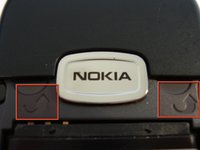
      • Press down on the grip on the back of the phone and slide the rear housing down towards the bottom of the phone.

      crwdns2952109:0crwdne2952109:0

      crwdns2917038:0crwdne2917038:0

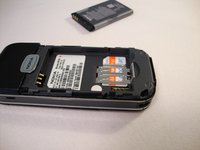
    2. Nokia 6030 Keypad Replacement: crwdns2935265:02crwdnd2935265:01crwdnd2935265:03crwdne2935265:0 Nokia 6030 Keypad Replacement: crwdns2935265:02crwdnd2935265:02crwdnd2935265:03crwdne2935265:0 Nokia 6030 Keypad Replacement: crwdns2935265:02crwdnd2935265:03crwdnd2935265:03crwdne2935265:0
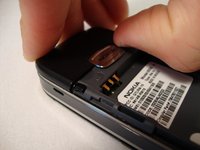
      • Use your finger to gently pull the bottom of the battery up by using the slip found at the bottom of the phone.

      • Lift out battery and remove.

      crwdns2952109:0crwdne2952109:0

      crwdns2917038:0crwdne2917038:0

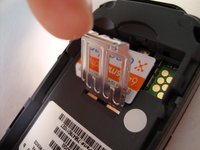
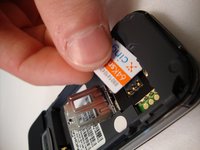
    1. Nokia 6030 Keypad Replacement, SIM Card: crwdns2935265:03crwdnd2935265:01crwdnd2935265:03crwdne2935265:0 Nokia 6030 Keypad Replacement, SIM Card: crwdns2935265:03crwdnd2935265:02crwdnd2935265:03crwdne2935265:0 Nokia 6030 Keypad Replacement, SIM Card: crwdns2935265:03crwdnd2935265:03crwdnd2935265:03crwdne2935265:0
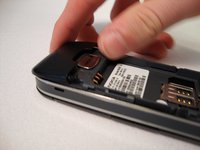
      • Use your finger to lift the metal cage up.

      • Remove SIM card.

      crwdns2952109:0crwdne2952109:0

      crwdns2917038:0crwdne2917038:0

    2. Nokia 6030 Keypad Replacement: crwdns2935265:04crwdnd2935265:01crwdnd2935265:01crwdne2935265:0
      • Use your finger to close the metal cage.

      crwdns2952109:0crwdne2952109:0

      crwdns2917038:0crwdne2917038:0

    1. Nokia 6030 Keypad Replacement, Front Cover: crwdns2935265:05crwdnd2935265:01crwdnd2935265:03crwdne2935265:0 Nokia 6030 Keypad Replacement, Front Cover: crwdns2935265:05crwdnd2935265:02crwdnd2935265:03crwdne2935265:0 Nokia 6030 Keypad Replacement, Front Cover: crwdns2935265:05crwdnd2935265:03crwdnd2935265:03crwdne2935265:0
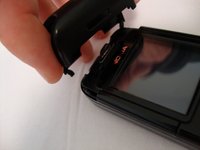
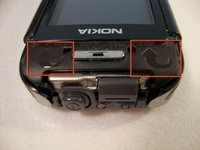
      • Insert your two fingers under the two tabs found at the top of the phone underneath the black casing, then pull the casing up and slide it out slowly.

      crwdns2952109:0crwdne2952109:0

      crwdns2917038:0crwdne2917038:0

    2. Nokia 6030 Keypad Replacement: crwdns2935265:06crwdnd2935265:01crwdnd2935265:02crwdne2935265:0 Nokia 6030 Keypad Replacement: crwdns2935265:06crwdnd2935265:02crwdnd2935265:02crwdne2935265:0
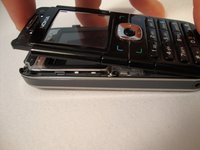
      • After removing the top cover, turn the phone over so the screen is facing upwards.

      crwdns2952109:0crwdne2952109:0

      crwdns2917038:0crwdne2917038:0

    3. Nokia 6030 Keypad Replacement: crwdns2935265:07crwdnd2935265:01crwdnd2935265:03crwdne2935265:0 Nokia 6030 Keypad Replacement: crwdns2935265:07crwdnd2935265:02crwdnd2935265:03crwdne2935265:0 Nokia 6030 Keypad Replacement: crwdns2935265:07crwdnd2935265:03crwdnd2935265:03crwdne2935265:0
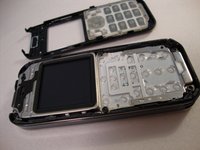
      • Use your fingers to slowly lift the screen back towards the bottom of the phone using the arrows found at the top of the phone.

      crwdns2952109:0crwdne2952109:0

      crwdns2917038:0crwdne2917038:0

    1. Nokia 6030 Keypad Replacement, Keypad: crwdns2935265:08crwdnd2935265:01crwdnd2935265:02crwdne2935265:0 Nokia 6030 Keypad Replacement, Keypad: crwdns2935265:08crwdnd2935265:02crwdnd2935265:02crwdne2935265:0
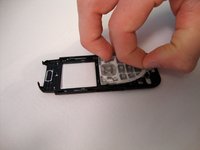
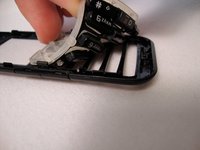
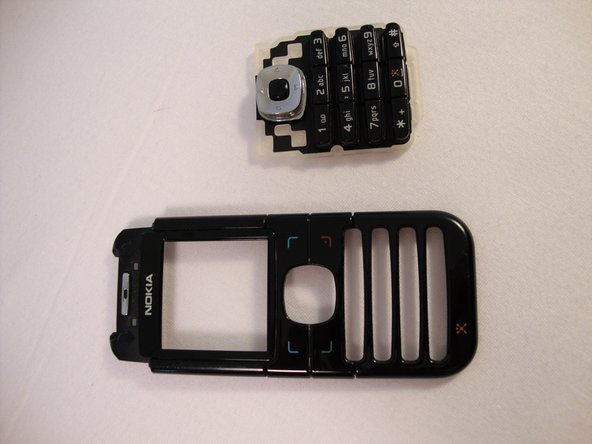
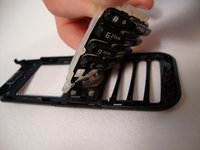
      • Gently pull the rubber away from the front screen and the buttons will detach from the plastic case.

      crwdns2952109:0crwdne2952109:0

      crwdns2917038:0crwdne2917038:0

    2. Nokia 6030 Keypad Replacement: crwdns2935265:09crwdnd2935265:01crwdnd2935265:02crwdne2935265:0 Nokia 6030 Keypad Replacement: crwdns2935265:09crwdnd2935265:02crwdnd2935265:02crwdne2935265:0
      • Remove old keypad and replace it with new keypad.

      crwdns2952109:0crwdne2952109:0

      crwdns2917038:0crwdne2917038:0

crwdns2915888:0crwdne2915888:0

To reassemble your device, follow these instructions in reverse order.

crwdns2935221:0crwdne2935221:0

crwdns2935227:0crwdne2935227:0

Spencer Woodworth

crwdns2935283:004/14/10crwdne2935283:0

346 crwdns2915208:0crwdne2915208:0

crwdns2935297:09crwdne2935297:0

crwdns2935287:0crwdne2935287:0

Cal Poly, Team 23-63, Johann Spring 2010 crwdns2935289:0Cal Poly, Team 23-63, Johann Spring 2010crwdne2935289:0

CPSU-JOHANN-S10S23G63

crwdns2931471:03crwdne2931471:0

crwdns2935297:0108crwdne2935297:0

crwdns2947412:00crwdne2947412:0

crwdns2917038:0crwdne2917038:0

crwdns2936625:0crwdne2936625:0:

crwdns2936751:024crwdne2936751:0 3

crwdns2936753:07crwdne2936753:0 16

crwdns2936753:030crwdne2936753:0 99

crwdns2959996:0crwdne2959996:0 3,478