
Nokia 6030 Battery Replacement

crwdns2959932:0crwdnd2959932:0Spencer Woodworthcrwdnd2959932:0crwdnd2959932:0crwdnd2959932:08crwdnd2959932:0crwdne2959932:0
crwdns2959936:0Nhl 13, 2026crwdne2959936:0
crwdns2869540:0crwdne2869540:0: 4.3K
crwdns2959988:0crwdne2959988:0
- crwdns2959990:0crwdne2959990:0
- 2
- crwdns2959992:0crwdne2959992:0
- 12
- crwdns2959994:0crwdne2959994:0
- 83
- crwdns2959996:0crwdne2959996:0
- 4,275
crwdns2955950:0crwdne2955950:0: 0
crwdns2959998:0crwdne2959998:0
crwdns2960000:0crwdne2960000:0crwdns2959984:0crwdne2959984:0: 3 4
crwdns2959974:03crwdne2959974:0
crwdns2959970:04crwdne2959970:0
crwdns2959986:0crwdne2959986:0: 0 1
crwdns2959958:0crwdne2959958:0
crwdns2959976:01crwdne2959976:0
crwdns2862633:0crwdne2862633:0
crwdns2862634:0crwdne2862634:0
crwdns2862635:0crwdne2862635:0
crwdns2862636:0crwdne2862636:0
crwdns2862637:0crwdne2862637:0
crwdns2862638:0crwdne2862638:0
crwdns2915892:0crwdne2915892:0
crwdns2959928:0crwdne2959928:0 ↓When a Nokia 6030 experiences power failure due to a dead battery, a quick replacement usually fixes the issue. The battery is fully removable and can be easily replaced by sliding off the phone's back cover.
-
-
-
Press down on the grip on the back of the phone and slide the rear housing down towards the bottom of the phone.
 crwdns2952109:0crwdne2952109:0
-
-
-
Use your finger to gently pull the bottom of the battery up by using the slip found at the bottom of the phone.
-
Lift out battery and remove.
-
-


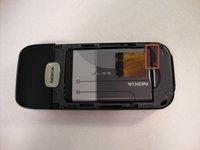


To reassemble your device, follow these instructions in reverse order.
crwdns2935221:0crwdne2935221:0
crwdns2935229:03crwdne2935229:0

crwdns2935287:0crwdne2935287:0

Cal Poly, Team 23-63, Johann Spring 2010 crwdns2935289:0Cal Poly, Team 23-63, Johann Spring 2010crwdne2935289:0
CPSU-JOHANN-S10S23G63
crwdns2931471:03crwdne2931471:0
crwdns2935297:0108crwdne2935297:0
