crwdns2933423:0crwdne2933423:0
crwdns2947577:0crwdnd2947577:0crwdne2947577:0

Nokia 6010 screen and speaker replacement

crwdns2869540:0crwdne2869540:0: 4958

crwdns2959988:0crwdne2959988:0

crwdns2959990:0crwdne2959990:0
1
crwdns2959992:0crwdne2959992:0
12
crwdns2959994:0crwdne2959994:0
85
crwdns2959996:0crwdne2959996:0
4,958
crwdns2955950:0crwdne2955950:0: 2

crwdns2960002:01crwdne2960002:0, crwdns2960006:01crwdne2960006:0

crwdns2960000:0crwdne2960000:0
crwdns2959984:0crwdne2959984:0: 2

crwdns2959974:02crwdne2959974:0

crwdns2959986:0crwdne2959986:0: 0

crwdns2959958:0crwdne2959958:0

crwdns2955944:0crwdne2955944:0: crwdns2931287:05crwdne2931287:0
crwdns2955970:0crwdne2955970:0: crwdns2937799:0crwdne2937799:0
Nokia 6010 screen and speaker replacement

crwdns2915892:0crwdne2915892:0

crwdns2959928:0crwdne2959928:0 ↓

Use this guide to remove and replace the Nokia 6010's LCD screen and speaker.

crwdns2959930:0crwdne2959930:0

crwdns2943215:0crwdne2943215:0

    1. Nokia 6010 screen and speaker replacement, Battery: crwdns2935265:01crwdnd2935265:01crwdnd2935265:03crwdne2935265:0 Nokia 6010 screen and speaker replacement, Battery: crwdns2935265:01crwdnd2935265:02crwdnd2935265:03crwdne2935265:0 Nokia 6010 screen and speaker replacement, Battery: crwdns2935265:01crwdnd2935265:03crwdnd2935265:03crwdne2935265:0
      • Press the small tab on the bottom of the back of the phone.

      • Push the back case upward towards the power button. The back case will then pop off.

      • It requires some force, so be careful.

      crwdns2952109:0crwdne2952109:0

      crwdns2917038:0crwdne2917038:0

    2. Nokia 6010 screen and speaker replacement: crwdns2935265:02crwdnd2935265:01crwdnd2935265:02crwdne2935265:0 Nokia 6010 screen and speaker replacement: crwdns2935265:02crwdnd2935265:02crwdnd2935265:02crwdne2935265:0
      • Lift the battery near the bottom and pry up.

      crwdns2952109:0crwdne2952109:0

      crwdns2917038:0crwdne2917038:0

    1. Nokia 6010 screen and speaker replacement, SIM Card: crwdns2935265:03crwdnd2935265:01crwdnd2935265:01crwdne2935265:0
      • With one hand, press the ridged tab near the visible side of the SIM card.

      • Slide the card out with your other hand.

      crwdns2952109:0crwdne2952109:0

      crwdns2917038:0crwdne2917038:0

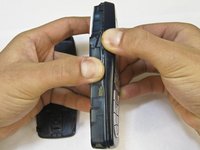
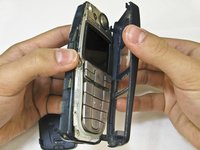
    1. Nokia 6010 screen and speaker replacement, Keypad: crwdns2935265:04crwdnd2935265:01crwdnd2935265:02crwdne2935265:0 Nokia 6010 screen and speaker replacement, Keypad: crwdns2935265:04crwdnd2935265:02crwdnd2935265:02crwdne2935265:0
      • Grip the phone on either the sides, the top, or the bottom.

      • Pull the front case away from the rest of the phone.

      • There are no special tabs to keep it in place so it should wiggle free easily.

      crwdns2952109:0crwdne2952109:0

      crwdns2917038:0crwdne2917038:0

    2. Nokia 6010 screen and speaker replacement: crwdns2935265:05crwdnd2935265:01crwdnd2935265:01crwdne2935265:0
      • Lift the keypad away from the body of the phone.

      • The keypad is the rubber-backed piece with the number keys.

      crwdns2952109:0crwdne2952109:0

      crwdns2917038:0crwdne2917038:0

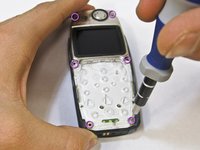
    1. Nokia 6010 screen and speaker replacement, LCD Screen and Speaker: crwdns2935265:06crwdnd2935265:01crwdnd2935265:02crwdne2935265:0 Nokia 6010 screen and speaker replacement, LCD Screen and Speaker: crwdns2935265:06crwdnd2935265:02crwdnd2935265:02crwdne2935265:0
      • Remove the six screws around the front of the phone body with a T6 screwdriver.

      crwdns2952109:0crwdne2952109:0

      crwdns2917038:0crwdne2917038:0

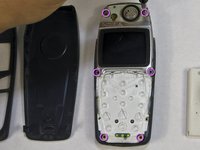
    2. Nokia 6010 screen and speaker replacement: crwdns2935265:07crwdnd2935265:01crwdnd2935265:03crwdne2935265:0 Nokia 6010 screen and speaker replacement: crwdns2935265:07crwdnd2935265:02crwdnd2935265:03crwdne2935265:0 Nokia 6010 screen and speaker replacement: crwdns2935265:07crwdnd2935265:03crwdnd2935265:03crwdne2935265:0
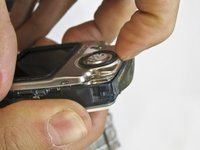
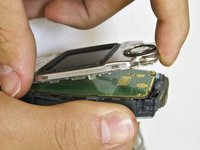
      • Insert your finger underneath the speaker piece and pry away from the phone body.

      • The plastic layer containing the LCD screen and speaker takes some force to remove.

      • There are 4 plastic tabs which keep it in place, but they are hard to press. Be careful and go tab by tab or use a spudger if you are nervous about using too much force.

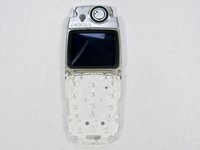
      • The LCD and the speaker are attached to the same piece and must be replaced together.

      crwdns2952109:0crwdne2952109:0

      crwdns2917038:0crwdne2917038:0

crwdns2915888:0crwdne2915888:0

To reassemble your device, follow these instructions in reverse order.

crwdns2935221:0crwdne2935221:0

crwdns2935229:02crwdne2935229:0

Nicholas Hanne

crwdns2935283:001/20/10crwdne2935283:0

129 crwdns2915208:0crwdne2915208:0

crwdns2935297:08crwdne2935297:0

crwdns2935287:0crwdne2935287:0

Cal Poly, Team 14-45, Regan Winter 2010 crwdns2935289:0Cal Poly, Team 14-45, Regan Winter 2010crwdne2935289:0

CPSU-REGAN-W10S14G45

crwdns2931471:05crwdne2931471:0

crwdns2935297:096crwdne2935297:0

crwdns2947410:01crwdne2947410:0

crwdns2917038:0crwdne2917038:0

crwdns2936625:0crwdne2936625:0:

crwdns2936751:024crwdne2936751:0 1

crwdns2936753:07crwdne2936753:0 12

crwdns2936753:030crwdne2936753:0 85

crwdns2959996:0crwdne2959996:0 4,958