crwdns2933423:0crwdne2933423:0
crwdns2947577:0crwdnd2947577:0crwdne2947577:0

Nokia 3300B Screen Replacement

crwdns2942213:0crwdne2942213:0

    1. Nokia 3300B Screen Replacement, Battery: crwdns2935265:01crwdnd2935265:01crwdnd2935265:02crwdne2935265:0 Nokia 3300B Screen Replacement, Battery: crwdns2935265:01crwdnd2935265:02crwdnd2935265:02crwdne2935265:0
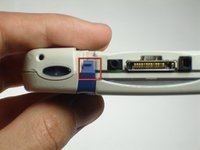
      • Flip the Nokia 3300B over with the back-side facing towards you.

      • Gently press the button on the back of the battery cover to release the cover and slide up.

      crwdns2952109:0crwdne2952109:0

      crwdns2917038:0crwdne2917038:0

    2. Nokia 3300B Screen Replacement: crwdns2935265:02crwdnd2935265:01crwdnd2935265:02crwdne2935265:0 Nokia 3300B Screen Replacement: crwdns2935265:02crwdnd2935265:02crwdnd2935265:02crwdne2935265:0
      • Lift the battery out of the back of the phone.

      • It is easiest to lift the battery out of the phone from the right-hand side, as seen in the picture.

      crwdns2952109:0crwdne2952109:0

      crwdns2917038:0crwdne2917038:0

    1. Nokia 3300B Screen Replacement, Screen: crwdns2935265:03crwdnd2935265:01crwdnd2935265:03crwdne2935265:0 Nokia 3300B Screen Replacement, Screen: crwdns2935265:03crwdnd2935265:02crwdnd2935265:03crwdne2935265:0 Nokia 3300B Screen Replacement, Screen: crwdns2935265:03crwdnd2935265:03crwdnd2935265:03crwdne2935265:0
      crwdns2935267:0crwdne2935267:0
      Tweezers
      $4.99
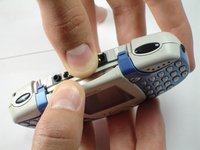
      • Gently push the blue tabs on the top of the phone out of their slots.

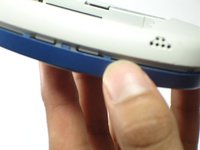
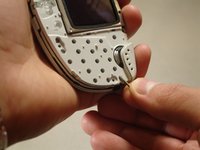
      • With the phone facing up, pop the blue faceplate off by using your fingernail (or some tweezers) and working your way around the phone.

      • Note: If the blue cover does not detach easily use your finger nails to try and split it open, as seen in the picture.

      crwdns2952109:0crwdne2952109:0

      crwdns2917038:0crwdne2917038:0

    2. Nokia 3300B Screen Replacement: crwdns2935265:04crwdnd2935265:01crwdnd2935265:01crwdne2935265:0
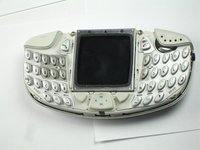
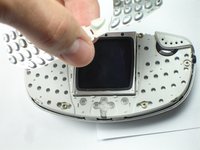
      • With the screen still facing you, remove the blue faceplate.

      crwdns2952109:0crwdne2952109:0

      crwdns2917038:0crwdne2917038:0

    3. Nokia 3300B Screen Replacement: crwdns2935265:05crwdnd2935265:01crwdnd2935265:02crwdne2935265:0 Nokia 3300B Screen Replacement: crwdns2935265:05crwdnd2935265:02crwdnd2935265:02crwdne2935265:0
      • Grab the sides of the keypad and lift it up vertically.

      • If you encounter resistance while removing the keypad, be sure to lift up evenly on both sides, so the button's pin don't snap.

      crwdns2952109:0crwdne2952109:0

      crwdns2917038:0crwdne2917038:0

    4. Nokia 3300B Screen Replacement: crwdns2935265:06crwdnd2935265:01crwdnd2935265:03crwdne2935265:0 Nokia 3300B Screen Replacement: crwdns2935265:06crwdnd2935265:02crwdnd2935265:03crwdne2935265:0 Nokia 3300B Screen Replacement: crwdns2935265:06crwdnd2935265:03crwdnd2935265:03crwdne2935265:0
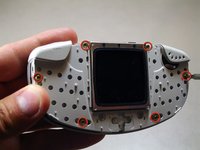
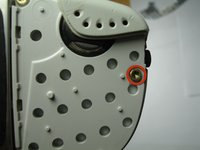
      • Using the Torx T6 bit of a Phillips precision screwdriver, remove the six screws on the phone's inner protective case, as seen in the picture.

      • NOTE: Be sure to save these screws so the phone can be reassembled later.

      crwdns2952109:0crwdne2952109:0

      crwdns2917038:0crwdne2917038:0

    5. Nokia 3300B Screen Replacement: crwdns2935265:07crwdnd2935265:01crwdnd2935265:02crwdne2935265:0 Nokia 3300B Screen Replacement: crwdns2935265:07crwdnd2935265:02crwdnd2935265:02crwdne2935265:0
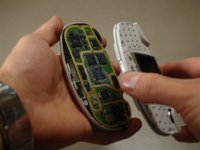
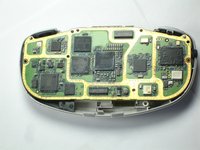
      • Holding the phone with the screen facing you, remove the top half of the phone from the circuit board.

      crwdns2952109:0crwdne2952109:0

      crwdns2917038:0crwdne2917038:0

    6. Nokia 3300B Screen Replacement: crwdns2935265:08crwdnd2935265:01crwdnd2935265:03crwdne2935265:0 Nokia 3300B Screen Replacement: crwdns2935265:08crwdnd2935265:02crwdnd2935265:03crwdne2935265:0 Nokia 3300B Screen Replacement: crwdns2935265:08crwdnd2935265:03crwdnd2935265:03crwdne2935265:0
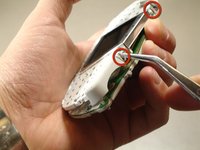
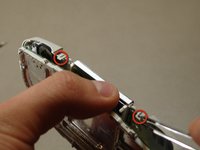
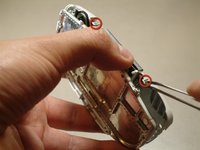
      • Hold the top half of the phone with the screen facing you.

      • Using a pair of tweezers, release the tabs holding the two distinct cases together.

      • The tabs are very fragile. Be gentle when releasing the tabs.

      crwdns2952109:0crwdne2952109:0

      crwdns2917038:0crwdne2917038:0

    7. Nokia 3300B Screen Replacement: crwdns2935265:09crwdnd2935265:01crwdnd2935265:01crwdne2935265:0
      • Be sure to remove both casings so that the screen is facing down. This will ensure that the screen does not fall out of its case.

      • NOTE: The screen's part identification sticker is on the top back side of the screen. The screen will need to be replaced with the same orientation.

      crwdns2952109:0crwdne2952109:0

      crwdns2917038:0crwdne2917038:0

    8. Nokia 3300B Screen Replacement: crwdns2935265:010crwdnd2935265:01crwdnd2935265:01crwdne2935265:0
      • Tilt the casing back and the screen should fall out smoothly.

      • Replace the old screen with the new screen.

      crwdns2952109:0crwdne2952109:0

      crwdns2917038:0crwdne2917038:0

crwdns2915888:0crwdne2915888:0

To reassemble your device, follow these instructions in reverse order.

crwdns2935221:0crwdne2935221:0

crwdns2935229:02crwdne2935229:0

Chris Colwell

crwdns2935283:004/13/10crwdne2935283:0

116 crwdns2915208:0crwdne2915208:0

crwdns2935297:02crwdne2935297:0

crwdns2935287:0crwdne2935287:0

Cal Poly, Team 18-65, Johann Spring 2010 crwdns2935289:0Cal Poly, Team 18-65, Johann Spring 2010crwdne2935289:0

CPSU-JOHANN-S10S18G65

crwdns2931471:04crwdne2931471:0

crwdns2935297:060crwdne2935297:0

crwdns2947412:00crwdne2947412:0

crwdns2917038:0crwdne2917038:0

crwdns2936625:0crwdne2936625:0:

crwdns2936751:024crwdne2936751:0 1

crwdns2936753:07crwdne2936753:0 8

crwdns2936753:030crwdne2936753:0 40

crwdns2942667:0crwdne2942667:0 3,652