crwdns2933423:0crwdne2933423:0
crwdns2947577:0crwdnd2947577:0crwdne2947577:0

Nokia 2610 Circuit Board Replacement

crwdns2942213:0crwdne2942213:0

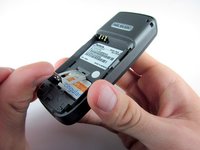
    1. Nokia 2610 Circuit Board Replacement, Battery and Sim Card: crwdns2935265:01crwdnd2935265:01crwdnd2935265:03crwdne2935265:0 Nokia 2610 Circuit Board Replacement, Battery and Sim Card: crwdns2935265:01crwdnd2935265:02crwdnd2935265:03crwdne2935265:0 Nokia 2610 Circuit Board Replacement, Battery and Sim Card: crwdns2935265:01crwdnd2935265:03crwdnd2935265:03crwdne2935265:0
      • Place your thumb on the middle of the back cover and push it toward the bottom of the phone to slide the cover off.

      crwdns2952109:0crwdne2952109:0

      crwdns2917038:0crwdne2917038:0

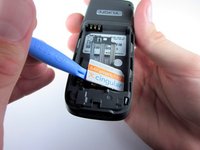
    2. Nokia 2610 Circuit Board Replacement: crwdns2935265:02crwdnd2935265:01crwdnd2935265:03crwdne2935265:0 Nokia 2610 Circuit Board Replacement: crwdns2935265:02crwdnd2935265:02crwdnd2935265:03crwdne2935265:0 Nokia 2610 Circuit Board Replacement: crwdns2935265:02crwdnd2935265:03crwdnd2935265:03crwdne2935265:0
      • Use a plastic opening tool (or your finger) to gently pry the battery out of the battery slot on the back of the phone.

      crwdns2952109:0crwdne2952109:0

      crwdns2917038:0crwdne2917038:0

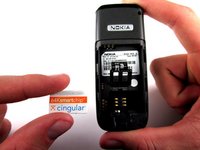
    3. Nokia 2610 Circuit Board Replacement: crwdns2935265:03crwdnd2935265:01crwdnd2935265:03crwdne2935265:0 Nokia 2610 Circuit Board Replacement: crwdns2935265:03crwdnd2935265:02crwdnd2935265:03crwdne2935265:0 Nokia 2610 Circuit Board Replacement: crwdns2935265:03crwdnd2935265:03crwdnd2935265:03crwdne2935265:0
      • Lift the metal sim card holder (at the bottom of the battery slot) up and carefully pry the sim card out of its slot with a plastic opening tool or your finger.

      • After removal, lower the metal sim card holder into its original position.

      crwdns2952109:0crwdne2952109:0

      crwdns2917038:0crwdne2917038:0

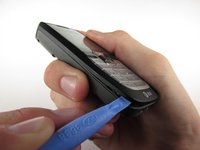
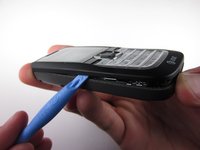
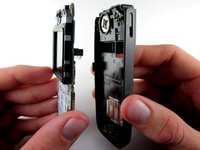
    1. Nokia 2610 Circuit Board Replacement, Front Pannel: crwdns2935265:04crwdnd2935265:01crwdnd2935265:02crwdne2935265:0 Nokia 2610 Circuit Board Replacement, Front Pannel: crwdns2935265:04crwdnd2935265:02crwdnd2935265:02crwdne2935265:0
      • Insert the plastic opening tool into the crack between the front and back panels.

      • Gently pry the front cover away from the back cover while sliding the plastic opening tool towards the top of the phone.

      crwdns2952109:0crwdne2952109:0

      crwdns2917038:0crwdne2917038:0

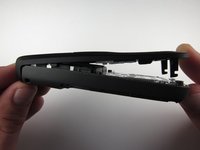
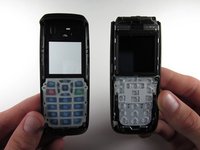
    2. Nokia 2610 Circuit Board Replacement: crwdns2935265:05crwdnd2935265:01crwdnd2935265:02crwdne2935265:0 Nokia 2610 Circuit Board Replacement: crwdns2935265:05crwdnd2935265:02crwdnd2935265:02crwdne2935265:0
      • Lift the bottom of the front cover away from the phone.

      • Continue lifting until the top of the front cover is fully removed from the phone.

      • Note: To replace the Keypad, gently lift it out of the front cover. It is located below the clear viewing window.

      crwdns2952109:0crwdne2952109:0

      crwdns2917038:0crwdne2917038:0

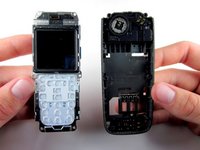
    1. Nokia 2610 Circuit Board Replacement, Circuit Board: crwdns2935265:06crwdnd2935265:01crwdnd2935265:01crwdne2935265:0
      • Use the Torx screwdriver with the T6 attachmet to remove the 6 .4 mm screws around the outside of the circuit board.

      • Note: Removing the 4 T6 screws around the screen will loosen it, so don't worry if the screen also separates from the circuit board.

      crwdns2952109:0crwdne2952109:0

      crwdns2917038:0crwdne2917038:0

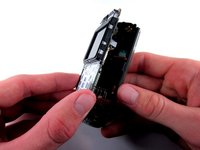
    2. Nokia 2610 Circuit Board Replacement: crwdns2935265:07crwdnd2935265:01crwdnd2935265:03crwdne2935265:0 Nokia 2610 Circuit Board Replacement: crwdns2935265:07crwdnd2935265:02crwdnd2935265:03crwdne2935265:0 Nokia 2610 Circuit Board Replacement: crwdns2935265:07crwdnd2935265:03crwdnd2935265:03crwdne2935265:0
      • Lift the circuit board out of the back cover.

      crwdns2952109:0crwdne2952109:0

      crwdns2917038:0crwdne2917038:0

crwdns2915888:0crwdne2915888:0

To reassemble your device, follow these instructions in reverse order.

crwdns2935221:0crwdne2935221:0

crwdns2935229:05crwdne2935229:0

Andrew Wood

crwdns2935283:010/05/10crwdne2935283:0

336 crwdns2915208:0crwdne2915208:0

crwdns2935297:03crwdne2935297:0

crwdns2935287:0crwdne2935287:0

Cal Poly, Team 7-52, Amido Fall 2010 crwdns2935289:0Cal Poly, Team 7-52, Amido Fall 2010crwdne2935289:0

CPSU-AMIDO-F10S7G52

crwdns2931471:04crwdne2931471:0

crwdns2935297:072crwdne2935297:0

crwdns2947410:01crwdne2947410:0

crwdns2917038:0crwdne2917038:0

crwdns2936625:0crwdne2936625:0:

crwdns2936751:024crwdne2936751:0 0

crwdns2936753:07crwdne2936753:0 6

crwdns2936753:030crwdne2936753:0 41

crwdns2942667:0crwdne2942667:0 3,724