crwdns2933423:0crwdne2933423:0
crwdns2947577:0crwdnd2947577:0crwdne2947577:0

Nintendo Wii Remote Shell Replacement

crwdns2942213:0crwdne2942213:0

    1. Nintendo Wii Remote Shell Replacement, Removing the strap (Optional, but recommended.): crwdns2935265:01crwdnd2935265:01crwdnd2935265:01crwdne2935265:0
      • Remove the Safety strap to prevent it into getting in our way

      crwdns2952109:0crwdne2952109:0

      crwdns2917038:0crwdne2917038:0

    2. Nintendo Wii Remote Shell Replacement, Removing the batteries: crwdns2935265:02crwdnd2935265:01crwdnd2935265:02crwdne2935265:0 Nintendo Wii Remote Shell Replacement, Removing the batteries: crwdns2935265:02crwdnd2935265:02crwdnd2935265:02crwdne2935265:0
      • Remove the battery using a fingernail.

      crwdns2952109:0crwdne2952109:0

      crwdns2917038:0crwdne2917038:0

    3. Nintendo Wii Remote Shell Replacement, Removing the screws: crwdns2935265:03crwdnd2935265:01crwdnd2935265:02crwdne2935265:0 Nintendo Wii Remote Shell Replacement, Removing the screws: crwdns2935265:03crwdnd2935265:02crwdnd2935265:02crwdne2935265:0
      • This is where the disassembly begins, Grab your Y1 Screwdriver and unscrew the following screws

      crwdns2952109:0crwdne2952109:0

      crwdns2917038:0crwdne2917038:0

      • Gently take out the front cover

      crwdns2952109:0crwdne2952109:0

      crwdns2917038:0crwdne2917038:0

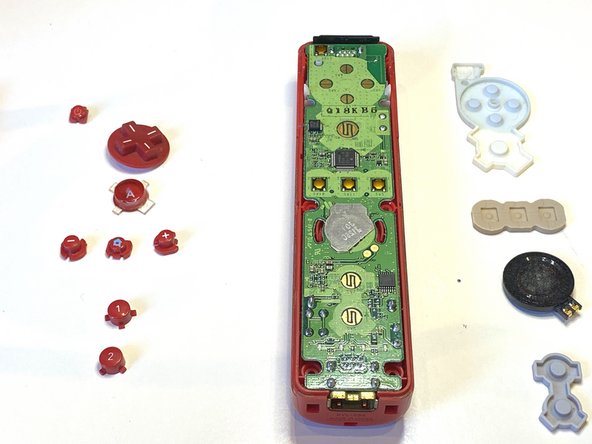
    4. Nintendo Wii Remote Shell Replacement, Removing the buttons: crwdns2935265:05crwdnd2935265:01crwdnd2935265:02crwdne2935265:0 Nintendo Wii Remote Shell Replacement, Removing the buttons: crwdns2935265:05crwdnd2935265:02crwdnd2935265:02crwdne2935265:0
      • Remove all of the buttons on the motherboard

      crwdns2952109:0crwdne2952109:0

      crwdns2917038:0crwdne2917038:0

    5. Nintendo Wii Remote Shell Replacement, Removing Rubber: crwdns2935265:06crwdnd2935265:01crwdnd2935265:02crwdne2935265:0 Nintendo Wii Remote Shell Replacement, Removing Rubber: crwdns2935265:06crwdnd2935265:02crwdnd2935265:02crwdne2935265:0
      • Remove all of the rubber.

      crwdns2952109:0crwdne2952109:0

      crwdns2917038:0crwdne2917038:0

    6. Nintendo Wii Remote Shell Replacement, Removing the Motherboard: crwdns2935265:07crwdnd2935265:01crwdnd2935265:03crwdne2935265:0 Nintendo Wii Remote Shell Replacement, Removing the Motherboard: crwdns2935265:07crwdnd2935265:02crwdnd2935265:03crwdne2935265:0 Nintendo Wii Remote Shell Replacement, Removing the Motherboard: crwdns2935265:07crwdnd2935265:03crwdnd2935265:03crwdne2935265:0
      • Take out the motherboard

      crwdns2952109:0crwdne2952109:0

      crwdns2917038:0crwdne2917038:0

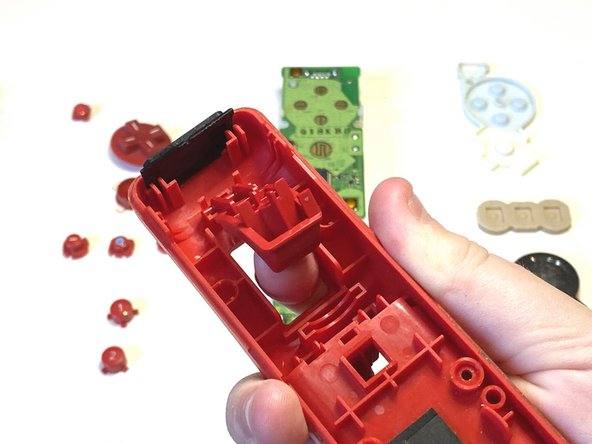
    7. Nintendo Wii Remote Shell Replacement, Taking out the B Button: crwdns2935265:08crwdnd2935265:01crwdnd2935265:03crwdne2935265:0 Nintendo Wii Remote Shell Replacement, Taking out the B Button: crwdns2935265:08crwdnd2935265:02crwdnd2935265:03crwdne2935265:0 Nintendo Wii Remote Shell Replacement, Taking out the B Button: crwdns2935265:08crwdnd2935265:03crwdnd2935265:03crwdne2935265:0
      • Take out the B button

      crwdns2952109:0crwdne2952109:0

      crwdns2917038:0crwdne2917038:0

    8. Nintendo Wii Remote Shell Replacement, Removing the B Button: crwdns2935265:09crwdnd2935265:01crwdnd2935265:02crwdne2935265:0 Nintendo Wii Remote Shell Replacement, Removing the B Button: crwdns2935265:09crwdnd2935265:02crwdnd2935265:02crwdne2935265:0
      • Remove the B Button

      crwdns2952109:0crwdne2952109:0

      crwdns2917038:0crwdne2917038:0

    9. Nintendo Wii Remote Shell Replacement, Getting new shell: crwdns2935265:010crwdnd2935265:01crwdnd2935265:01crwdne2935265:0
      • Grab your new shell

      crwdns2952109:0crwdne2952109:0

      crwdns2917038:0crwdne2917038:0

    10. Nintendo Wii Remote Shell Replacement, Inserting the components: crwdns2935265:011crwdnd2935265:01crwdnd2935265:02crwdne2935265:0 Nintendo Wii Remote Shell Replacement, Inserting the components: crwdns2935265:011crwdnd2935265:02crwdnd2935265:02crwdne2935265:0
      • Insert all of the buttons

      • Make sure they fit in properly and are clickable.

      crwdns2952109:0crwdne2952109:0

      crwdns2917038:0crwdne2917038:0

    11. Nintendo Wii Remote Shell Replacement, Inserting Rubber: crwdns2935265:012crwdnd2935265:01crwdnd2935265:02crwdne2935265:0 Nintendo Wii Remote Shell Replacement, Inserting Rubber: crwdns2935265:012crwdnd2935265:02crwdnd2935265:02crwdne2935265:0
      • Put on all of the rubber on the buttons

      crwdns2952109:0crwdne2952109:0

      crwdns2917038:0crwdne2917038:0

      • Connect the B button

      crwdns2952109:0crwdne2952109:0

      crwdns2917038:0crwdne2917038:0

      • Carfully place the back cover on your wii remote

      crwdns2952109:0crwdne2952109:0

      crwdns2917038:0crwdne2917038:0

    12. Nintendo Wii Remote Shell Replacement, Screwing In: crwdns2935265:015crwdnd2935265:01crwdnd2935265:01crwdne2935265:0
      • Screw in the Y1 Screws into the following places

      crwdns2952109:0crwdne2952109:0

      crwdns2917038:0crwdne2917038:0

crwdns2915888:0crwdne2915888:0

Thats it!

crwdns2935221:0crwdne2935221:0

crwdns2935229:05crwdne2935229:0

Artem Ivat

crwdns2935283:002/05/20crwdne2935283:0

3,945 crwdns2915208:0crwdne2915208:0

crwdns2935297:013crwdne2935297:0

crwdns2935287:0crwdne2935287:0

Kid fixers crwdns2935289:0Kid fixerscrwdne2935289:0

Community

crwdns2931471:0222crwdne2931471:0

crwdns2935297:02,046crwdne2935297:0

crwdns2947410:01crwdne2947410:0

crwdns2917038:0crwdne2917038:0

crwdns2936625:0crwdne2936625:0:

crwdns2936751:024crwdne2936751:0 8

crwdns2936753:07crwdne2936753:0 57

crwdns2936753:030crwdne2936753:0 221

crwdns2942667:0crwdne2942667:0 7,310