crwdns2933423:0crwdne2933423:0
crwdns2947577:0crwdnd2947577:0crwdne2947577:0

Nintendo WaveBird Wireless Controller Joystick Replacement

crwdns2869540:0crwdne2869540:0: 12 mil

crwdns2959988:0crwdne2959988:0

crwdns2959990:0crwdne2959990:0
3
crwdns2959992:0crwdne2959992:0
36
crwdns2959994:0crwdne2959994:0
184
crwdns2959996:0crwdne2959996:0
11.994
crwdns2955950:0crwdne2955950:0: 2

crwdns2960002:01crwdne2960002:0, crwdns2960006:01crwdne2960006:0

crwdns2960000:0crwdne2960000:0
crwdns2959984:0crwdne2959984:0: 9

crwdns2959974:09crwdne2959974:0

crwdns2959986:0crwdne2959986:0: 5

crwdns2959982:05crwdne2959982:0

crwdns2955944:0crwdne2955944:0: 5 - 10 crwdns2931279:0crwdne2931279:0
crwdns2955970:0crwdne2955970:0: crwdns2937801:0crwdne2937801:0
crwdns2862591:0crwdne2862591:0

crwdns2862592:0crwdne2862592:0

Nintendo WaveBird Wireless Controller Joystick Replacement

crwdns2915892:0crwdne2915892:0

crwdns2959928:0crwdne2959928:0 ↓

This guide will show you the steps on installing the joystick. This will be helpful if the joystick isn't working properly.

crwdns2959930:0crwdne2959930:0

crwdns2943215:0crwdne2943215:0

    1. Nintendo WaveBird Wireless Controller Joystick Replacement, Batteries: crwdns2935265:01crwdnd2935265:01crwdnd2935265:02crwdne2935265:0 Nintendo WaveBird Wireless Controller Joystick Replacement, Batteries: crwdns2935265:01crwdnd2935265:02crwdnd2935265:02crwdne2935265:0
      • Pull down on the battery cover release lever and pull back to remove the cover.

      crwdns2952109:0crwdne2952109:0

      crwdns2917038:0crwdne2917038:0

    2. Nintendo WaveBird Wireless Controller Joystick Replacement: crwdns2935265:02crwdnd2935265:01crwdnd2935265:01crwdne2935265:0
      • Remove both batteries from the device.

      crwdns2952109:0crwdne2952109:0

      crwdns2917038:0crwdne2917038:0

    1. Nintendo WaveBird Wireless Controller Joystick Replacement, Front Panel: crwdns2935265:03crwdnd2935265:01crwdnd2935265:02crwdne2935265:0 Nintendo WaveBird Wireless Controller Joystick Replacement, Front Panel: crwdns2935265:03crwdnd2935265:02crwdnd2935265:02crwdne2935265:0
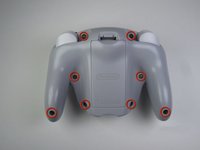
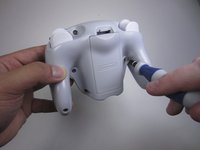
      • Remove the eight 9 mm screws from the back panel using the Tri-point Y1 screwdriver.

      • During reassembly, firmly hold the panels of the controller together while replacing the screws so the panels do not separate.

      crwdns2952109:0crwdne2952109:0

      crwdns2917038:0crwdne2917038:0

    2. Nintendo WaveBird Wireless Controller Joystick Replacement: crwdns2935265:04crwdnd2935265:01crwdnd2935265:02crwdne2935265:0 Nintendo WaveBird Wireless Controller Joystick Replacement: crwdns2935265:04crwdnd2935265:02crwdnd2935265:02crwdne2935265:0
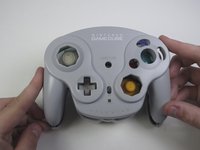
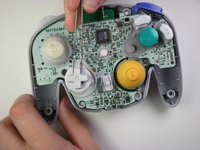
      • Carefully turn over the controller and place it on a flat surface.

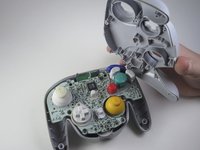
      • Slowly separate the top panel from the bottom panel.

      • The buttons are loose and may fall off the motherboard.

      • Once separated, set aside the top panel.

      • During reassembly, make sure the front panel lines up with the buttons so they slide back into place.

      crwdns2952109:0crwdne2952109:0

      crwdns2917038:0crwdne2917038:0

    1. Nintendo WaveBird Wireless Controller Joystick Replacement, Buttons: crwdns2935265:05crwdnd2935265:01crwdnd2935265:03crwdne2935265:0 Nintendo WaveBird Wireless Controller Joystick Replacement, Buttons: crwdns2935265:05crwdnd2935265:02crwdnd2935265:03crwdne2935265:0 Nintendo WaveBird Wireless Controller Joystick Replacement, Buttons: crwdns2935265:05crwdnd2935265:03crwdnd2935265:03crwdne2935265:0
      crwdns2935267:0crwdne2935267:0
      Tweezers
      $4.99
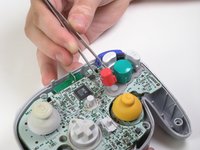
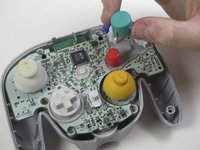
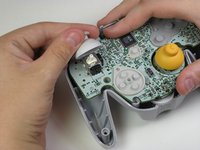
      • Use tweezers to remove the buttons.

      • It may be easier to remove the A button off of the pad by lifting it with your fingers.

      • During reassembly, make sure all buttons are in their respective sockets so they match up with the front panel.

      crwdns2952109:0crwdne2952109:0

      crwdns2917038:0crwdne2917038:0

    1. Nintendo WaveBird Wireless Controller Joystick Replacement, Joystick: crwdns2935265:06crwdnd2935265:01crwdnd2935265:02crwdne2935265:0 Nintendo WaveBird Wireless Controller Joystick Replacement, Joystick: crwdns2935265:06crwdnd2935265:02crwdnd2935265:02crwdne2935265:0
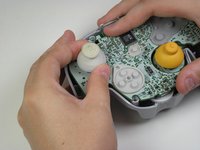
      • Grab the base of the grey joystick cover with one hand and firmly hold down the rest of the controller with the other hand.

      • Pull off the grey joystick cover.

      • During reassembly, make sure the slots inside the joystick cover line up with the motherboard so it can fit back together.

      crwdns2952109:0crwdne2952109:0

      crwdns2917038:0crwdne2917038:0

crwdns2915888:0crwdne2915888:0

To reassemble your device, follow these instructions in reverse order.

crwdns2935221:0crwdne2935221:0

crwdns2935229:09crwdne2935229:0

Garrett Leung

crwdns2935283:004/16/13crwdne2935283:0

1.012 crwdns2915208:0crwdne2915208:0

crwdns2935297:08crwdne2935297:0

crwdns2935287:0crwdne2935287:0

Cal Poly, Team 10-40, Amido Spring 2013 crwdns2935289:0Cal Poly, Team 10-40, Amido Spring 2013crwdne2935289:0

CPSU-AMIDO-S13S10G40

crwdns2931471:04crwdne2931471:0

crwdns2935297:0180crwdne2935297:0

crwdns2947410:01crwdne2947410:0

Question. My wavebird joystick wobbles a lot and gets stuck in directions I’m not inputting. Will replacing the top of the stick fix this? Or would I have to solder a new analog stick to the board?

Golgamang - crwdns2934203:0crwdne2934203:0 crwdns2950251:0crwdne2950251:0

crwdns2917038:0crwdne2917038:0

crwdns2936625:0crwdne2936625:0:

crwdns2936751:024crwdne2936751:0 3

crwdns2936753:07crwdne2936753:0 36

crwdns2936753:030crwdne2936753:0 184

crwdns2959996:0crwdne2959996:0 11,994