crwdns2933423:0crwdne2933423:0
crwdns2947577:0crwdnd2947577:0crwdne2947577:0

Nintendo Switch Lite Battery Disconnection

crwdns2862623:0crwdne2862623:0
crwdns2948751:0crwdne2948751:0

crwdns2942213:0crwdne2942213:0

  1. Nintendo Switch Lite Battery Disconnection, Remove the back panel screws: crwdns2935265:01crwdnd2935265:01crwdnd2935265:01crwdne2935265:0
    crwdns2935267:0crwdne2935267:0
    Magnetic Project Mat
    $16.96
    • Before beginning this repair, make sure that the device is completely turned off.

    • Use a Y00 screwdriver to remove the four 6.3 mm-long screws securing the back panel.

    • Throughout this repair, keep track of each screw and make sure it goes back exactly where it came from.

    crwdns2952109:0crwdne2952109:0

    crwdns2917038:0crwdne2917038:0

  2. Nintendo Switch Lite Battery Disconnection, Remove the top and bottom back panel screws: crwdns2935265:02crwdnd2935265:01crwdnd2935265:02crwdne2935265:0 Nintendo Switch Lite Battery Disconnection, Remove the top and bottom back panel screws: crwdns2935265:02crwdnd2935265:02crwdnd2935265:02crwdne2935265:0
    • Use a JIS 000 driver or an iFixit PH 000 driver to remove the following screws securing the back panel:

    • Two 3.6 mm-long screws on the top of the device

    • Two 3.6 mm-long screws on the bottom of the device

    • To prevent these tight screws from stripping, apply firm downward force, work slowly and try a different screwdriver if the screws won't come out.

    crwdns2952109:0crwdne2952109:0

    crwdns2917038:0crwdne2917038:0

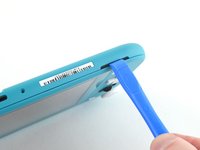
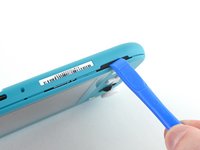
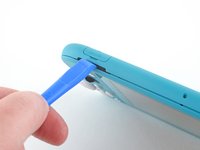
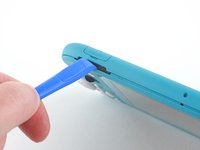
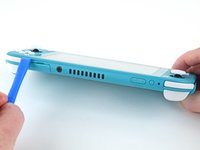
  3. Nintendo Switch Lite Battery Disconnection, Release the clips securing the back panel: crwdns2935265:03crwdnd2935265:01crwdnd2935265:02crwdne2935265:0 Nintendo Switch Lite Battery Disconnection, Release the clips securing the back panel: crwdns2935265:03crwdnd2935265:02crwdnd2935265:02crwdne2935265:0
    • Insert an opening tool into the left speaker grille on the bottom of the device.

    • Twist the opening tool to release the clips securing the back panel.

    • Avoid inserting the opening tool further than required to prevent damage to the speaker module.

    crwdns2952109:0crwdne2952109:0

    crwdns2917038:0crwdne2917038:0

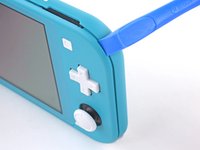
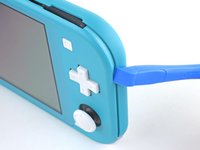
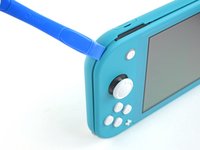
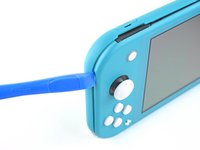
  4. Nintendo Switch Lite Battery Disconnection, Continue releasing the clips around the device: crwdns2935265:04crwdnd2935265:01crwdnd2935265:02crwdne2935265:0 Nintendo Switch Lite Battery Disconnection, Continue releasing the clips around the device: crwdns2935265:04crwdnd2935265:02crwdnd2935265:02crwdne2935265:0
    • Slide the opening tool around the bottom-left corner to release the clips on the left side of the device.

    crwdns2952109:0crwdne2952109:0

    crwdns2917038:0crwdne2917038:0

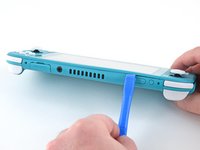
  5. Nintendo Switch Lite Battery Disconnection, Twist to release the clips: crwdns2935265:05crwdnd2935265:01crwdnd2935265:02crwdne2935265:0 Nintendo Switch Lite Battery Disconnection, Twist to release the clips: crwdns2935265:05crwdnd2935265:02crwdnd2935265:02crwdne2935265:0
    • Insert an opening tool into the right speaker grille on the bottom of the device.

    • Twist the opening tool to release the clips.

    • Avoid inserting the opening tool further than required to prevent damage to the speaker module.

    crwdns2952109:0crwdne2952109:0

    crwdns2917038:0crwdne2917038:0

  6. Nintendo Switch Lite Battery Disconnection, Slide and pry around the corners: crwdns2935265:06crwdnd2935265:01crwdnd2935265:02crwdne2935265:0 Nintendo Switch Lite Battery Disconnection, Slide and pry around the corners: crwdns2935265:06crwdnd2935265:02crwdnd2935265:02crwdne2935265:0
    • Slide and pry the opening tool around the bottom-right corner to release the clips on the right side of the device.

    crwdns2952109:0crwdne2952109:0

    crwdns2917038:0crwdne2917038:0

  7. Nintendo Switch Lite Battery Disconnection: crwdns2935265:07crwdnd2935265:01crwdnd2935265:02crwdne2935265:0 Nintendo Switch Lite Battery Disconnection: crwdns2935265:07crwdnd2935265:02crwdnd2935265:02crwdne2935265:0
    • Continue sliding and prying the opening tool along the gap on the top of the device to release the clips.

    crwdns2952109:0crwdne2952109:0

    crwdns2917038:0crwdne2917038:0

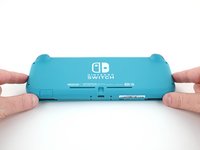
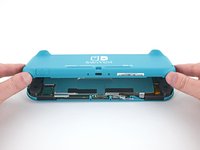
  8. Nintendo Switch Lite Battery Disconnection, Remove the back panel: crwdns2935265:08crwdnd2935265:01crwdnd2935265:03crwdne2935265:0 Nintendo Switch Lite Battery Disconnection, Remove the back panel: crwdns2935265:08crwdnd2935265:02crwdnd2935265:03crwdne2935265:0 Nintendo Switch Lite Battery Disconnection, Remove the back panel: crwdns2935265:08crwdnd2935265:03crwdnd2935265:03crwdne2935265:0
    • Lift the bottom edge of the back panel, opening it like a book.

    • Remove the back panel.

    crwdns2952109:0crwdne2952109:0

    crwdns2917038:0crwdne2917038:0

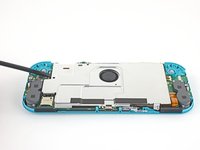
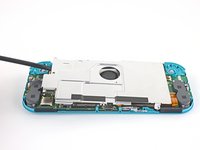
  9. Nintendo Switch Lite Battery Disconnection, Remove the shield plate: crwdns2935265:09crwdnd2935265:01crwdnd2935265:01crwdne2935265:0
    • Use a JIS 000 driver or an iFixit PH 000 driver to remove the four screws securing the shield plate:

    • Three 3.1 mm screws

    • One 4.5 mm screw

    crwdns2952109:0crwdne2952109:0

    crwdns2917038:0crwdne2917038:0

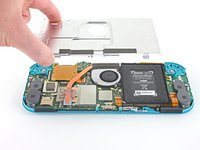
  10. Nintendo Switch Lite Battery Disconnection: crwdns2935265:010crwdnd2935265:01crwdnd2935265:03crwdne2935265:0 Nintendo Switch Lite Battery Disconnection: crwdns2935265:010crwdnd2935265:02crwdnd2935265:03crwdne2935265:0 Nintendo Switch Lite Battery Disconnection: crwdns2935265:010crwdnd2935265:03crwdnd2935265:03crwdne2935265:0
    • Use a spudger or your fingers to lift the shield plate up and out of the device.

    • You may feel a bit of resistance. This is normal, since the shield plate is slightly bonded to the heat sink with thermal paste.

    • Remove the shield plate.

    • Clean off the old thermal paste from the shield plate and heat sink using isopropyl alcohol and a microfiber cloth. Apply new thermal paste to the heat sink before reassembly.

    crwdns2952109:0crwdne2952109:0

    crwdns2917038:0crwdne2917038:0

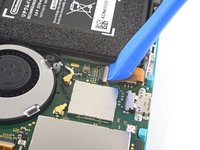
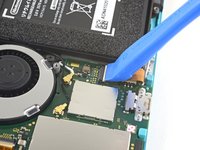
  11. Nintendo Switch Lite Battery Disconnection, Disconnect the interconnect cable: crwdns2935265:011crwdnd2935265:01crwdnd2935265:02crwdne2935265:0 Nintendo Switch Lite Battery Disconnection, Disconnect the interconnect cable: crwdns2935265:011crwdnd2935265:02crwdnd2935265:02crwdne2935265:0
    • Use an opening tool or your fingernail to flip up the small, hinged locking flap on the motherboard interconnect cable's ZIF connector.

    crwdns2952109:0crwdne2952109:0

    crwdns2917038:0crwdne2917038:0

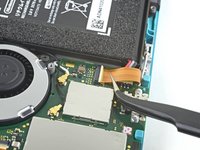
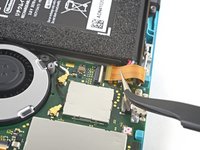
  12. Nintendo Switch Lite Battery Disconnection: crwdns2935265:012crwdnd2935265:01crwdnd2935265:02crwdne2935265:0 Nintendo Switch Lite Battery Disconnection: crwdns2935265:012crwdnd2935265:02crwdnd2935265:02crwdne2935265:0
    • Do Not Use Metal Tweezers! Some fixers state that metallic tweezers can short circuit the ribbon cable/connector. It might be safer to just use nylon-tipped or ceramic-tipped tweezers.

    • Use a pair of tweezers to slide the interconnect cable out of its connector on the motherboard.

    crwdns2952109:0crwdne2952109:0

    crwdns2917038:0crwdne2917038:0

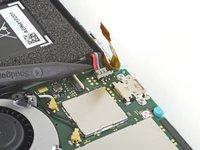
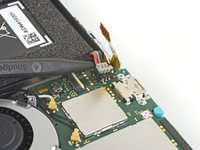
  13. Nintendo Switch Lite Battery Disconnection, Disconnect the battery: crwdns2935265:013crwdnd2935265:01crwdnd2935265:02crwdne2935265:0 Nintendo Switch Lite Battery Disconnection, Disconnect the battery: crwdns2935265:013crwdnd2935265:02crwdnd2935265:02crwdne2935265:0
    • Use the point of a spudger to pry the battery connector straight up and out of its socket on the motherboard.

    • During reassembly, wait until after you connect the interconnect cable (above) before connecting the battery.

    crwdns2952109:0crwdne2952109:0

    crwdns2917038:0crwdne2917038:0

crwdns2915888:0crwdne2915888:0

To reassemble your device, follow these instructions in reverse order.

crwdns2935221:0crwdne2935221:0

crwdns2935227:0crwdne2935227:0

Craig Lloyd

crwdns2935283:002/10/16crwdne2935283:0

42,833 crwdns2915208:0crwdne2915208:0

crwdns2935297:082crwdne2935297:0

crwdns2947412:00crwdne2947412:0

crwdns2917038:0crwdne2917038:0

crwdns2936625:0crwdne2936625:0:

crwdns2936751:024crwdne2936751:0 0

crwdns2936753:07crwdne2936753:0 10

crwdns2936753:030crwdne2936753:0 44

crwdns2942667:0crwdne2942667:0 494