
Nintendo Family Computer (Famicom) Controller Buttons Replacement

crwdns2959932:0crwdnd2959932:0Kwesi Kyei-Fordjourcrwdnd2959932:0crwdnd2959932:0crwdnd2959932:02crwdnd2959932:0crwdne2959932:0
crwdns2959936:0Kho 21, 2024crwdne2959936:0
crwdns2869540:0crwdne2869540:0: 908
crwdns2959988:0crwdne2959988:0
- crwdns2959990:0crwdne2959990:0
- 2
- crwdns2959992:0crwdne2959992:0
- 19
- crwdns2959994:0crwdne2959994:0
- 74
- crwdns2959996:0crwdne2959996:0
- 908
crwdns2955950:0crwdne2955950:0: 0
crwdns2959998:0crwdne2959998:0
crwdns2960000:0crwdne2960000:0crwdns2959984:0crwdne2959984:0: 0 1
crwdns2959956:0crwdne2959956:0
crwdns2959968:01crwdne2959968:0
crwdns2959986:0crwdne2959986:0: 0 1
crwdns2959958:0crwdne2959958:0
crwdns2959976:01crwdne2959976:0
crwdns2915892:0crwdne2915892:0
crwdns2959928:0crwdne2959928:0 ↓The controller buttons of a Nintendo Family Computer (Famicom) are essential components responsible for player interaction and gameplay input. Over time, these buttons can become worn, sticky, or unresponsive due to frequent use, environmental factors, or aging materials. Replacing the controller buttons is a practical solution to restore the responsiveness and tactile feel of the Famicom's controllers, enhancing the overall gaming experience.
crwdns2959930:0crwdne2959930:0
crwdns2943215:0crwdne2943215:0

-
-
-
Use Phillips screwdriver to remove the the 6 9.3 mm screws that secure the rear case.
-
Remove the rear case.
 crwdns2952109:0crwdne2952109:0
-
-
-
-
Gently lift the motherboard up and out of the controller.
-
-
-
Remove the buttons as needed.
-
-


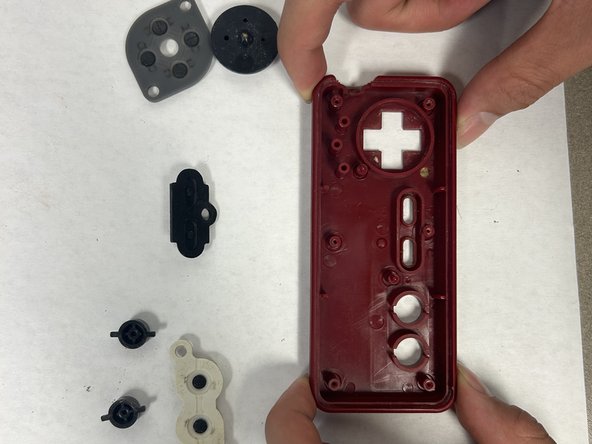
To reassemble your device, follow these instructions in reverse order.
crwdns2935287:0crwdne2935287:0

IUPUI, Team 2-2, Harley Spring 2024 crwdns2935289:0IUPUI, Team 2-2, Harley Spring 2024crwdne2935289:0
IUPUI-HARLEY-S24S2G2
crwdns2931471:04crwdne2931471:0
crwdns2935297:036crwdne2935297:0
