crwdns2933423:0crwdne2933423:0
crwdns2947577:0crwdnd2947577:0crwdne2947577:0

Nintendo 64 Motherboard Replacement

crwdns2869540:0crwdne2869540:0: 74 k

crwdns2959988:0crwdne2959988:0

crwdns2959990:0crwdne2959990:0
10
crwdns2959992:0crwdne2959992:0
70
crwdns2959994:0crwdne2959994:0
369
crwdns2959996:0crwdne2959996:0
73,689
crwdns2955950:0crwdne2955950:0: 9

crwdns2960004:06crwdne2960004:0, crwdns2960008:03crwdne2960008:0

crwdns2960000:0crwdne2960000:0
crwdns2959984:0crwdne2959984:0: 41

crwdns2959974:041crwdne2959974:0

crwdns2959986:0crwdne2959986:0: 43

crwdns2959982:043crwdne2959982:0

crwdns2955944:0crwdne2955944:0: 15 - 20 crwdns2931279:0crwdne2931279:0
crwdns2955970:0crwdne2955970:0: crwdns2937799:0crwdne2937799:0
crwdns2862627:0crwdne2862627:0

crwdns2862628:0crwdne2862628:0

Nintendo 64 Motherboard Replacement

crwdns2959930:0crwdne2959930:0

crwdns2943215:0crwdne2943215:0

crwdns2915892:0crwdne2915892:0

crwdns2959928:0crwdne2959928:0 ↓

This guide will show how to replace the Nintendo 64 motherboard.

    1. Nintendo 64 Motherboard Replacement, Top Cover: crwdns2935265:01crwdnd2935265:01crwdnd2935265:01crwdne2935265:0
      • Remove the expansion pack cover by pushing in the tab and pulling out.

      crwdns2952109:0crwdne2952109:0

      crwdns2917038:0crwdne2917038:0

    2. Nintendo 64 Motherboard Replacement: crwdns2935265:02crwdnd2935265:01crwdnd2935265:01crwdne2935265:0
      • If your system uses a jumper pack, the same procedure applies to remove it.

      • A small spoon can be used in place of a spudger.

      • Lever the expansion pack out using a metal spudger.

      crwdns2952109:0crwdne2952109:0

      crwdns2917038:0crwdne2917038:0

    3. Nintendo 64 Motherboard Replacement: crwdns2935265:03crwdnd2935265:01crwdnd2935265:01crwdne2935265:0
      • Remove the six screws on the bottom side indicated in the example with a gamebit head or screwdriver.

      crwdns2952109:0crwdne2952109:0

      crwdns2917038:0crwdne2917038:0

    4. Nintendo 64 Motherboard Replacement: crwdns2935265:04crwdnd2935265:01crwdnd2935265:01crwdne2935265:0
      • Remove the two front feet of the N64.

      crwdns2952109:0crwdne2952109:0

      crwdns2917038:0crwdne2917038:0

    5. Nintendo 64 Motherboard Replacement: crwdns2935265:05crwdnd2935265:01crwdnd2935265:01crwdne2935265:0
      • Rotate to top side up and lift off top cover.

      crwdns2952109:0crwdne2952109:0

      crwdns2917038:0crwdne2917038:0

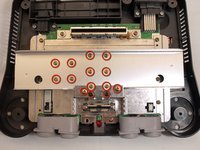
    1. Nintendo 64 Motherboard Replacement, Metal Plate: crwdns2935265:06crwdnd2935265:01crwdnd2935265:02crwdne2935265:0 Nintendo 64 Motherboard Replacement, Metal Plate: crwdns2935265:06crwdnd2935265:02crwdnd2935265:02crwdne2935265:0
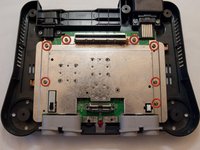
      • Remove the fourteen screws indicated in the example using the larger Phillips screwdriver.

      crwdns2952109:0crwdne2952109:0

      crwdns2917038:0crwdne2917038:0

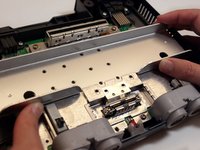
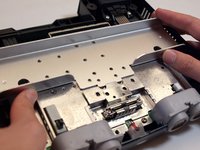
    2. Nintendo 64 Motherboard Replacement: crwdns2935265:07crwdnd2935265:01crwdnd2935265:02crwdne2935265:0 Nintendo 64 Motherboard Replacement: crwdns2935265:07crwdnd2935265:02crwdnd2935265:02crwdne2935265:0
      • Remove the metal plate indicated in the example by sliding it back and then lifting it up.

      crwdns2952109:0crwdne2952109:0

      crwdns2917038:0crwdne2917038:0

    3. Nintendo 64 Motherboard Replacement: crwdns2935265:08crwdnd2935265:01crwdnd2935265:01crwdne2935265:0
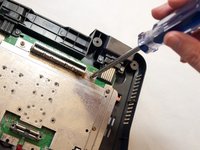
      • Remove the two screws indicated in the example using the smaller Phillips screwdriver.

      crwdns2952109:0crwdne2952109:0

      crwdns2917038:0crwdne2917038:0

    4. Nintendo 64 Motherboard Replacement: crwdns2935265:09crwdnd2935265:01crwdnd2935265:01crwdne2935265:0
      • Remove the screw to the right of the LED light using the larger Phillips screwdriver.

      crwdns2952109:0crwdne2952109:0

      crwdns2917038:0crwdne2917038:0

    5. Nintendo 64 Motherboard Replacement: crwdns2935265:010crwdnd2935265:01crwdnd2935265:01crwdne2935265:0
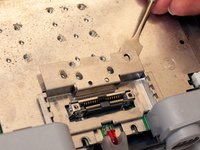
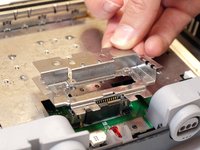
      • Remove the small metal bracket from the back of the expansion pack slot.

      crwdns2952109:0crwdne2952109:0

      crwdns2917038:0crwdne2917038:0

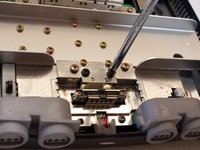
    6. Nintendo 64 Motherboard Replacement: crwdns2935265:011crwdnd2935265:01crwdnd2935265:02crwdne2935265:0 Nintendo 64 Motherboard Replacement: crwdns2935265:011crwdnd2935265:02crwdnd2935265:02crwdne2935265:0
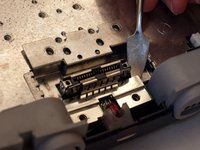
      • Remove the small metal bracket from the front of the expansion pack slot with the metal spudger.

      crwdns2952109:0crwdne2952109:0

      crwdns2917038:0crwdne2917038:0

    7. Nintendo 64 Motherboard Replacement: crwdns2935265:012crwdnd2935265:01crwdnd2935265:02crwdne2935265:0 Nintendo 64 Motherboard Replacement: crwdns2935265:012crwdnd2935265:02crwdnd2935265:02crwdne2935265:0
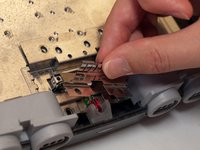
      • Remove the small metal bracket behind the expansion slot using the spudger.

      crwdns2952109:0crwdne2952109:0

      crwdns2917038:0crwdne2917038:0

    8. Nintendo 64 Motherboard Replacement: crwdns2935265:013crwdnd2935265:01crwdnd2935265:02crwdne2935265:0 Nintendo 64 Motherboard Replacement: crwdns2935265:013crwdnd2935265:02crwdnd2935265:02crwdne2935265:0
      • Remove the seven screws indicated in the example using the larger Phillips screwdriver.

      crwdns2952109:0crwdne2952109:0

      crwdns2917038:0crwdne2917038:0

    9. Nintendo 64 Motherboard Replacement: crwdns2935265:014crwdnd2935265:01crwdnd2935265:01crwdne2935265:0
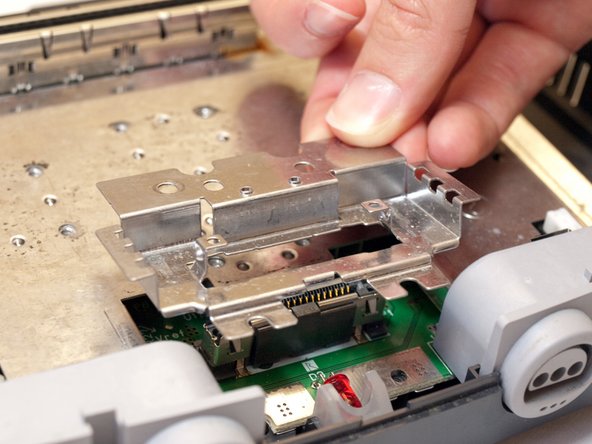
      • Lift off and remove the metal plate as indicated in the example.

      crwdns2952109:0crwdne2952109:0

      crwdns2917038:0crwdne2917038:0

    1. Nintendo 64 Motherboard Replacement, Motherboard: crwdns2935265:015crwdnd2935265:01crwdnd2935265:01crwdne2935265:0
      • Remove the four screws indicated using the #1 Phillips screwdriver.

      crwdns2952109:0crwdne2952109:0

      crwdns2917038:0crwdne2917038:0

    2. Nintendo 64 Motherboard Replacement, Motherboard removal: crwdns2935265:016crwdnd2935265:01crwdnd2935265:01crwdne2935265:0
      • Lift up and remove the motherboard.

      crwdns2952109:0crwdne2952109:0

      crwdns2917038:0crwdne2917038:0

crwdns2915888:0crwdne2915888:0

To reassemble your device, follow these instructions in reverse order.

crwdns2935221:0crwdne2935221:0

crwdns2935229:041crwdne2935229:0

crwdns2862417:0crwdne2862417:0

crwdns2935293:0crwdne2935293:0

tonymag28

crwdns2935283:010/28/09crwdne2935283:0

2,324 crwdns2915208:0crwdne2915208:0

crwdns2935297:03crwdne2935297:0

crwdns2935287:0crwdne2935287:0

Cal Poly, Team 5-4, Regan Fall 2009 crwdns2935289:0Cal Poly, Team 5-4, Regan Fall 2009crwdne2935289:0

CPSU-REGAN-F09S5G4

crwdns2931471:07crwdne2931471:0

crwdns2935297:060crwdne2935297:0

crwdns2947412:03crwdne2947412:0

4.2mm doesn't seem right. When I looked to purchase all I saw was 4.5mm and now that I have one in my hand it seems to fit very precisely on the screws on my N64.

negroslim - crwdns2934203:0crwdne2934203:0 crwdns2950251:0crwdne2950251:0

i got the second comment :whyy:

Sqwerks - crwdns2934203:0crwdne2934203:0 crwdns2950251:0crwdne2950251:0

What are the symptoms of a bad motherboard?

Jon - crwdns2934203:0crwdne2934203:0 crwdns2950251:0crwdne2950251:0

crwdns2917038:0crwdne2917038:0

crwdns2936625:0crwdne2936625:0:

crwdns2936751:024crwdne2936751:0 10

crwdns2936753:07crwdne2936753:0 70

crwdns2936753:030crwdne2936753:0 369

crwdns2959996:0crwdne2959996:0 73,689