crwdns2933423:0crwdne2933423:0
crwdns2947577:0crwdnd2947577:0crwdne2947577:0

Nintendo 64 Controller D-Pad Replacement

crwdns2869540:0crwdne2869540:0: 1,6 тыс.

crwdns2959988:0crwdne2959988:0

crwdns2959990:0crwdne2959990:0
0
crwdns2959992:0crwdne2959992:0
8
crwdns2959994:0crwdne2959994:0
64
crwdns2959996:0crwdne2959996:0
1 588
crwdns2955950:0crwdne2955950:0: 0

crwdns2959998:0crwdne2959998:0

crwdns2960000:0crwdne2960000:0
crwdns2959984:0crwdne2959984:0: 1

crwdns2959972:01crwdne2959972:0

crwdns2959986:0crwdne2959986:0: 0

crwdns2959958:0crwdne2959958:0

crwdns2955944:0crwdne2955944:0: 15 - 30 crwdns2931279:0crwdne2931279:0
crwdns2955970:0crwdne2955970:0: crwdns2937801:0crwdne2937801:0
crwdns2862591:0crwdne2862591:0

crwdns2862592:0crwdne2862592:0

Nintendo 64 Controller D-Pad Replacement

crwdns2915892:0crwdne2915892:0

crwdns2959928:0crwdne2959928:0 ↓

Use this guide to replace a worn out or unresponsive D-pad on your Nintendo 64 controller.

The D-pad is an input component allowing you to control the up, right, left, and down direction of movement within a game. Over time, continuous use of the D-pad can render it non-functional. Fortunately, replacement of the D-pad is fairly easy and you can go back to playing your favorite Nintendo 64 games in no time.

Make sure to inspect your controller for any possible defects that may make repairs difficult or dangerous. If there are any loose wires, consider replacing the cable. If any of the screws are stripped, this guide has many helpful tips for removing these screws. Additionally, make sure your controller is disconnected from your Nintendo 64 system before you begin.

crwdns2959930:0crwdne2959930:0

crwdns2943215:0crwdne2943215:0

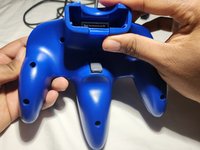
    1. Nintendo 64 Controller D-Pad Replacement, Controller D-Pad Replacement: crwdns2935265:01crwdnd2935265:01crwdnd2935265:03crwdne2935265:0 Nintendo 64 Controller D-Pad Replacement, Controller D-Pad Replacement: crwdns2935265:01crwdnd2935265:02crwdnd2935265:03crwdne2935265:0 Nintendo 64 Controller D-Pad Replacement, Controller D-Pad Replacement: crwdns2935265:01crwdnd2935265:03crwdnd2935265:03crwdne2935265:0
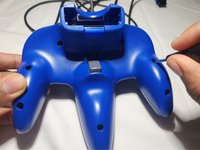
      • Use a Phillips #0 screwdriver to remove the seven 10 mm screws from the body.

      • Remove the two 6 mm Phillips #0 screws from the expansion slot.

      • Separate the back cover from the front and set it aside.

      crwdns2952109:0crwdne2952109:0

      crwdns2917038:0crwdne2917038:0

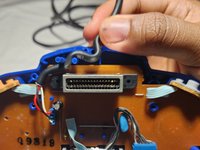
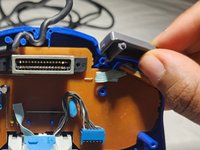
    2. Nintendo 64 Controller D-Pad Replacement: crwdns2935265:02crwdnd2935265:01crwdnd2935265:02crwdne2935265:0 Nintendo 64 Controller D-Pad Replacement: crwdns2935265:02crwdnd2935265:02crwdnd2935265:02crwdne2935265:0
      • Remove the left and right shoulder triggers by sliding them straight up.

      • Gently unhook the cable that is looped around two cable clamps by nudging it up and out.

      crwdns2952109:0crwdne2952109:0

      crwdns2917038:0crwdne2917038:0

    3. Nintendo 64 Controller D-Pad Replacement: crwdns2935265:03crwdnd2935265:01crwdnd2935265:03crwdne2935265:0 Nintendo 64 Controller D-Pad Replacement: crwdns2935265:03crwdnd2935265:02crwdnd2935265:03crwdne2935265:0 Nintendo 64 Controller D-Pad Replacement: crwdns2935265:03crwdnd2935265:03crwdnd2935265:03crwdne2935265:0
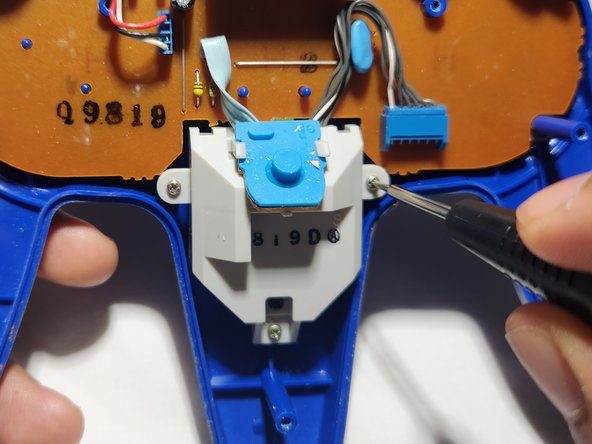
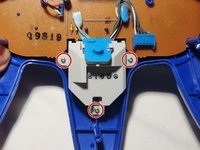
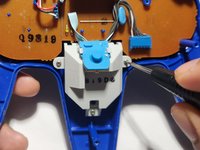
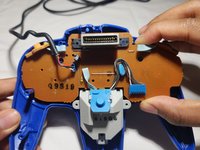
      • Use a Phillips #0 screwdriver to remove the three silver 6 mm screws holding the joystick assembly in place.

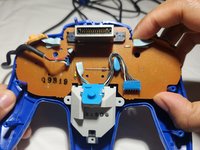
      • Gently lift the motherboard and joystick assembly out of the controller.

      • In order to avoid damage to the board, lift it by the edges.

      crwdns2952109:0crwdne2952109:0

      crwdns2917038:0crwdne2917038:0

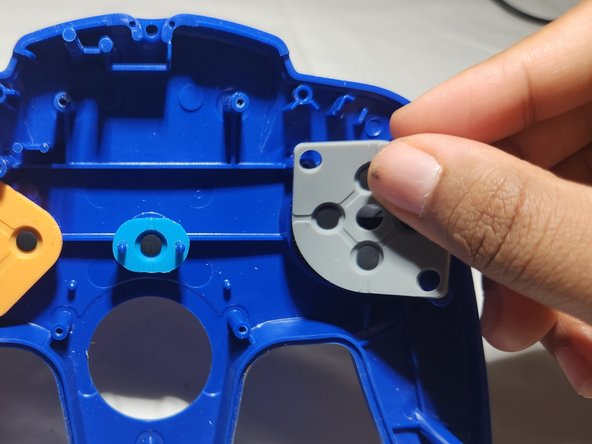
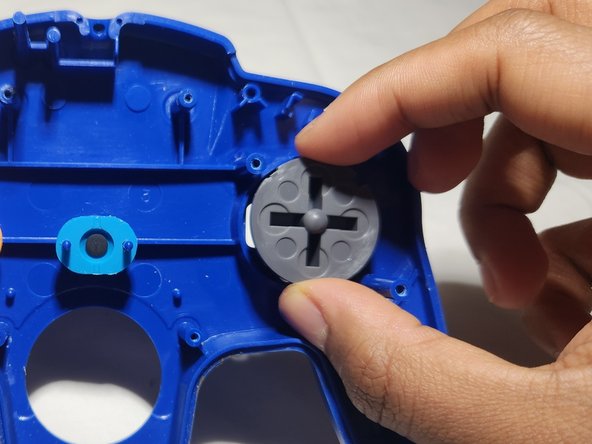
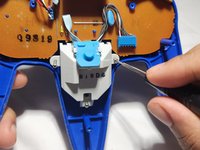
    4. Nintendo 64 Controller D-Pad Replacement: crwdns2935265:04crwdnd2935265:01crwdnd2935265:03crwdne2935265:0 Nintendo 64 Controller D-Pad Replacement: crwdns2935265:04crwdnd2935265:02crwdnd2935265:03crwdne2935265:0 Nintendo 64 Controller D-Pad Replacement: crwdns2935265:04crwdnd2935265:03crwdnd2935265:03crwdne2935265:0
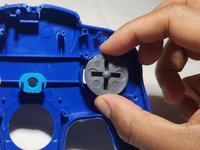
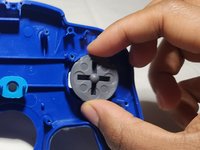
      • Slide the rubber pad off that covers the back of the D-pad.

      • Remove the broken D-pad from its socket.

      crwdns2952109:0crwdne2952109:0

      crwdns2917038:0crwdne2917038:0

    5. Nintendo 64 Controller D-Pad Replacement: crwdns2935265:05crwdnd2935265:01crwdnd2935265:03crwdne2935265:0 Nintendo 64 Controller D-Pad Replacement: crwdns2935265:05crwdnd2935265:02crwdnd2935265:03crwdne2935265:0 Nintendo 64 Controller D-Pad Replacement: crwdns2935265:05crwdnd2935265:03crwdnd2935265:03crwdne2935265:0
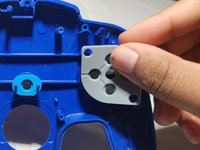
      • Insert the replacement D-pad into the socket.

      • Stretch the rubber backing onto the plastic pieces and slide it down over the D-pad.

      • Carefully reinsert the circuit board into the controller housing.

      • Insert the joystick into its opening.

      crwdns2952109:0crwdne2952109:0

      crwdns2917038:0crwdne2917038:0

    6. Nintendo 64 Controller D-Pad Replacement: crwdns2935265:06crwdnd2935265:01crwdnd2935265:03crwdne2935265:0 Nintendo 64 Controller D-Pad Replacement: crwdns2935265:06crwdnd2935265:02crwdnd2935265:03crwdne2935265:0 Nintendo 64 Controller D-Pad Replacement: crwdns2935265:06crwdnd2935265:03crwdnd2935265:03crwdne2935265:0
      • Carefully secure the cord around the cable clamps.

      • Be sure to apply enough pressure so it sits below or flush to the edge to avoid problems putting the front and back case together.

      • Re-insert the shoulder triggers into place.

      • The L trigger will go on the right and the R trigger on the left.

      • Use a Phillips #0 screwdriver to secure the screws to the joystick assembly.

      crwdns2952109:0crwdne2952109:0

      crwdns2917038:0crwdne2917038:0

    7. Nintendo 64 Controller D-Pad Replacement: crwdns2935265:07crwdnd2935265:01crwdnd2935265:02crwdne2935265:0 Nintendo 64 Controller D-Pad Replacement: crwdns2935265:07crwdnd2935265:02crwdnd2935265:02crwdne2935265:0
      • Snap the back cover into place.

      • Use a Phillips #0 screwdriver to replace the screws on the back cover.

      crwdns2952109:0crwdne2952109:0

      crwdns2917038:0crwdne2917038:0

crwdns2915888:0crwdne2915888:0

Happy gaming!

crwdns2935221:0crwdne2935221:0

crwdns2935227:0crwdne2935227:0

crwdns2862417:0crwdne2862417:0

crwdns2935291:0crwdne2935291:0

Jamie Durman

crwdns2935283:007/01/23crwdne2935283:0

169 crwdns2915208:0crwdne2915208:0

crwdns2935295:0crwdne2935295:0

crwdns2935287:0crwdne2935287:0

Austin Community College, Team 2-1, Watkins Summer 2023 crwdns2935289:0Austin Community College, Team 2-1, Watkins Summer 2023crwdne2935289:0

AUSTINCC-WATKINS-SU23S2G1

crwdns2934841:01crwdne2934841:0

crwdns2935297:012crwdne2935297:0

crwdns2947412:00crwdne2947412:0

crwdns2917038:0crwdne2917038:0

crwdns2936625:0crwdne2936625:0:

crwdns2936751:024crwdne2936751:0 0

crwdns2936753:07crwdne2936753:0 8

crwdns2936753:030crwdne2936753:0 64

crwdns2959996:0crwdne2959996:0 1,588