crwdns2933423:0crwdne2933423:0
crwdns2947577:0crwdnd2947577:0crwdne2947577:0

Nintendo 3DS Wi-Fi Board Replacement

crwdns2862623:0crwdne2862623:0
crwdns2948751:0crwdne2948751:0

crwdns2942213:0crwdne2942213:0

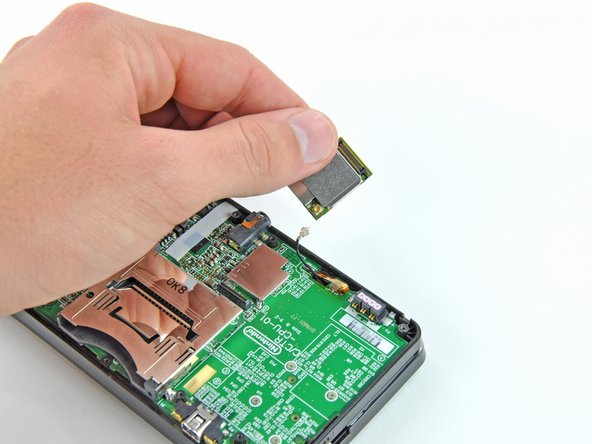
    1. Nintendo 3DS Wi-Fi Board Replacement, Pry the Wi-Fi card up: crwdns2935265:01crwdnd2935265:01crwdnd2935265:02crwdne2935265:0 Nintendo 3DS Wi-Fi Board Replacement, Pry the Wi-Fi card up: crwdns2935265:01crwdnd2935265:02crwdnd2935265:02crwdne2935265:0
      • Slide the flat end of a spudger under the corner of the Wi-Fi board, and lift it away from the motherboard.

      • The Wi-Fi antenna cable is still connected to the Wi-Fi board, so you cannot completely remove the Wi-Fi board yet.

      crwdns2952109:0crwdne2952109:0

      crwdns2917038:0crwdne2917038:0

    2. Nintendo 3DS Wi-Fi Board Replacement, Disconnect the Wi-Fi board: crwdns2935265:02crwdnd2935265:01crwdnd2935265:03crwdne2935265:0 Nintendo 3DS Wi-Fi Board Replacement, Disconnect the Wi-Fi board: crwdns2935265:02crwdnd2935265:02crwdnd2935265:03crwdne2935265:0 Nintendo 3DS Wi-Fi Board Replacement, Disconnect the Wi-Fi board: crwdns2935265:02crwdnd2935265:03crwdnd2935265:03crwdne2935265:0
      • Lift the Wi-Fi board off the motherboard and rotate it so that the bottom side is facing up.

      • Use the flat end of a spudger to pry the Wi-Fi antenna cable connector off its socket on the Wi-Fi board.

      • Remove the Wi-Fi board from the device.

      crwdns2952109:0crwdne2952109:0

      crwdns2917038:0crwdne2917038:0

crwdns2915888:0crwdne2915888:0

To reassemble your device, follow these instructions in reverse order.

crwdns2935221:0crwdne2935221:0

David Hodson

crwdns2935283:004/13/10crwdne2935283:0

156,906 crwdns2915208:0crwdne2915208:0

crwdns2935297:0127crwdne2935297:0

crwdns2947412:00crwdne2947412:0

crwdns2917038:0crwdne2917038:0

crwdns2936625:0crwdne2936625:0:

crwdns2936751:024crwdne2936751:0 3

crwdns2936753:07crwdne2936753:0 5

crwdns2936753:030crwdne2936753:0 26

crwdns2942667:0crwdne2942667:0 561