
Nikon D80 Main Board Replacement

crwdns2959932:0crwdnd2959932:0Sara Martincrwdnd2959932:0crwdnd2959932:0crwdnd2959932:04crwdnd2959932:0crwdne2959932:0
crwdns2959936:0Mud 7, 2024crwdne2959936:0
crwdns2869540:0crwdne2869540:0: 3,6 B
crwdns2959988:0crwdne2959988:0
- crwdns2959990:0crwdne2959990:0
- 5
- crwdns2959992:0crwdne2959992:0
- 27
- crwdns2959994:0crwdne2959994:0
- 125
- crwdns2959996:0crwdne2959996:0
- 3.627
crwdns2955950:0crwdne2955950:0: 2
crwdns2960002:01crwdne2960002:0, crwdns2960006:01crwdne2960006:0
crwdns2960000:0crwdne2960000:0crwdns2959984:0crwdne2959984:0: 3 4
crwdns2959974:03crwdne2959974:0
crwdns2959970:04crwdne2959970:0
crwdns2959986:0crwdne2959986:0: 0 1
crwdns2959958:0crwdne2959958:0
crwdns2959976:01crwdne2959976:0
crwdns2915892:0crwdne2915892:0
crwdns2959928:0crwdne2959928:0 ↓Excessive use sometimes causes certain ports, such as the AV Port, to cease normal function. This guide explains how to remove the main board from a Nikon D80 camera. For safety purposes, please remove the battery before working with any electronic components.
Please note that this guide requires soldering. For more information on how to solder and desolder connections, please visit this guide.
crwdns2959930:0crwdne2959930:0
crwdns2943215:0crwdne2943215:0


-
-
-
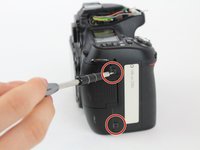
Using a Phillips #00 screwdriver, remove the four 6.2 mm screws from the left and right sides of the outer cover.
 crwdns2952109:0crwdne2952109:0
-
-
crwdns2935267:0crwdne2935267:0Tweezers$4.99
-
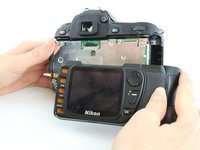
Use tweezers to gently flip the small locking flap of the zero force insertion connector up.
-
Pull the orange connector cable out of the zero force insertion connector using the tweezers.
-
Remove the back cover.
-
-
-
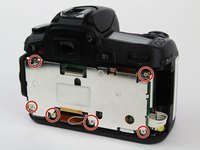
Use a Phillips #00 screwdriver to remove the six 3.7 mm screws.
-
Remove the back plate that covers the main board.
-
-
-
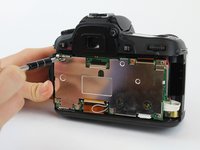
Use a Phillips #00 screwdriver to unscrew the 2.3 mm screw.
-
-
-
-
Use tweezers to gently flip the small locking flaps of the zero force insertion connectors up.
-
Pull the bottom orange connector cable out of the zero force insertion connector using the tweezers.
-
Pull the top orange connector cable out of the zero force insertion connector using the tweezers.
-
Remove the ribbon cables by gently pulling them away from the no-fuss ribbon cable connectors.
-
Remove the ribbon cables by gently pulling them away from the no-fuss ribbon cable connectors.
-
Disconnect the main board from the two ports on the left by pulling the main board to the right.
-
-
-
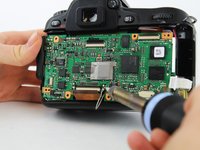
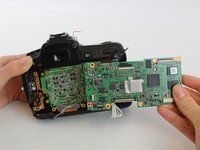
Using the soldering iron, disconnect the four wires soldered to the main board.
-
Remove the main board.
-
-






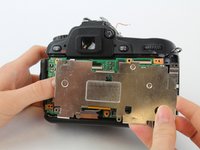


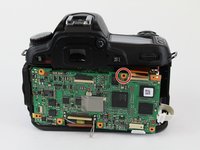
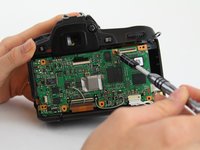


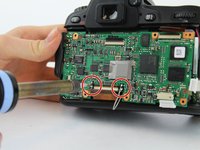
To reassemble your device, follow these instructions in reverse order.
crwdns2935221:0crwdne2935221:0
crwdns2935229:03crwdne2935229:0

crwdns2935287:0crwdne2935287:0

USF Tampa, Team S1-G1, Leahy Fall 2017 crwdns2935289:0USF Tampa, Team S1-G1, Leahy Fall 2017crwdne2935289:0
USFT-LEAHY-F17S1G1
crwdns2931471:04crwdne2931471:0
crwdns2935297:060crwdne2935297:0
crwdns2947410:01crwdne2947410:0
Is there a Nikon repair forum that might provide more detailed information?
this is the clearest instructions so far but I’m sure there are diagnostic codes for more precise troubleshooting
Mermaid - crwdns2934203:0crwdne2934203:0 crwdns2950251:0crwdne2950251:0
