crwdns2933423:0crwdne2933423:0
crwdns2947577:0crwdnd2947577:0crwdne2947577:0

Nikon Coolpix P4 Lens Replacement

crwdns2869540:0crwdne2869540:0: 4.1K

crwdns2959988:0crwdne2959988:0

crwdns2959990:0crwdne2959990:0
2
crwdns2959992:0crwdne2959992:0
28
crwdns2959994:0crwdne2959994:0
97
crwdns2959996:0crwdne2959996:0
4,086
crwdns2955950:0crwdne2955950:0: 1

crwdns2960002:01crwdne2960002:0.

crwdns2959984:0crwdne2959984:0: 1

crwdns2959972:01crwdne2959972:0

crwdns2959986:0crwdne2959986:0: 1

crwdns2959980:01crwdne2959980:0

crwdns2955944:0crwdne2955944:0: crwdns2931287:015crwdne2931287:0
crwdns2955970:0crwdne2955970:0: crwdns2937801:0crwdne2937801:0
Nikon Coolpix P4 Lens Replacement

crwdns2915892:0crwdne2915892:0

crwdns2959928:0crwdne2959928:0 ↓

This guide provides simple step-by-step instructions explaining how to replace the lens of a Nikon COOLPIX P4. The lens on this digital camera allows users to zoom in and out and is protected by a shutter. The camera itself is a basic compact point-and-shoot model.

WARNING: The lens is made of glass. There is a risk of scratches, cracks, or other damage to the glass, so caution should be exercised when handing the lens.

The lens of the Nikon COOLPIX P4 may need to be replaced if there are lens errors, cracks or damage, lens housing problems, or other issues that render the camera faulty and/or inoperable. This is a beginner-friendly guide. No special skills are required to complete this guide, only a basic understanding of how to use a screwdriver and handle a camera.

WARNING: This replacement guide involves disassembling parts of the Nikon COOLPIX P4 in order to complete the lens replacement. Wires, cables, and the motherboard will be exposed. As with disassembling any electronic device, there is potential risk of damage. Specifically, in Step 10, there is potential for device damage, so extra care must be taken.

crwdns2959930:0crwdne2959930:0

crwdns2943215:0crwdne2943215:0

    1. Nikon Coolpix P4 Lens Replacement, Battery: crwdns2935265:01crwdnd2935265:01crwdnd2935265:01crwdne2935265:0
      • Flip the camera upside down (have the side with the buttons facing away from you)

      • Look for the side with the triangle icon with three lines in it, this is the battery door. Add pressure and slide this door slightly until it clicks and pops open.

      crwdns2952109:0crwdne2952109:0

      crwdns2917038:0crwdne2917038:0

    2. Nikon Coolpix P4 Lens Replacement: crwdns2935265:02crwdnd2935265:01crwdnd2935265:01crwdne2935265:0
      • Once the door clicks, you can open it to reveal the slots holding the memory card and the battery.

      • Focusing on the larger slot, this holds the battery. Push the orange tab away from the slot, this will eject the old battery if one was previously inside.

      • Once this slot is open, you can place the new battery inside.

      • Make sure to close the orange tab to secure it in place!

      crwdns2952109:0crwdne2952109:0

      crwdns2917038:0crwdne2917038:0

    1. Nikon Coolpix P4 Lens Replacement, LCD Screen: crwdns2935265:03crwdnd2935265:01crwdnd2935265:01crwdne2935265:0
      • Remove the four 2.2 mm screws located on the bottom of the camera.

      crwdns2952109:0crwdne2952109:0

      crwdns2917038:0crwdne2917038:0

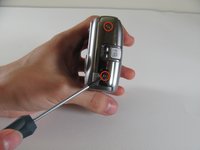
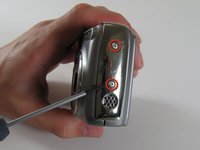
    2. Nikon Coolpix P4 Lens Replacement: crwdns2935265:04crwdnd2935265:01crwdnd2935265:02crwdne2935265:0 Nikon Coolpix P4 Lens Replacement: crwdns2935265:04crwdnd2935265:02crwdnd2935265:02crwdne2935265:0
      • Remove the two 2.9 mm screws from the side panel.

      • Remove the side panel.

      crwdns2952109:0crwdne2952109:0

      crwdns2917038:0crwdne2917038:0

    3. Nikon Coolpix P4 Lens Replacement: crwdns2935265:05crwdnd2935265:01crwdnd2935265:03crwdne2935265:0 Nikon Coolpix P4 Lens Replacement: crwdns2935265:05crwdnd2935265:02crwdnd2935265:03crwdne2935265:0 Nikon Coolpix P4 Lens Replacement: crwdns2935265:05crwdnd2935265:03crwdnd2935265:03crwdne2935265:0
      • Remove the two 5 mm screws from the right side panel.

      • Remove the panel from the right side.

      • Remove the single 2.1 mm screw set underneath the panel.

      crwdns2952109:0crwdne2952109:0

      crwdns2917038:0crwdne2917038:0

    4. Nikon Coolpix P4 Lens Replacement: crwdns2935265:06crwdnd2935265:01crwdnd2935265:01crwdne2935265:0
      • Remove the two 4.8 mm screws attaching the back panel to the body on the left side.

      crwdns2952109:0crwdne2952109:0

      crwdns2917038:0crwdne2917038:0

    5. Nikon Coolpix P4 Lens Replacement: crwdns2935265:07crwdnd2935265:01crwdnd2935265:01crwdne2935265:0
      • Gently pull off the back cover.

      crwdns2952109:0crwdne2952109:0

      crwdns2917038:0crwdne2917038:0

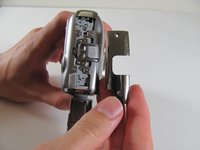
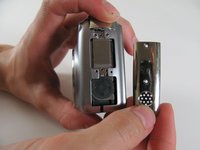
    6. Nikon Coolpix P4 Lens Replacement: crwdns2935265:08crwdnd2935265:01crwdnd2935265:02crwdne2935265:0 Nikon Coolpix P4 Lens Replacement: crwdns2935265:08crwdnd2935265:02crwdnd2935265:02crwdne2935265:0
      • Remove the three 4.8 mm screws from the A/V out tab on the left side.

      • Remove the tab.

      crwdns2952109:0crwdne2952109:0

      crwdns2917038:0crwdne2917038:0

    7. Nikon Coolpix P4 Lens Replacement: crwdns2935265:09crwdnd2935265:01crwdnd2935265:01crwdne2935265:0
      • Remove the two 4.6 mm screws attaching the front panel to the body on the left side.

      crwdns2952109:0crwdne2952109:0

      crwdns2917038:0crwdne2917038:0

    8. Nikon Coolpix P4 Lens Replacement: crwdns2935265:010crwdnd2935265:01crwdnd2935265:01crwdne2935265:0
      • Flip up the front panel.

      • Potential for device damage. There should be wires still attaching the panel to the body. DO NOT TRY TO PULL OFF COMPLETELY.

      crwdns2952109:0crwdne2952109:0

      crwdns2917038:0crwdne2917038:0

    9. Nikon Coolpix P4 Lens Replacement: crwdns2935265:011crwdnd2935265:01crwdnd2935265:01crwdne2935265:0
      • Remove the 2.2 mm screw.

      • Remove the 2.9 mm screw.

      • Remove the 2.1 mm screw.

      crwdns2952109:0crwdne2952109:0

      crwdns2917038:0crwdne2917038:0

    10. Nikon Coolpix P4 Lens Replacement: crwdns2935265:012crwdnd2935265:01crwdnd2935265:01crwdne2935265:0
      • Carefully pull the orange LCD connector up and out of the port.

      • Be careful to pull vertically while pushing the black tab upwards

      crwdns2952109:0crwdne2952109:0

      crwdns2917038:0crwdne2917038:0

    11. Nikon Coolpix P4 Lens Replacement: crwdns2935265:013crwdnd2935265:01crwdnd2935265:01crwdne2935265:0
      • Remove the 3.1 mm screw below the LCD.

      crwdns2952109:0crwdne2952109:0

      crwdns2917038:0crwdne2917038:0

    12. Nikon Coolpix P4 Lens Replacement: crwdns2935265:014crwdnd2935265:01crwdnd2935265:01crwdne2935265:0
      • Carefully pull out the plug connecting the LCD to the motherboard.

      crwdns2952109:0crwdne2952109:0

      crwdns2917038:0crwdne2917038:0

    13. Nikon Coolpix P4 Lens Replacement: crwdns2935265:015crwdnd2935265:01crwdnd2935265:01crwdne2935265:0
      • Remove the LCD from the camera body.

      crwdns2952109:0crwdne2952109:0

      crwdns2917038:0crwdne2917038:0

    1. Nikon Coolpix P4 Lens Replacement, Motherboard: crwdns2935265:016crwdnd2935265:01crwdnd2935265:01crwdne2935265:0
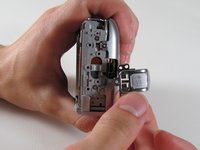
      • Remove the two screws on the opposite sides of the flash.

      crwdns2952109:0crwdne2952109:0

      crwdns2917038:0crwdne2917038:0

    2. Nikon Coolpix P4 Lens Replacement: crwdns2935265:017crwdnd2935265:01crwdnd2935265:01crwdne2935265:0
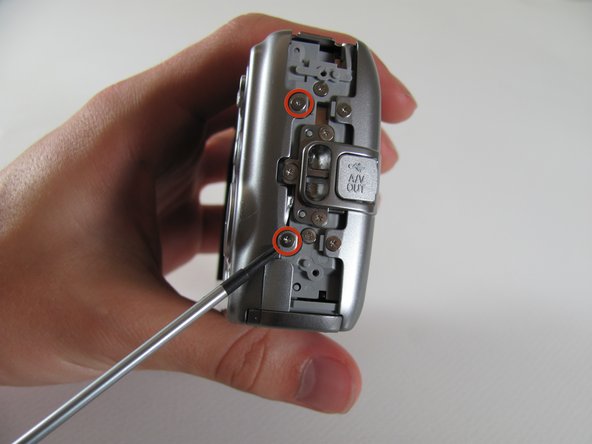
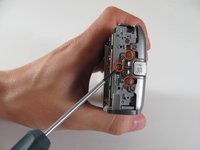
      • Remove the two 2.9 mm screws on the right side of the camera.

      crwdns2952109:0crwdne2952109:0

      crwdns2917038:0crwdne2917038:0

    3. Nikon Coolpix P4 Lens Replacement: crwdns2935265:018crwdnd2935265:01crwdnd2935265:01crwdne2935265:0
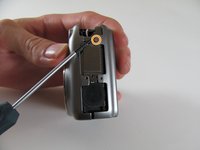
      • Remove the four screws on the bottom of the camera.

      crwdns2952109:0crwdne2952109:0

      crwdns2917038:0crwdne2917038:0

    4. Nikon Coolpix P4 Lens Replacement: crwdns2935265:019crwdnd2935265:01crwdnd2935265:01crwdne2935265:0
      • Remove the seven 2.8 mm screws from the back of the camera.

      crwdns2952109:0crwdne2952109:0

      crwdns2917038:0crwdne2917038:0

    5. Nikon Coolpix P4 Lens Replacement: crwdns2935265:020crwdnd2935265:01crwdnd2935265:01crwdne2935265:0
      • Detach the cable that connects the lens to the left side of the motherboard.

      • Firmly grasp the base of the cable and gently pull it from the socket.

      crwdns2952109:0crwdne2952109:0

      crwdns2917038:0crwdne2917038:0

    6. Nikon Coolpix P4 Lens Replacement: crwdns2935265:021crwdnd2935265:01crwdnd2935265:01crwdne2935265:0
      • Remove the right panel.

      crwdns2952109:0crwdne2952109:0

      crwdns2917038:0crwdne2917038:0

    7. Nikon Coolpix P4 Lens Replacement: crwdns2935265:022crwdnd2935265:01crwdnd2935265:01crwdne2935265:0
      • Remove the 2.8 mm screw from the top of the camera.

      crwdns2952109:0crwdne2952109:0

      crwdns2917038:0crwdne2917038:0

    8. Nikon Coolpix P4 Lens Replacement: crwdns2935265:023crwdnd2935265:01crwdnd2935265:01crwdne2935265:0
      • Remove the three 2.8 mm screws from the motherboard.

      • Detach the orange tab with the foam on top.

      • It should click out of place.

      crwdns2952109:0crwdne2952109:0

      crwdns2917038:0crwdne2917038:0

    9. Nikon Coolpix P4 Lens Replacement: crwdns2935265:024crwdnd2935265:01crwdnd2935265:01crwdne2935265:0
      • Remove the motherboard by pulling it up and out of the port.

      crwdns2952109:0crwdne2952109:0

      crwdns2917038:0crwdne2917038:0

    10. Nikon Coolpix P4 Lens Replacement: crwdns2935265:025crwdnd2935265:01crwdnd2935265:01crwdne2935265:0
      • Carefully remove the tab that connects the flash to the motherboard from the port by gently pulling the connector to the right and out of its port.

      crwdns2952109:0crwdne2952109:0

      crwdns2917038:0crwdne2917038:0

    11. Nikon Coolpix P4 Lens Replacement: crwdns2935265:026crwdnd2935265:01crwdnd2935265:01crwdne2935265:0
      • Fully remove the motherboard from the camera body.

      crwdns2952109:0crwdne2952109:0

      crwdns2917038:0crwdne2917038:0

    1. Nikon Coolpix P4 Lens Replacement, Lens: crwdns2935265:027crwdnd2935265:01crwdnd2935265:01crwdne2935265:0
      • Locate the orange plug on the right side of the lens.

      • Carefully snap the plug out of place.

      • This piece is meant to snap in and out of place easily!

      crwdns2952109:0crwdne2952109:0

      crwdns2917038:0crwdne2917038:0

    2. Nikon Coolpix P4 Lens Replacement: crwdns2935265:028crwdnd2935265:01crwdnd2935265:01crwdne2935265:0
      • Once the orange piece detaches, gently pull up the flash unit from its place in the camera.

      • The flash unit will still be attached to the camera by a separate cord.

      crwdns2952109:0crwdne2952109:0

      crwdns2917038:0crwdne2917038:0

    3. Nikon Coolpix P4 Lens Replacement: crwdns2935265:029crwdnd2935265:01crwdnd2935265:01crwdne2935265:0
      • Remove the lens from the rest of the camera.

      crwdns2952109:0crwdne2952109:0

      crwdns2917038:0crwdne2917038:0

crwdns2915888:0crwdne2915888:0

To reassemble your device, follow these instructions in reverse order.

crwdns2935221:0crwdne2935221:0

crwdns2935227:0crwdne2935227:0

Luke Baumann

crwdns2935283:004/13/11crwdne2935283:0

128 crwdns2915208:0crwdne2915208:0

crwdns2935297:05crwdne2935297:0

crwdns2935287:0crwdne2935287:0

Cal Poly, Team 8-5, Regan Spring 2011 crwdns2935289:0Cal Poly, Team 8-5, Regan Spring 2011crwdne2935289:0

CPSU-REGAN-S11S8G5

crwdns2931471:04crwdne2931471:0

crwdns2935297:060crwdne2935297:0

crwdns2947412:00crwdne2947412:0

crwdns2917038:0crwdne2917038:0

crwdns2936625:0crwdne2936625:0:

crwdns2936751:024crwdne2936751:0 2

crwdns2936753:07crwdne2936753:0 28

crwdns2936753:030crwdne2936753:0 97

crwdns2959996:0crwdne2959996:0 4,086