crwdns2933423:0crwdne2933423:0
crwdns2947577:0crwdnd2947577:0crwdne2947577:0

Nikon Coolpix L830 LCD Monitor Replacement

crwdns2942213:0crwdne2942213:0

    1. Nikon Coolpix L830 LCD Monitor Replacement, LCD Monitor: crwdns2935265:01crwdnd2935265:01crwdnd2935265:01crwdne2935265:0
      • Use a Phillips head P000 screwdriver to remove the four 3.0 mm Phillips screws on the back of the monitor.

      crwdns2952109:0crwdne2952109:0

      crwdns2917038:0crwdne2917038:0

    2. Nikon Coolpix L830 LCD Monitor Replacement: crwdns2935265:02crwdnd2935265:01crwdnd2935265:01crwdne2935265:0
      • Use a Phillips head P000 screwdriver to remove the two 3.0 mm Phillips screws on the hinge cover.

      crwdns2952109:0crwdne2952109:0

      crwdns2917038:0crwdne2917038:0

    3. Nikon Coolpix L830 LCD Monitor Replacement: crwdns2935265:03crwdnd2935265:01crwdnd2935265:02crwdne2935265:0 Nikon Coolpix L830 LCD Monitor Replacement: crwdns2935265:03crwdnd2935265:02crwdnd2935265:02crwdne2935265:0
      • Remove the top hinge cover.

      • The top hinge cover contains screw holes.

      • Remove the bottom hinge cover.

      • The bottom hinge cover contains no screw holes.

      crwdns2952109:0crwdne2952109:0

      crwdns2917038:0crwdne2917038:0

    4. Nikon Coolpix L830 LCD Monitor Replacement: crwdns2935265:04crwdnd2935265:01crwdnd2935265:01crwdne2935265:0
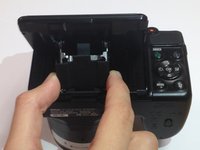
      • Remove the back cover of the LCD monitor with your hands or a plastic opening tool.

      • The cover will slide down the hinge, but it will not be completely removed.

      crwdns2952109:0crwdne2952109:0

      crwdns2917038:0crwdne2917038:0

    5. Nikon Coolpix L830 LCD Monitor Replacement: crwdns2935265:05crwdnd2935265:01crwdnd2935265:02crwdne2935265:0 Nikon Coolpix L830 LCD Monitor Replacement: crwdns2935265:05crwdnd2935265:02crwdnd2935265:02crwdne2935265:0
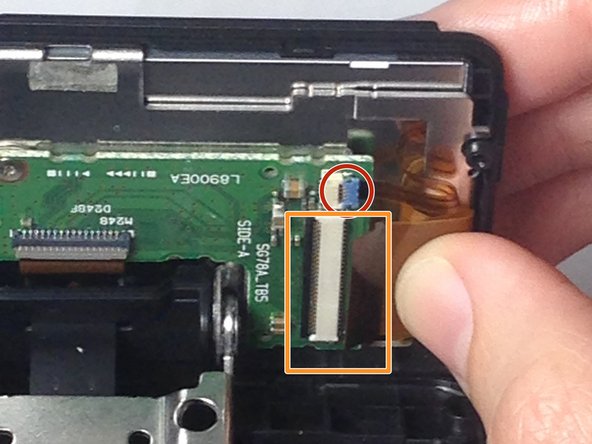
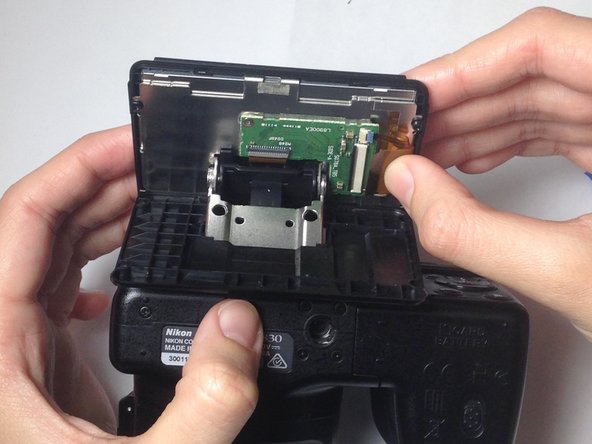
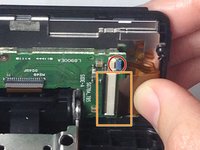
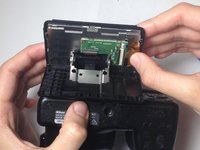
      • Use your thumb to gently pull the small flex ribbon wire connector from its socket.

      • Use your thumb to gently pull the wide flex ribbon wire connector from its socket.

      crwdns2952109:0crwdne2952109:0

      crwdns2917038:0crwdne2917038:0

    6. Nikon Coolpix L830 LCD Monitor Replacement: crwdns2935265:06crwdnd2935265:01crwdnd2935265:01crwdne2935265:0
      • Use a plastic opening tool to remove the front cover of the LCD monitor, allowing the monitor to be completely be released.

      crwdns2952109:0crwdne2952109:0

      crwdns2917038:0crwdne2917038:0

    7. Nikon Coolpix L830 LCD Monitor Replacement: crwdns2935265:07crwdnd2935265:01crwdnd2935265:01crwdne2935265:0
      • Gently remove the old, damaged LCD monitor.

      crwdns2952109:0crwdne2952109:0

      crwdns2917038:0crwdne2917038:0

crwdns2915888:0crwdne2915888:0

To reassemble your device, follow these instructions in reverse order.

crwdns2935221:0crwdne2935221:0

crwdns2935227:0crwdne2935227:0

Blake Johnson

crwdns2935283:010/28/16crwdne2935283:0

359 crwdns2915208:0crwdne2915208:0

crwdns2935297:02crwdne2935297:0

crwdns2935287:0crwdne2935287:0

Baylor, Team 4-4, Williams Fall 2016 crwdns2935289:0Baylor, Team 4-4, Williams Fall 2016crwdne2935289:0

BU-WILLIAMS-F16S4G4

crwdns2931471:03crwdne2931471:0

crwdns2935297:010crwdne2935297:0

crwdns2947412:02crwdne2947412:0

I cant remove two of the screws. Help

jo Hogan - crwdns2934203:0crwdne2934203:0 crwdns2950251:0crwdne2950251:0

Très bien pour démonter , mais pour remonter les nappes, notamment la moins large, je n'arrive pas à l'insérer !

Avez vous une technique à me proposer ?

Michel Cassel - crwdns2934203:0crwdne2934203:0 crwdns2950251:0crwdne2950251:0

crwdns2917038:0crwdne2917038:0

crwdns2936625:0crwdne2936625:0:

crwdns2936751:024crwdne2936751:0 2

crwdns2936753:07crwdne2936753:0 11

crwdns2936753:030crwdne2936753:0 60

crwdns2942667:0crwdne2942667:0 3,432