crwdns2933423:0crwdne2933423:0
crwdns2947577:0crwdnd2947577:0crwdne2947577:0

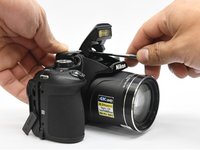
Nikon Coolpix B700 Flash Unit Replacement

crwdns2942213:0crwdne2942213:0

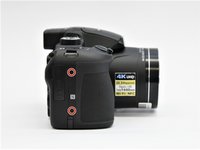
    1. Nikon Coolpix B700 Flash Unit Replacement, Back Frame Assembly: crwdns2935265:01crwdnd2935265:01crwdnd2935265:01crwdne2935265:0
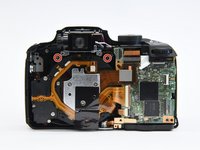
      • Use the Phillips screwdriver to remove the two 5.5 mm screws on the left side of the camera.

      crwdns2952109:0crwdne2952109:0

      crwdns2917038:0crwdne2917038:0

    2. Nikon Coolpix B700 Flash Unit Replacement: crwdns2935265:02crwdnd2935265:01crwdnd2935265:01crwdne2935265:0
      • Use the Phillips screwdriver to remove seven 5.5 mm screws from the bottom of the camera.

      crwdns2952109:0crwdne2952109:0

      crwdns2917038:0crwdne2917038:0

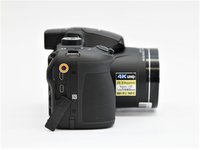
    3. Nikon Coolpix B700 Flash Unit Replacement: crwdns2935265:03crwdnd2935265:01crwdnd2935265:02crwdne2935265:0 Nikon Coolpix B700 Flash Unit Replacement: crwdns2935265:03crwdnd2935265:02crwdnd2935265:02crwdne2935265:0
      • Use the Phillips screwdriver to remove the two 5.5mm screws on the right side of the camera.

      • Open the HDMI flap to remove a 5.5mm screw.

      • Don't forget to replace the hidden screw under the HDMI flap during reassembly.

      crwdns2952109:0crwdne2952109:0

      crwdns2917038:0crwdne2917038:0

    4. Nikon Coolpix B700 Flash Unit Replacement: crwdns2935265:04crwdnd2935265:01crwdnd2935265:01crwdne2935265:0
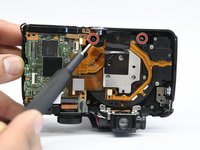
      • Use the Phillips screwdriver to remove the two 5.5mm screws under the LCD panel.

      crwdns2952109:0crwdne2952109:0

      crwdns2917038:0crwdne2917038:0

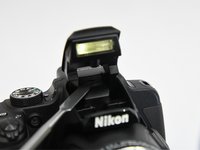
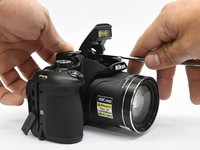
    5. Nikon Coolpix B700 Flash Unit Replacement: crwdns2935265:05crwdnd2935265:01crwdnd2935265:03crwdne2935265:0 Nikon Coolpix B700 Flash Unit Replacement: crwdns2935265:05crwdnd2935265:02crwdnd2935265:03crwdne2935265:0 Nikon Coolpix B700 Flash Unit Replacement: crwdns2935265:05crwdnd2935265:03crwdnd2935265:03crwdne2935265:0
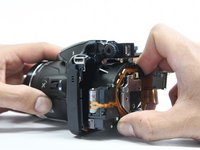
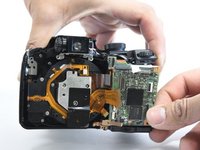
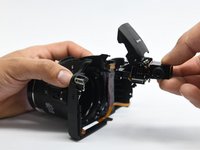
      • Open the flash assembly and insert the spudger into the slot under the flash unit and twist.

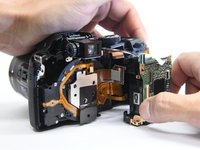
      • While twisting, pry apart the shell to split the camera in half.

      crwdns2952109:0crwdne2952109:0

      crwdns2917038:0crwdne2917038:0

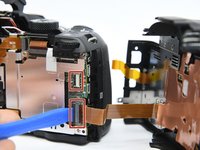
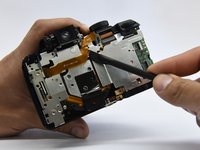
    6. Nikon Coolpix B700 Flash Unit Replacement: crwdns2935265:06crwdnd2935265:01crwdnd2935265:01crwdne2935265:0
      • Be careful not to damage the ribbons that connect the halves together.

      crwdns2952109:0crwdne2952109:0

      crwdns2917038:0crwdne2917038:0

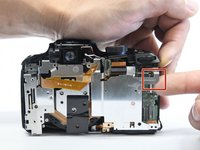
    7. Nikon Coolpix B700 Flash Unit Replacement: crwdns2935265:07crwdnd2935265:01crwdnd2935265:02crwdne2935265:0 Nikon Coolpix B700 Flash Unit Replacement: crwdns2935265:07crwdnd2935265:02crwdnd2935265:02crwdne2935265:0
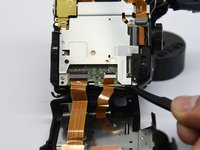
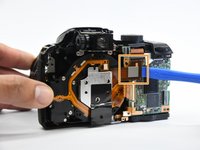
      • Place the pry tool under the black latch. Lift gently until the latch flips up.

      • Gently pull the ribbon away from the latch.

      • Be gentle when taking ribbons out and apart because they are fragile.

      crwdns2952109:0crwdne2952109:0

      crwdns2917038:0crwdne2917038:0

    1. Nikon Coolpix B700 Flash Unit Replacement, Internal Bracket: crwdns2935265:08crwdnd2935265:01crwdnd2935265:01crwdne2935265:0
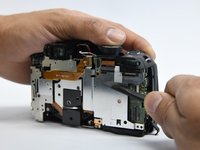
      • Use the Phillips screwdriver to remove the remaining five 5.55mm screws.

      • Remove the single 6mm screw.

      crwdns2952109:0crwdne2952109:0

      crwdns2917038:0crwdne2917038:0

    2. Nikon Coolpix B700 Flash Unit Replacement: crwdns2935265:09crwdnd2935265:01crwdnd2935265:01crwdne2935265:0
      • Insert the pry tool under the latch and gently lift up to remove the ribbon.

      crwdns2952109:0crwdne2952109:0

      crwdns2917038:0crwdne2917038:0

    3. Nikon Coolpix B700 Flash Unit Replacement: crwdns2935265:010crwdnd2935265:01crwdnd2935265:01crwdne2935265:0
      • Move the ribbon out of the way to reveal the hidden screw.

      crwdns2952109:0crwdne2952109:0

      crwdns2917038:0crwdne2917038:0

    4. Nikon Coolpix B700 Flash Unit Replacement: crwdns2935265:011crwdnd2935265:01crwdnd2935265:01crwdne2935265:0
      • Lift the button assembly gently to give access to remove the 4mm screw.

      crwdns2952109:0crwdne2952109:0

      crwdns2917038:0crwdne2917038:0

    5. Nikon Coolpix B700 Flash Unit Replacement: crwdns2935265:012crwdnd2935265:01crwdnd2935265:01crwdne2935265:0
      • On the top of the camera, remove the 6mm screw.

      crwdns2952109:0crwdne2952109:0

      crwdns2917038:0crwdne2917038:0

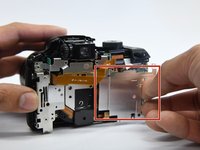
    6. Nikon Coolpix B700 Flash Unit Replacement: crwdns2935265:013crwdnd2935265:01crwdnd2935265:02crwdne2935265:0 Nikon Coolpix B700 Flash Unit Replacement: crwdns2935265:013crwdnd2935265:02crwdnd2935265:02crwdne2935265:0
      • With the spudger tool gently pry off the white tap holding in the bracket.

      • Use the same tool to remove the glued-on ribbon.

      crwdns2952109:0crwdne2952109:0

      crwdns2917038:0crwdne2917038:0

    7. Nikon Coolpix B700 Flash Unit Replacement: crwdns2935265:014crwdnd2935265:01crwdnd2935265:02crwdne2935265:0 Nikon Coolpix B700 Flash Unit Replacement: crwdns2935265:014crwdnd2935265:02crwdnd2935265:02crwdne2935265:0
      • Gently lift up the button assembly to slide the bracket out.

      crwdns2952109:0crwdne2952109:0

      crwdns2917038:0crwdne2917038:0

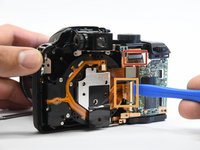
    8. Nikon Coolpix B700 Flash Unit Replacement: crwdns2935265:015crwdnd2935265:01crwdnd2935265:02crwdne2935265:0 Nikon Coolpix B700 Flash Unit Replacement: crwdns2935265:015crwdnd2935265:02crwdnd2935265:02crwdne2935265:0
      • With the pry tool gently lift up the latch and pull the cable toward the lens assembly.

      • Use the pry tool again and place it under the ribbon and lift straight up to disconnect the ribbon.

      crwdns2952109:0crwdne2952109:0

      crwdns2917038:0crwdne2917038:0

    1. Nikon Coolpix B700 Flash Unit Replacement, Lens Assembly: crwdns2935265:016crwdnd2935265:01crwdnd2935265:02crwdne2935265:0 Nikon Coolpix B700 Flash Unit Replacement, Lens Assembly: crwdns2935265:016crwdnd2935265:02crwdnd2935265:02crwdne2935265:0
      • Use the Phillips screwdriver to remove the four 6 mm screw that hold on the bracket housing.

      crwdns2952109:0crwdne2952109:0

      crwdns2917038:0crwdne2917038:0

    2. Nikon Coolpix B700 Flash Unit Replacement: crwdns2935265:017crwdnd2935265:01crwdnd2935265:01crwdne2935265:0
      • Remove the tripod mount from it's slot.

      crwdns2952109:0crwdne2952109:0

      crwdns2917038:0crwdne2917038:0

    3. Nikon Coolpix B700 Flash Unit Replacement: crwdns2935265:018crwdnd2935265:01crwdnd2935265:03crwdne2935265:0 Nikon Coolpix B700 Flash Unit Replacement: crwdns2935265:018crwdnd2935265:02crwdnd2935265:03crwdne2935265:0 Nikon Coolpix B700 Flash Unit Replacement: crwdns2935265:018crwdnd2935265:03crwdnd2935265:03crwdne2935265:0
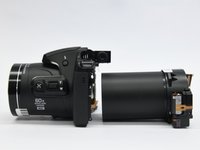
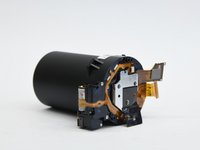
      • Now you just have to slide the lens assembly out of the housing.

      crwdns2952109:0crwdne2952109:0

      crwdns2917038:0crwdne2917038:0

    1. Nikon Coolpix B700 Flash Unit Replacement, Motherboard: crwdns2935265:019crwdnd2935265:01crwdnd2935265:01crwdne2935265:0
      • Use the metal spudger to open the latch to remove the ribbon.

      crwdns2952109:0crwdne2952109:0

      crwdns2917038:0crwdne2917038:0

    2. Nikon Coolpix B700 Flash Unit Replacement: crwdns2935265:020crwdnd2935265:01crwdnd2935265:01crwdne2935265:0
      • Use the Phillips screwdriver to remove the single 6 mm screw.

      crwdns2952109:0crwdne2952109:0

      crwdns2917038:0crwdne2917038:0

    3. Nikon Coolpix B700 Flash Unit Replacement: crwdns2935265:021crwdnd2935265:01crwdnd2935265:02crwdne2935265:0 Nikon Coolpix B700 Flash Unit Replacement: crwdns2935265:021crwdnd2935265:02crwdnd2935265:02crwdne2935265:0
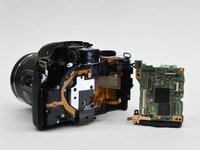
      • Gently lift the button assembly. Slide the motherboard out from the shell.

      crwdns2952109:0crwdne2952109:0

      crwdns2917038:0crwdne2917038:0

    4. Nikon Coolpix B700 Flash Unit Replacement: crwdns2935265:022crwdnd2935265:01crwdnd2935265:02crwdne2935265:0 Nikon Coolpix B700 Flash Unit Replacement: crwdns2935265:022crwdnd2935265:02crwdnd2935265:02crwdne2935265:0
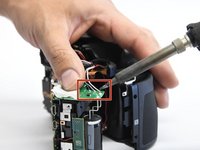
      • Desolder the black, gray, and white wires from the motherboard.

      • The motherboard is labeled with the wire colors.

      crwdns2952109:0crwdne2952109:0

      crwdns2917038:0crwdne2917038:0

    1. Nikon Coolpix B700 Flash Unit Replacement, Flash Unit: crwdns2935265:023crwdnd2935265:01crwdnd2935265:01crwdne2935265:0
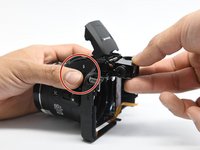
      • Using a Phillips screwdriver, remove the two 6 mm screws that hold the flash assembly.

      crwdns2952109:0crwdne2952109:0

      crwdns2917038:0crwdne2917038:0

    2. Nikon Coolpix B700 Flash Unit Replacement: crwdns2935265:024crwdnd2935265:01crwdnd2935265:02crwdne2935265:0 Nikon Coolpix B700 Flash Unit Replacement: crwdns2935265:024crwdnd2935265:02crwdnd2935265:02crwdne2935265:0
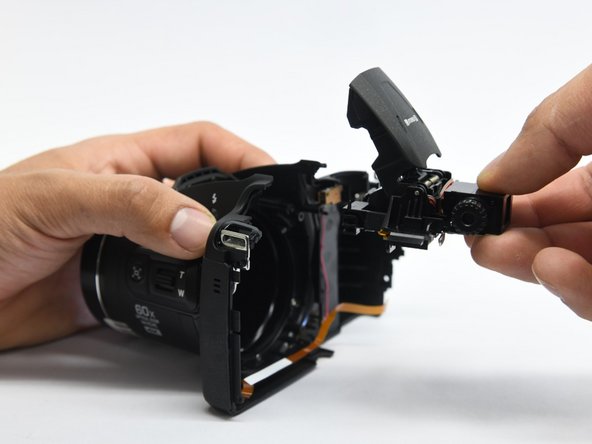
      • Now while pushing the flash button slide out the flash assembly from the housing.

      • The flash button could fall out when the assembly is removed.

      • During reassembly, insert the flash unit assembly first, then reconnect the flash button.

      crwdns2952109:0crwdne2952109:0

      crwdns2917038:0crwdne2917038:0

crwdns2915888:0crwdne2915888:0

To reassemble your device, follow these instructions in reverse order.

crwdns2935221:0crwdne2935221:0

crwdns2935227:0crwdne2935227:0

Carlos Salgado

crwdns2935283:002/27/19crwdne2935283:0

1,456 crwdns2915208:0crwdne2915208:0

crwdns2935297:07crwdne2935297:0

crwdns2935287:0crwdne2935287:0

Purdue University Northwest, Team S4-G5, Hingst Spring 2019 crwdns2935289:0Purdue University Northwest, Team S4-G5, Hingst Spring 2019crwdne2935289:0

PNW-HINGST-S19S4G5

crwdns2931471:04crwdne2931471:0

crwdns2935297:014crwdne2935297:0

crwdns2947412:00crwdne2947412:0

crwdns2917038:0crwdne2917038:0

crwdns2936625:0crwdne2936625:0:

crwdns2936751:024crwdne2936751:0 0

crwdns2936753:07crwdne2936753:0 5

crwdns2936753:030crwdne2936753:0 26

crwdns2942667:0crwdne2942667:0 874