
Nikon COOLPIX P2 Case Replacement

crwdns2959932:0crwdnd2959932:0Jessica Broughcrwdnd2959932:0crwdnd2959932:0crwdnd2959932:011crwdnd2959932:0crwdne2959932:0
crwdns2959936:0Sun 7, 2016crwdne2959936:0
crwdns2869540:0crwdne2869540:0: 1.9K
crwdns2959988:0crwdne2959988:0
- crwdns2959990:0crwdne2959990:0
- 4
- crwdns2959992:0crwdne2959992:0
- 22
- crwdns2959994:0crwdne2959994:0
- 94
- crwdns2959996:0crwdne2959996:0
- 1,888
crwdns2955950:0crwdne2955950:0: 0
crwdns2959998:0crwdne2959998:0
crwdns2960000:0crwdne2960000:0crwdns2959984:0crwdne2959984:0: 0 1
crwdns2959956:0crwdne2959956:0
crwdns2959968:01crwdne2959968:0
crwdns2959986:0crwdne2959986:0: 0 1
crwdns2959958:0crwdne2959958:0
crwdns2959976:01crwdne2959976:0
crwdns2915892:0crwdne2915892:0
crwdns2959928:0crwdne2959928:0 ↓Replace the outer casing of your camera if it is damaged.
crwdns2959930:0crwdne2959930:0
crwdns2943215:0crwdne2943215:0


-
-
-
Remove the screw located near the speaker port using a Phillips 00 screwdriver.
 crwdns2952109:0crwdne2952109:0
-
-
-
Turn camera upside down so that the battery compartment is facing you.
-
Remove all four screws from the bottom of the camera with a Phillips 00 screwdriver.
-
-
-
Rotate the camera to the opposite side where the A/V outlet is located.
-
Unscrew and remove all four screws with a Phillips 00 screwdriver.
-
-
-
Turn the camera so that the Wi-Fi adapter is facing you.
-
Unscrew and remove all four screws with a Phillips 00 screwdriver.
-
-
-
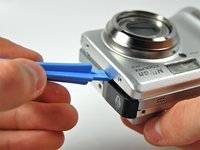
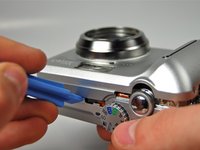
Using a plastic opening tool, pry the front casing of the camera.
-
Continue this motion all around the front casing of the camera.
-
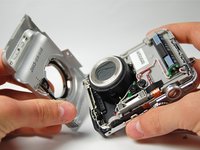
Gently pull apart the front casing from the rest of the camera.
-
-
-
Using the plastic opening tool pry the back casing of the camera.
-
-
-
-
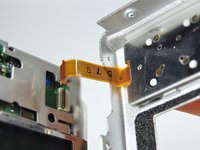
Carefully pull apart the back casing of the camera from the front of the camera without tearing the orange ribbon.
-
-
-
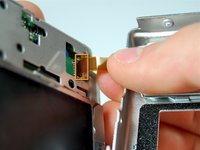
Pull down the on the black latch to carefully separate the orange ribbon from the motherboard.
-
Pull apart the orange ribbon and front casing from the rest of the camera.
-
-




To reassemble your device, follow these instructions in reverse order.

crwdns2935287:0crwdne2935287:0

Cal Poly, Team 3-28, Amido Winter 2012 crwdns2935289:0Cal Poly, Team 3-28, Amido Winter 2012crwdne2935289:0
CPSU-AMIDO-W12S3G28
crwdns2931471:04crwdne2931471:0
crwdns2935297:060crwdne2935297:0
