crwdns2933423:0crwdne2933423:0
crwdns2947577:0crwdnd2947577:0crwdne2947577:0

Nexus One Camera Replacement

crwdns2869540:0crwdne2869540:0: 4K

crwdns2959988:0crwdne2959988:0

crwdns2959990:0crwdne2959990:0
2
crwdns2959992:0crwdne2959992:0
23
crwdns2959994:0crwdne2959994:0
100
crwdns2959996:0crwdne2959996:0
3.989
crwdns2955950:0crwdne2955950:0: 2

crwdns2960004:02crwdne2960004:0.

crwdns2959984:0crwdne2959984:0: 1

crwdns2959972:01crwdne2959972:0

crwdns2959986:0crwdne2959986:0: 0

crwdns2959958:0crwdne2959958:0

crwdns2955944:0crwdne2955944:0: crwdns2931273:0crwdne2931273:0
crwdns2955970:0crwdne2955970:0: crwdns2937801:0crwdne2937801:0
crwdns2944444:0crwdne2944444:0

crwdns2944446:0crwdne2944446:0

Nexus One Camera Replacement

crwdns2959930:0crwdne2959930:0

crwdns2943215:0crwdne2943215:0

    1. Nexus One Camera Replacement, Rear Cover: crwdns2935265:01crwdnd2935265:01crwdnd2935265:02crwdne2935265:0 Nexus One Camera Replacement, Rear Cover: crwdns2935265:01crwdnd2935265:02crwdnd2935265:02crwdne2935265:0
      • Using two fingers, push up on the rear cover.

      crwdns2952109:0crwdne2952109:0

      crwdns2917038:0crwdne2917038:0

    2. Nexus One Camera Replacement: crwdns2935265:02crwdnd2935265:01crwdnd2935265:01crwdne2935265:0
      • The rear cover slides up and off.

      crwdns2952109:0crwdne2952109:0

      crwdns2917038:0crwdne2917038:0

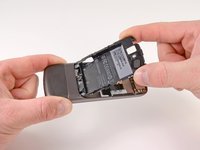
    1. Nexus One Camera Replacement, Battery: crwdns2935265:03crwdnd2935265:01crwdnd2935265:01crwdne2935265:0
      • Using the plastic opening tools, pry the left bottom corner of the battery up.

      crwdns2952109:0crwdne2952109:0

      crwdns2917038:0crwdne2917038:0

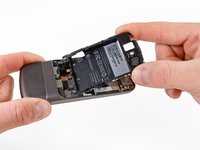
    2. Nexus One Camera Replacement: crwdns2935265:04crwdnd2935265:01crwdnd2935265:01crwdne2935265:0
      • Pull the battery up and out.

      crwdns2952109:0crwdne2952109:0

      crwdns2917038:0crwdne2917038:0

    1. Nexus One Camera Replacement, Battery Housing: crwdns2935265:05crwdnd2935265:01crwdnd2935265:01crwdne2935265:0
      • Remove the two Torx T5 screws.

      • Remove the one Philips #00 screw.

      crwdns2952109:0crwdne2952109:0

      crwdns2917038:0crwdne2917038:0

    2. Nexus One Camera Replacement: crwdns2935265:06crwdnd2935265:01crwdnd2935265:02crwdne2935265:0 Nexus One Camera Replacement: crwdns2935265:06crwdnd2935265:02crwdnd2935265:02crwdne2935265:0
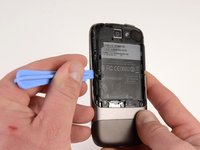
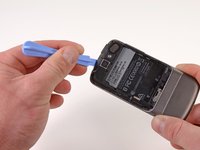
      • Using the plastic opening tool, pry up the battery housing upwards.

      • Push pry tool down, undoing the plastic tab.

      crwdns2952109:0crwdne2952109:0

      crwdns2917038:0crwdne2917038:0

    3. Nexus One Camera Replacement: crwdns2935265:07crwdnd2935265:01crwdnd2935265:02crwdne2935265:0 Nexus One Camera Replacement: crwdns2935265:07crwdnd2935265:02crwdnd2935265:02crwdne2935265:0
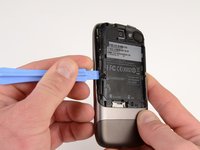
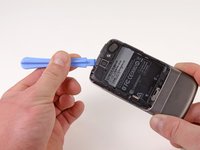
      • Pry the upper left tab open on the battery housing.

      crwdns2952109:0crwdne2952109:0

      crwdns2917038:0crwdne2917038:0

    4. Nexus One Camera Replacement: crwdns2935265:08crwdnd2935265:01crwdnd2935265:02crwdne2935265:0 Nexus One Camera Replacement: crwdns2935265:08crwdnd2935265:02crwdnd2935265:02crwdne2935265:0
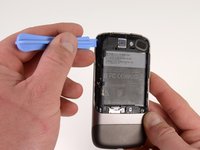
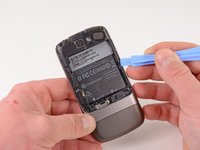
      • Pry the top tab of the battery housing.

      crwdns2952109:0crwdne2952109:0

      crwdns2917038:0crwdne2917038:0

    5. Nexus One Camera Replacement: crwdns2935265:09crwdnd2935265:01crwdnd2935265:02crwdne2935265:0 Nexus One Camera Replacement: crwdns2935265:09crwdnd2935265:02crwdnd2935265:02crwdne2935265:0
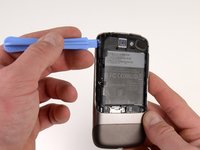
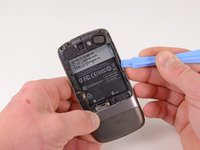
      • Pry the right side tab of the battery housing.

      crwdns2952109:0crwdne2952109:0

      crwdns2917038:0crwdne2917038:0

    6. Nexus One Camera Replacement: crwdns2935265:010crwdnd2935265:01crwdnd2935265:02crwdne2935265:0 Nexus One Camera Replacement: crwdns2935265:010crwdnd2935265:02crwdnd2935265:02crwdne2935265:0
      • Pull up on the battery housing.

      • Slide the battery housing out to remove it.

      crwdns2952109:0crwdne2952109:0

      crwdns2917038:0crwdne2917038:0

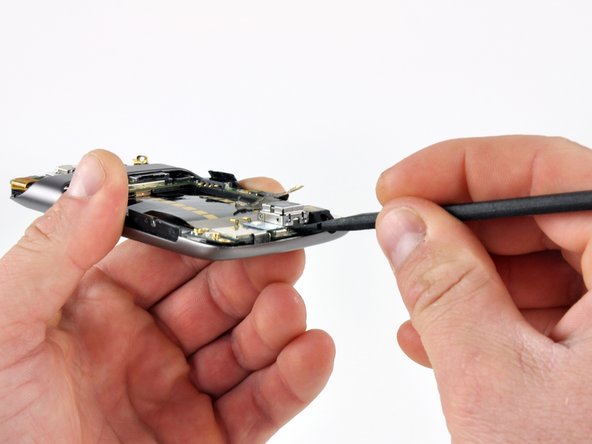
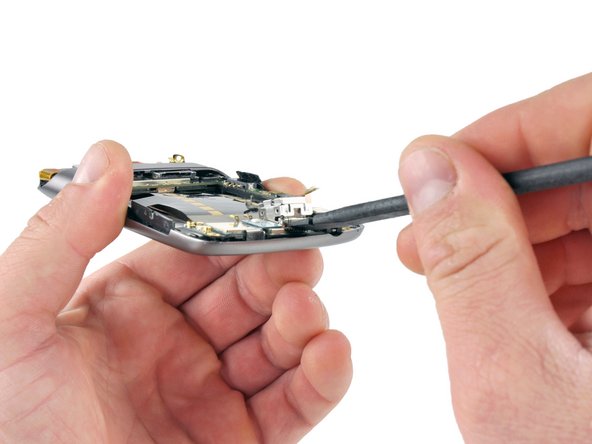
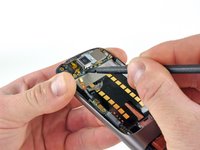
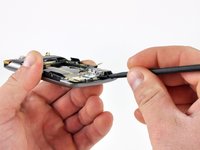
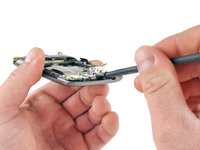
    1. Nexus One Camera Replacement, Camera: crwdns2935265:011crwdnd2935265:01crwdnd2935265:03crwdne2935265:0 Nexus One Camera Replacement, Camera: crwdns2935265:011crwdnd2935265:02crwdnd2935265:03crwdne2935265:0 Nexus One Camera Replacement, Camera: crwdns2935265:011crwdnd2935265:03crwdnd2935265:03crwdne2935265:0
      • Place the spudger under the metal cover and pry upwards. (shoot bottom side first with tabbed clip)

      • Swap the spudger to the other side of the cover base. Pry upwards. (fix?)

      • Grasp the camera module and pull up.

      crwdns2952109:0crwdne2952109:0

      crwdns2917038:0crwdne2917038:0

crwdns2915888:0crwdne2915888:0

To reassemble your device, follow these instructions in reverse order.

crwdns2935221:0crwdne2935221:0

crwdns2935227:0crwdne2935227:0

Niklas Johnson

crwdns2935283:001/31/12crwdne2935283:0

1.207 crwdns2915208:0crwdne2915208:0

crwdns2935297:018crwdne2935297:0

crwdns2947412:00crwdne2947412:0

crwdns2917038:0crwdne2917038:0

crwdns2936625:0crwdne2936625:0:

crwdns2936751:024crwdne2936751:0 2

crwdns2936753:07crwdne2936753:0 23

crwdns2936753:030crwdne2936753:0 100

crwdns2959996:0crwdne2959996:0 3,989