crwdns2933423:0crwdne2933423:0
crwdns2947577:0crwdnd2947577:0crwdne2947577:0

Nexus 4 Plastic Midframe Replacement

crwdns2942213:0crwdne2942213:0

    1. Nexus 4 Plastic Midframe Replacement, Back Cover: crwdns2935265:01crwdnd2935265:01crwdnd2935265:02crwdne2935265:0 Nexus 4 Plastic Midframe Replacement, Back Cover: crwdns2935265:01crwdnd2935265:02crwdnd2935265:02crwdne2935265:0
      crwdns2935267:0crwdne2935267:0
      SIM Card Eject Tool
      $2.99
      • Power off the phone, by long-pressing the power button and touching Power off.

      • Remove the SIM tray using the SIM Card Eject Tool.

      • This step is required in order to remove the back case.

      crwdns2952109:0crwdne2952109:0

      crwdns2917038:0crwdne2917038:0

    2. Nexus 4 Plastic Midframe Replacement: crwdns2935265:02crwdnd2935265:01crwdnd2935265:01crwdne2935265:0
      crwdns2935267:0crwdne2935267:0
      T5 Torx Screwdriver
      $5.49
      crwdns2952109:0crwdne2952109:0

      crwdns2917038:0crwdne2917038:0

    3. Nexus 4 Plastic Midframe Replacement: crwdns2935265:03crwdnd2935265:01crwdnd2935265:03crwdne2935265:0 Nexus 4 Plastic Midframe Replacement: crwdns2935265:03crwdnd2935265:02crwdnd2935265:03crwdne2935265:0 Nexus 4 Plastic Midframe Replacement: crwdns2935265:03crwdnd2935265:03crwdnd2935265:03crwdne2935265:0
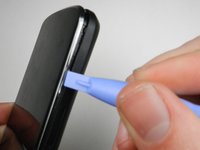
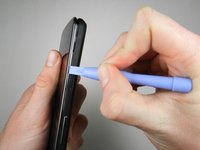
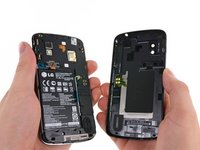
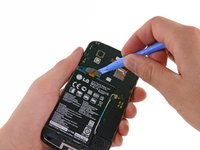
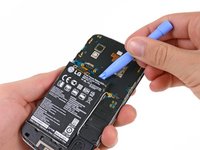
      • Gently open the back case by prying along the edge of the cover, starting at a corner of the phone and circling around the phone using a plastic opening tool.

      • The opening process may take a few minutes. The plastic will make a light snapping noise as the back cover separates from the rest of the phone.

      crwdns2952109:0crwdne2952109:0

      crwdns2917038:0crwdne2917038:0

    1. Nexus 4 Plastic Midframe Replacement, Battery: crwdns2935265:04crwdnd2935265:01crwdnd2935265:02crwdne2935265:0 Nexus 4 Plastic Midframe Replacement, Battery: crwdns2935265:04crwdnd2935265:02crwdnd2935265:02crwdne2935265:0
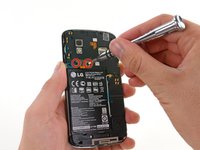
      • Remove the two 1.8 mm Phillips screws holding down the battery connector.

      • Using a plastic opening tool, disconnect the battery cable from its socket on the motherboard.

      crwdns2952109:0crwdne2952109:0

      crwdns2917038:0crwdne2917038:0

    2. Nexus 4 Plastic Midframe Replacement, Battery removal: crwdns2935265:05crwdnd2935265:01crwdnd2935265:02crwdne2935265:0 Nexus 4 Plastic Midframe Replacement, Battery removal: crwdns2935265:05crwdnd2935265:02crwdnd2935265:02crwdne2935265:0
      crwdns2935267:0crwdne2935267:0
      Plastic Cards
      $2.99
      • Remove the blue tape that secures the white antenna cable to the battery.

      • Using a spudger, carefully disconnect the white antenna cable.

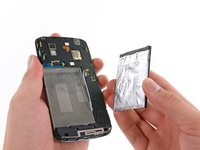
      • Carefully pry the battery out with a Plastic Opening Tool, starting at the top left-hand corner and working down towards the bottom right-hand corner.

      • If necessary, you can also use a plastic card to separate the battery from the metal midframe.

      • The battery is securely glued to the phone. When reinstalling the battery, press the battery firmly against the adhesive strip.

      crwdns2952109:0crwdne2952109:0

      crwdns2917038:0crwdne2917038:0

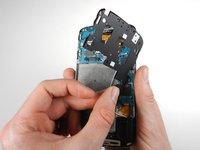
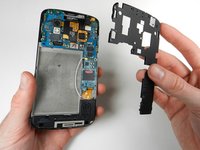
    1. Nexus 4 Plastic Midframe Replacement, Plastic Midframe: crwdns2935265:06crwdnd2935265:01crwdnd2935265:03crwdne2935265:0 Nexus 4 Plastic Midframe Replacement, Plastic Midframe: crwdns2935265:06crwdnd2935265:02crwdnd2935265:03crwdne2935265:0 Nexus 4 Plastic Midframe Replacement, Plastic Midframe: crwdns2935265:06crwdnd2935265:03crwdnd2935265:03crwdne2935265:0
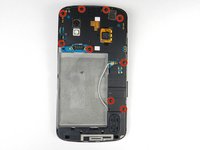
      • Remove the nine 4.6 mm Phillips #000 screws. Gently lift out the plastic cover.

      • The midframe is held in with two clips, one at either side. Use a plastic spudger to release each side and gently lift up and away.

      crwdns2952109:0crwdne2952109:0

      crwdns2917038:0crwdne2917038:0

crwdns2915888:0crwdne2915888:0

To reassemble your device, follow these instructions in reverse order.

crwdns2935221:0crwdne2935221:0

crwdns2935229:07crwdne2935229:0

Kaitlyn Jones

crwdns2935283:001/27/13crwdne2935283:0

4 964 crwdns2915208:0crwdne2915208:0

crwdns2935297:08crwdne2935297:0

crwdns2935287:0crwdne2935287:0

Cal Poly, Team 3-32, Amido Winter 2013 crwdns2935289:0Cal Poly, Team 3-32, Amido Winter 2013crwdne2935289:0

CPSU-AMIDO-W13S3G32

crwdns2931471:04crwdne2931471:0

crwdns2935297:096crwdne2935297:0

crwdns2947412:00crwdne2947412:0

crwdns2917038:0crwdne2917038:0

crwdns2936625:0crwdne2936625:0:

crwdns2936751:024crwdne2936751:0 2

crwdns2936753:07crwdne2936753:0 7

crwdns2936753:030crwdne2936753:0 48

crwdns2942667:0crwdne2942667:0 11,628