crwdns2933423:0crwdne2933423:0
crwdns2947577:0crwdnd2947577:0crwdne2947577:0

Nextbook Premium 7SE Battery Replacement

crwdns2869540:0crwdne2869540:0: 1,2 k

crwdns2959988:0crwdne2959988:0

crwdns2959990:0crwdne2959990:0
2
crwdns2959992:0crwdne2959992:0
19
crwdns2959994:0crwdne2959994:0
103
crwdns2959996:0crwdne2959996:0
1 175
crwdns2955950:0crwdne2955950:0: 0

crwdns2959998:0crwdne2959998:0

crwdns2960000:0crwdne2960000:0
crwdns2959984:0crwdne2959984:0: 1

crwdns2959972:01crwdne2959972:0

crwdns2959986:0crwdne2959986:0: 0

crwdns2959958:0crwdne2959958:0

crwdns2955944:0crwdne2955944:0: 10 - 20 crwdns2931279:0crwdne2931279:0
crwdns2955970:0crwdne2955970:0: crwdns2937801:0crwdne2937801:0
Nextbook Premium 7SE Battery Replacement

crwdns2915892:0crwdne2915892:0

crwdns2959928:0crwdne2959928:0 ↓

It is important to note that this guide requires the use of a soldering iron. Be sure you familiarize yourself on how to use a soldering iron.

crwdns2959930:0crwdne2959930:0

crwdns2943215:0crwdne2943215:0

    1. Nextbook Premium 7SE Battery Replacement, Back Cover: crwdns2935265:01crwdnd2935265:01crwdnd2935265:03crwdne2935265:0 Nextbook Premium 7SE Battery Replacement, Back Cover: crwdns2935265:01crwdnd2935265:02crwdnd2935265:03crwdne2935265:0 Nextbook Premium 7SE Battery Replacement, Back Cover: crwdns2935265:01crwdnd2935265:03crwdnd2935265:03crwdne2935265:0
      • Insert the plastic opening tool into the middle of the bottom edge of the device. The tool should be inserted within the seam between the back and front covers.

      • Slide the opening tool to the right and slowly continue to separate the back cover from the device.

      • Avoid prying on the buttons, as they are easily damaged.

      crwdns2952109:0crwdne2952109:0

      crwdns2917038:0crwdne2917038:0

    2. Nextbook Premium 7SE Battery Replacement: crwdns2935265:02crwdnd2935265:01crwdnd2935265:01crwdne2935265:0
      • Pull the cover off of the device once about three quarters of the cover has been pried open using the plastic opening tool.

      crwdns2952109:0crwdne2952109:0

      crwdns2917038:0crwdne2917038:0

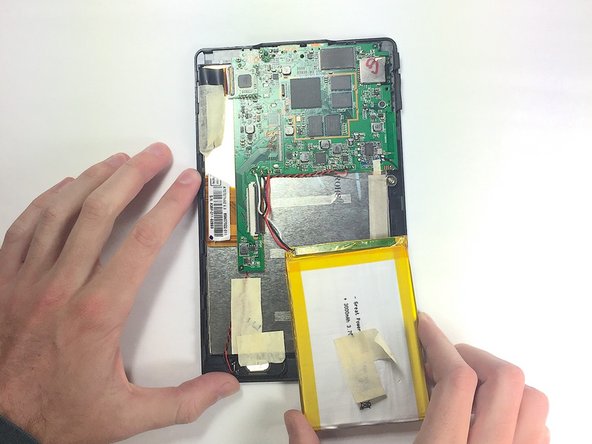
    1. Nextbook Premium 7SE Battery Replacement, Battery: crwdns2935265:03crwdnd2935265:01crwdnd2935265:01crwdne2935265:0
      • Remove masking tape from the battery.

      crwdns2952109:0crwdne2952109:0

      crwdns2917038:0crwdne2917038:0

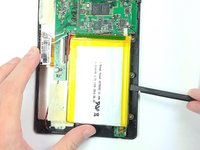
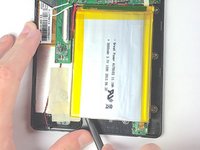
    2. Nextbook Premium 7SE Battery Replacement: crwdns2935265:04crwdnd2935265:01crwdnd2935265:03crwdne2935265:0 Nextbook Premium 7SE Battery Replacement: crwdns2935265:04crwdnd2935265:02crwdnd2935265:03crwdne2935265:0 Nextbook Premium 7SE Battery Replacement: crwdns2935265:04crwdnd2935265:03crwdnd2935265:03crwdne2935265:0
      • Pry the battery from the base using the nylon spudger and move it away from the motherboard.

      • Handle the battery with care to avoid damaging it.

      crwdns2952109:0crwdne2952109:0

      crwdns2917038:0crwdne2917038:0

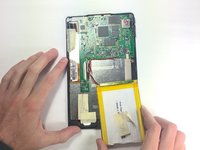
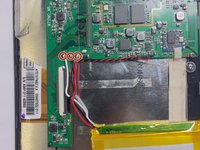
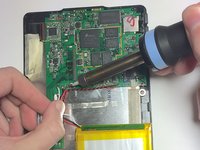
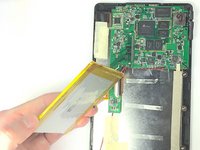
    3. Nextbook Premium 7SE Battery Replacement: crwdns2935265:05crwdnd2935265:01crwdnd2935265:03crwdne2935265:0 Nextbook Premium 7SE Battery Replacement: crwdns2935265:05crwdnd2935265:02crwdnd2935265:03crwdne2935265:0 Nextbook Premium 7SE Battery Replacement: crwdns2935265:05crwdnd2935265:03crwdnd2935265:03crwdne2935265:0
      • De-solder the three contact points and remove the battery.

      • See the following guide for instructions on how to solder. How To Solder and Desolder Connections

      • Use caution when operating the soldering iron.

      crwdns2952109:0crwdne2952109:0

      crwdns2917038:0crwdne2917038:0

crwdns2915888:0crwdne2915888:0

To reassemble your device, follow these instructions in reverse order, being careful when re-soldering the contacts back into place.

crwdns2935221:0crwdne2935221:0

crwdns2935227:0crwdne2935227:0

Walker Karstens

crwdns2935283:010/30/16crwdne2935283:0

364 crwdns2915208:0crwdne2915208:0

crwdns2935297:03crwdne2935297:0

crwdns2935287:0crwdne2935287:0

Baylor, Team 4-1, Williams Fall 2016 crwdns2935289:0Baylor, Team 4-1, Williams Fall 2016crwdne2935289:0

BU-WILLIAMS-F16S4G1

crwdns2931471:04crwdne2931471:0

crwdns2935297:084crwdne2935297:0

crwdns2947412:00crwdne2947412:0

crwdns2917038:0crwdne2917038:0

crwdns2936625:0crwdne2936625:0:

crwdns2936751:024crwdne2936751:0 2

crwdns2936753:07crwdne2936753:0 19

crwdns2936753:030crwdne2936753:0 103

crwdns2959996:0crwdne2959996:0 1,175