
NeuTab N7 Pro Battery Replacement

crwdns2959934:0crwdnd2959934:0Eric Fiskecrwdnd2959934:0crwdnd2959934:0crwdne2959934:0
crwdns2959936:0Mud 9, 2016crwdne2959936:0
crwdns2869540:0crwdne2869540:0: 2.6K
crwdns2959988:0crwdne2959988:0
- crwdns2959990:0crwdne2959990:0
- 3
- crwdns2959992:0crwdne2959992:0
- 29
- crwdns2959994:0crwdne2959994:0
- 95
- crwdns2959996:0crwdne2959996:0
- 2,633
crwdns2955950:0crwdne2955950:0: 0
crwdns2959998:0crwdne2959998:0
crwdns2960000:0crwdne2960000:0crwdns2959984:0crwdne2959984:0: 3 4
crwdns2959974:03crwdne2959974:0
crwdns2959970:04crwdne2959970:0
crwdns2959986:0crwdne2959986:0: 0 1
crwdns2959958:0crwdne2959958:0
crwdns2959976:01crwdne2959976:0
crwdns2959930:0crwdne2959930:0
crwdns2943215:0crwdne2943215:0
-
-
Spudger4.9


crwdns2915892:0crwdne2915892:0
crwdns2959928:0crwdne2959928:0 ↓Use this guide to replace the battery.
-
-
-
Insert plastic opening tool and pry back case away from the device, slowly moving the plastic opening tool along the device.
 crwdns2952109:0crwdne2952109:0
-
-
-
-
Follow the red and black wires from the battery to where they are soldered to the motherboard.
-
Use a soldering iron to separate the positive and negative wires from the motherboard.
-
-
-
Insert plastic spudger under the battery and slide back and forth, separating the battery from the case.
-
-


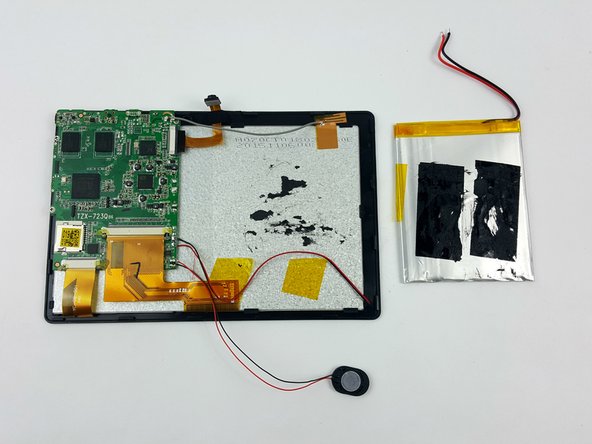
To reassemble your device, follow these instructions in reverse order.
crwdns2935221:0crwdne2935221:0
crwdns2935229:03crwdne2935229:0

crwdns2935287:0crwdne2935287:0

USF Tampa, Team 7-1, Cheng Spring 2016 crwdns2935289:0USF Tampa, Team 7-1, Cheng Spring 2016crwdne2935289:0
USFT-CHENG-S16S7G1
crwdns2931471:03crwdne2931471:0
crwdns2935297:060crwdne2935297:0
