crwdns2956850:0crwdne2956850:0 crwdns2956756:0crwdnd2956756:0crwdne2956756:0
crwdns2915892:0crwdne2915892:0
This guide shows you how to remove the Wi-Fi card from an NH57ADS, once the lower case and battery have been removed.
crwdns2942213:0crwdne2942213:0
-
-
-
Remove the two screws holding the battery in place.
-
Slip your finger into the finger hole provided at the top of the battery.
-
...and lift to remove it
 crwdns2952109:0crwdne2952109:0
-
-
-
-
-
Remove the five Phillips screws securing the bottom to the case.
-
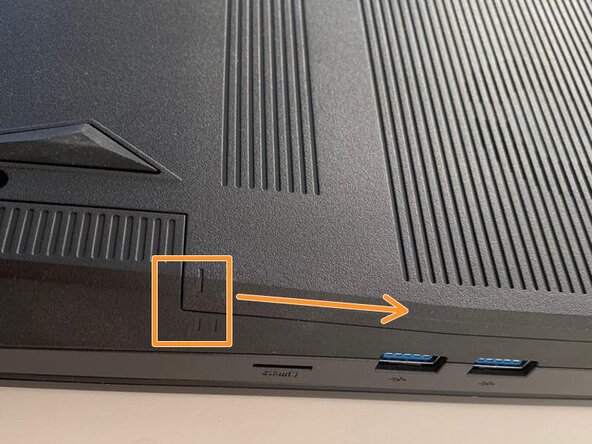
Slide the cover up slightly to release the clips holding it in place. This is the view on the right. The mark on the cover should now line up with the second mark on the case of the computer.
-
-
-
-
This is the view on the left before and after sliding the cover. The mark on the cover should now line up with the second mark on the case of the computer.
-
Slide the bottom cover to remove it.
-
-
-
-
crwdns2935267:0crwdne2935267:0Spudger$3.99
-
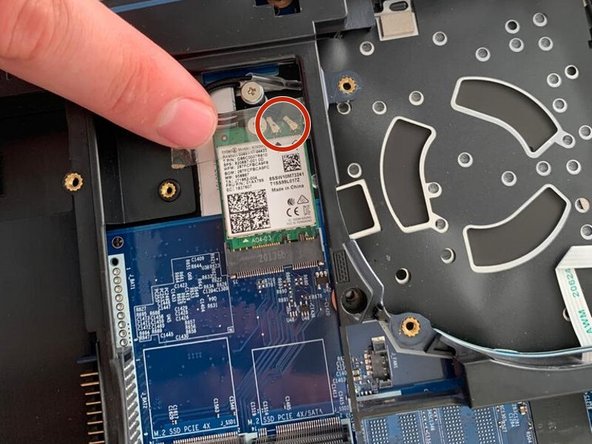
Remove the piece of tape and the two cables.
-
Unscrew and remove the card.
-
-








To reassemble your device, follow the instructions in reverse order.

