crwdns2933423:0crwdne2933423:0
crwdns2947577:0crwdnd2947577:0crwdne2947577:0

Nest Hello Camera Replacement

crwdns2942213:0crwdne2942213:0

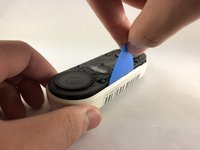
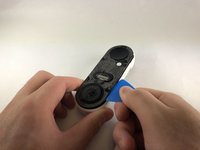
  1. Nest Hello Camera Replacement, Casing and Faceplate: crwdns2935265:01crwdnd2935265:01crwdnd2935265:01crwdne2935265:0
    • Insert the pick between the black faceplate and white casing of the Nest Hello.

    • Pry the faceplate away from the device with the opening pick.

    • If you have not opened the Nest Hello before, there will be a protective foam mesh that is glued to the plastic covering and the inside of the mesh, use a pick to cut through the mesh as much as possible.

    • Completely remove the faceplate from the device, do not be afraid to pull hard.

    crwdns2952109:0crwdne2952109:0
  2. Nest Hello Camera Replacement: crwdns2935265:02crwdnd2935265:01crwdnd2935265:02crwdne2935265:0 Nest Hello Camera Replacement: crwdns2935265:02crwdnd2935265:02crwdnd2935265:02crwdne2935265:0
    • Peel back the cover stickers and use the Phillips #000 screwdriver to remove the four screws.

    crwdns2952109:0crwdne2952109:0
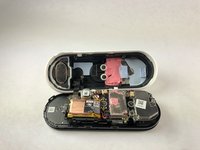
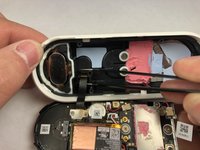
  3. Nest Hello Camera Replacement: crwdns2935265:03crwdnd2935265:01crwdnd2935265:03crwdne2935265:0 Nest Hello Camera Replacement: crwdns2935265:03crwdnd2935265:02crwdnd2935265:03crwdne2935265:0 Nest Hello Camera Replacement: crwdns2935265:03crwdnd2935265:03crwdnd2935265:03crwdne2935265:0
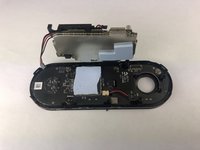
    • Insert opening pick between the white casing and the black internal circuitry and pry it out.

    • There is a ribbon cable connecting the white casing to the circuit boards. Be careful not to tear out the cable while separating the casing from the circuit boards.

    crwdns2952109:0crwdne2952109:0
  4. Nest Hello Camera Replacement, Motherboard: crwdns2935265:04crwdnd2935265:01crwdnd2935265:01crwdne2935265:0
    • Use the Phillips #000 to remove the two screws holding the ribbon cable to the white casing.

    crwdns2952109:0crwdne2952109:0
  5. Nest Hello Camera Replacement: crwdns2935265:05crwdnd2935265:01crwdnd2935265:02crwdne2935265:0 Nest Hello Camera Replacement: crwdns2935265:05crwdnd2935265:02crwdnd2935265:02crwdne2935265:0
    crwdns2935267:0crwdne2935267:0
    Tweezers
    $4.99
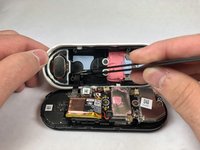
    • Grip the connector with the tweezers as shown and pull it away from the casing.

    crwdns2952109:0crwdne2952109:0
  6. Nest Hello Camera Replacement: crwdns2935265:06crwdnd2935265:01crwdnd2935265:01crwdne2935265:0
    • Remove the six smaller screws shown with the Phillips #000 screwdriver.

    • Remove the three larger screws shown with the Phillips #000 screwdriver.

    crwdns2952109:0crwdne2952109:0
  7. Nest Hello Camera Replacement: crwdns2935265:07crwdnd2935265:01crwdnd2935265:02crwdne2935265:0 Nest Hello Camera Replacement: crwdns2935265:07crwdnd2935265:02crwdnd2935265:02crwdne2935265:0
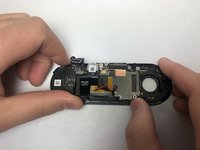
    • Holding the device as shown push the circuit board away from you and up to free it from the clips.

    crwdns2952109:0crwdne2952109:0
  8. Nest Hello Camera Replacement: crwdns2935265:08crwdnd2935265:01crwdnd2935265:02crwdne2935265:0 Nest Hello Camera Replacement: crwdns2935265:08crwdnd2935265:02crwdnd2935265:02crwdne2935265:0
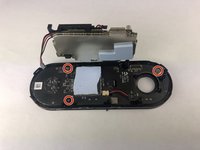
    • Use the Phillips #000 screwdriver to remove the three screws holding the last circuit board to the black plastic housing.

    crwdns2952109:0crwdne2952109:0
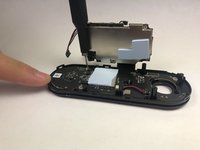
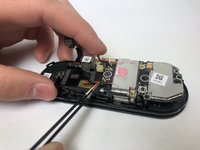
  9. Nest Hello Camera Replacement: crwdns2935265:09crwdnd2935265:01crwdnd2935265:01crwdne2935265:0
    • Insert the pick underneath the black connectors and pry them upward to disconnect them from the circuit board.

    • Work your way around the device, prying the circuit board away from the housing.

    • Make sure to feed the wires when taking off the circuit board.

    crwdns2952109:0crwdne2952109:0
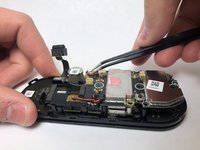
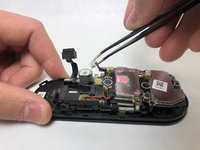
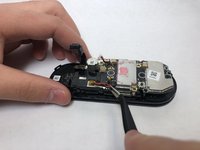
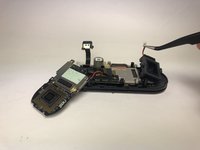
  10. Nest Hello Camera Replacement, Camera: crwdns2935265:010crwdnd2935265:01crwdnd2935265:03crwdne2935265:0 Nest Hello Camera Replacement, Camera: crwdns2935265:010crwdnd2935265:02crwdnd2935265:03crwdne2935265:0 Nest Hello Camera Replacement, Camera: crwdns2935265:010crwdnd2935265:03crwdnd2935265:03crwdne2935265:0
    • Remove the plug connecting the camera to the device.

    crwdns2952109:0crwdne2952109:0
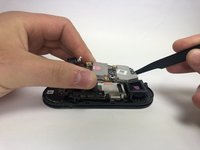
  11. Nest Hello Camera Replacement: crwdns2935265:011crwdnd2935265:01crwdnd2935265:03crwdne2935265:0 Nest Hello Camera Replacement: crwdns2935265:011crwdnd2935265:02crwdnd2935265:03crwdne2935265:0 Nest Hello Camera Replacement: crwdns2935265:011crwdnd2935265:03crwdnd2935265:03crwdne2935265:0
    • Lift the top layer of circuits to reveal the unplugged camera.

    • Lift up the camera and remove it from the device.

    • If you flip the camera upside down a black rubber rectangle will fall out.

    crwdns2952109:0crwdne2952109:0
crwdns2915888:0crwdne2915888:0

To reassemble your device, follow these instructions in reverse order.

crwdns2935227:0crwdne2935227:0

Daniel Moore

crwdns2935283:001/14/20crwdne2935283:0

926 crwdns2915208:0crwdne2915208:0

crwdns2935297:06crwdne2935297:0

crwdns2935287:0crwdne2935287:0

Embry-Riddle Aeronautical University, Team S1-G7, Cromer Twal Spring 2020 crwdns2935289:0Embry-Riddle Aeronautical University, Team S1-G7, Cromer Twal Spring 2020crwdne2935289:0

ERAU-CROMER TWAL-S20S1G7

crwdns2931471:04crwdne2931471:0

crwdns2935297:027crwdne2935297:0

crwdns2947412:00crwdne2947412:0

crwdns2917038:0crwdne2917038:0

crwdns2936625:0crwdne2936625:0:

crwdns2936751:024crwdne2936751:0 1

crwdns2936753:07crwdne2936753:0 10

crwdns2936753:030crwdne2936753:0 80

crwdns2942667:0crwdne2942667:0 2,729