
Nest Dropcam Pro Mounting Clips Replacement

crwdns2959932:0crwdnd2959932:0David Foenscrwdnd2959932:0crwdnd2959932:0crwdne2959932:0
crwdns2959936:0Huk 4, 2015crwdne2959936:0
crwdns2869540:0crwdne2869540:0: 1,8K
crwdns2959988:0crwdne2959988:0
- crwdns2959990:0crwdne2959990:0
- 2
- crwdns2959992:0crwdne2959992:0
- 28
- crwdns2959994:0crwdne2959994:0
- 96
- crwdns2959996:0crwdne2959996:0
- 1.845
crwdns2955950:0crwdne2955950:0: 1
crwdns2960002:01crwdne2960002:0.
crwdns2959984:0crwdne2959984:0: 0 1
crwdns2959956:0crwdne2959956:0
crwdns2959968:01crwdne2959968:0
crwdns2959986:0crwdne2959986:0: 0 1
crwdns2959958:0crwdne2959958:0
crwdns2959976:01crwdne2959976:0
crwdns2915892:0crwdne2915892:0
crwdns2959928:0crwdne2959928:0 ↓This guide is needed to replace the mounting clips if they do not securely hold the camera in its mount. Make sure the device is unplugged before opening.
crwdns2959930:0crwdne2959930:0
crwdns2943215:0crwdne2943215:0

-
-
-
Press in the mounting clips on each side of the case to remove the camera from the mount.
 crwdns2952109:0crwdne2952109:0
-
-
-
Using a Philips #0 screwdriver, remove the four 3 mm screws.
-
-
-
-
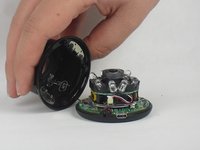
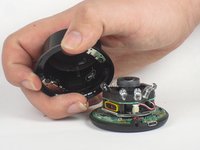
Lift the front of the case slowly, as there is an antenna cable attached to the motherboard.
-
Carefully disconnect the antenna cable from the motherboard. You will feel this cable "pop" out of place when disconnected.
-
-
-
-
-
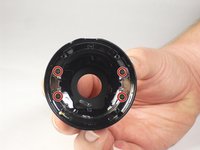
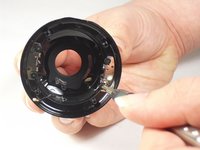
Using a Philips #0 screwdriver, remove the four 4 mm screws that are attaching the mounting clips to the case.
-
-
-
Lift the mounting clips away from the case.
-
-





To reassemble your device, follow these instructions in reverse order.

crwdns2935287:0crwdne2935287:0

USF Tampa, Team 15-4, Blackwell Fall 2015 crwdns2935289:0USF Tampa, Team 15-4, Blackwell Fall 2015crwdne2935289:0
USFT-BLACKWELL-F15S15G4
crwdns2931471:03crwdne2931471:0
crwdns2935297:072crwdne2935297:0
