crwdns2933423:0crwdne2933423:0
crwdns2947577:0crwdnd2947577:0crwdne2947577:0

Neato Botvac 80 Laser Replacement

crwdns2942213:0crwdne2942213:0

    1. Neato Botvac 80 Laser Replacement, Rear Bumper: crwdns2935265:01crwdnd2935265:01crwdnd2935265:01crwdne2935265:0
      • Grab the rear bumper with both hands on either side.

      crwdns2952109:0crwdne2952109:0

      crwdns2917038:0crwdne2917038:0

    2. Neato Botvac 80 Laser Replacement: crwdns2935265:02crwdnd2935265:01crwdnd2935265:01crwdne2935265:0
      • Pull the left and right sides away from the machine to unclip the bumper. This requires that you bend the plastic a little bit. Unclip one side a little bit and allow the prong to rest on the side of the machine. Then unclip the other side and pull off the bumper parallel to both sides

      crwdns2952109:0crwdne2952109:0

      crwdns2917038:0crwdne2917038:0

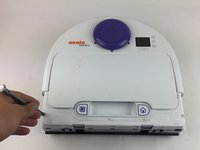
    1. Neato Botvac 80 Laser Replacement, Top Face Panel: crwdns2935265:03crwdnd2935265:01crwdnd2935265:02crwdne2935265:0 Neato Botvac 80 Laser Replacement, Top Face Panel: crwdns2935265:03crwdnd2935265:02crwdnd2935265:02crwdne2935265:0
      • Looking from above, remove the two 11mm screws with a torx T10 screwdriver.

      crwdns2952109:0crwdne2952109:0

      crwdns2917038:0crwdne2917038:0

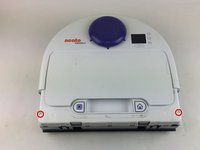
    2. Neato Botvac 80 Laser Replacement: crwdns2935265:04crwdnd2935265:01crwdnd2935265:01crwdne2935265:0
      • Begin by placing the robot on it's back and removing the six 11m screws using a Torx T10 screwdriver.

      crwdns2952109:0crwdne2952109:0

      crwdns2917038:0crwdne2917038:0

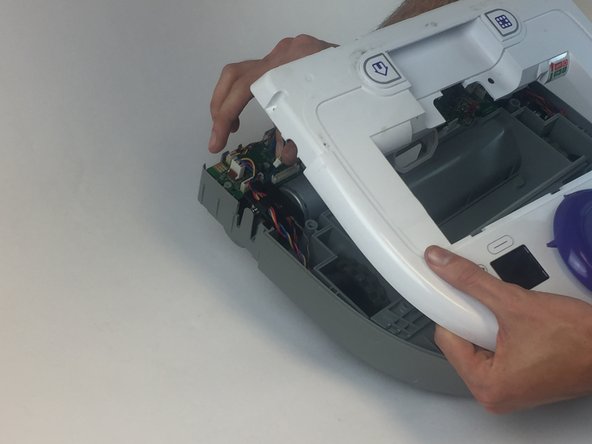
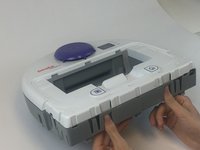
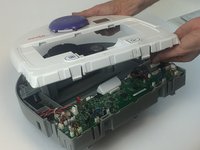
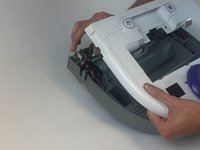
    3. Neato Botvac 80 Laser Replacement: crwdns2935265:05crwdnd2935265:01crwdnd2935265:03crwdne2935265:0 Neato Botvac 80 Laser Replacement: crwdns2935265:05crwdnd2935265:02crwdnd2935265:03crwdne2935265:0 Neato Botvac 80 Laser Replacement: crwdns2935265:05crwdnd2935265:03crwdnd2935265:03crwdne2935265:0
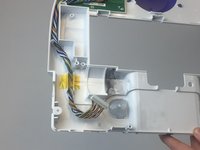
      • To remove the top, you must press in both of the clamps at the same time and push upwards.

      • When removing the top, before you can completely take it off you must unplug the LCD power cable from the motherboard.

      crwdns2952109:0crwdne2952109:0

      crwdns2917038:0crwdne2917038:0

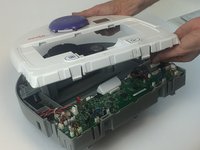
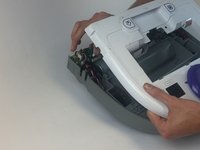
    1. Neato Botvac 80 Laser Replacement, Laser: crwdns2935265:06crwdnd2935265:01crwdnd2935265:03crwdne2935265:0 Neato Botvac 80 Laser Replacement, Laser: crwdns2935265:06crwdnd2935265:02crwdnd2935265:03crwdne2935265:0 Neato Botvac 80 Laser Replacement, Laser: crwdns2935265:06crwdnd2935265:03crwdnd2935265:03crwdne2935265:0
      • Lift gently upon the top panel.

      • Unplug the clip located on the right side before completely removing.

      crwdns2952109:0crwdne2952109:0

      crwdns2917038:0crwdne2917038:0

    2. Neato Botvac 80 Laser Replacement: crwdns2935265:07crwdnd2935265:01crwdnd2935265:03crwdne2935265:0 Neato Botvac 80 Laser Replacement: crwdns2935265:07crwdnd2935265:02crwdnd2935265:03crwdne2935265:0 Neato Botvac 80 Laser Replacement: crwdns2935265:07crwdnd2935265:03crwdnd2935265:03crwdne2935265:0
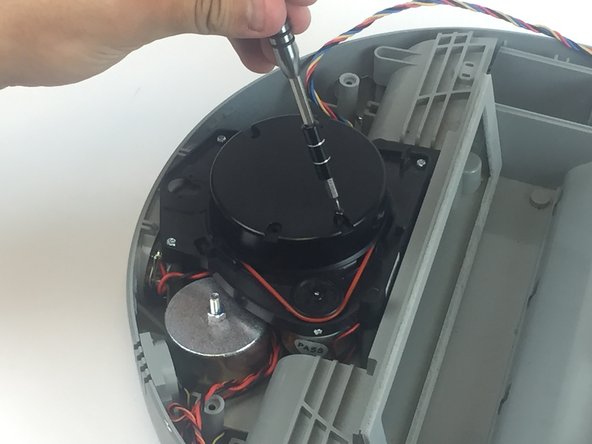
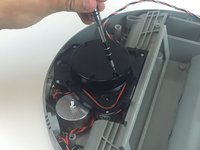
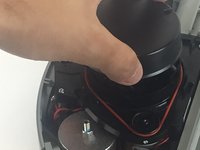
      • This black cap spins so may need a hand when unscrewing the screws.

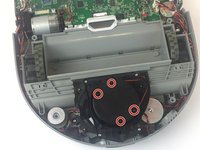
      • Locate and unscrew the four 12 mm screws located in the black cap with the phillips #00 screwdriver.

      • Lift the black cap to reveal the laser.

      crwdns2952109:0crwdne2952109:0

      crwdns2917038:0crwdne2917038:0

    3. Neato Botvac 80 Laser Replacement: crwdns2935265:08crwdnd2935265:01crwdnd2935265:03crwdne2935265:0 Neato Botvac 80 Laser Replacement: crwdns2935265:08crwdnd2935265:02crwdnd2935265:03crwdne2935265:0 Neato Botvac 80 Laser Replacement: crwdns2935265:08crwdnd2935265:03crwdnd2935265:03crwdne2935265:0
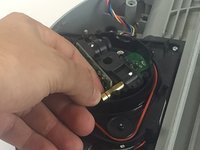
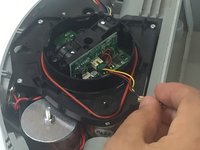
      • There are two loosely secured black blinders on both the laser and sensor.

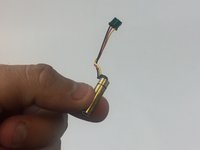
      • Gently pull back on the gold laser to remove it from the socket.

      • Unplug the mini LCU clip by gently pulling up and remove the laser.

      crwdns2952109:0crwdne2952109:0

      crwdns2917038:0crwdne2917038:0

crwdns2915888:0crwdne2915888:0

To reassemble your device, follow these instructions in reverse order.

crwdns2935221:0crwdne2935221:0

crwdns2935229:04crwdne2935229:0

Brandon Blank

crwdns2935283:002/02/17crwdne2935283:0

675 crwdns2915208:0crwdne2915208:0

crwdns2935297:05crwdne2935297:0

crwdns2935287:0crwdne2935287:0

USF Tampa, Team 17-5, Blackwell Spring 2017 crwdns2935289:0USF Tampa, Team 17-5, Blackwell Spring 2017crwdne2935289:0

USFT-BLACKWELL-S17S17G5

crwdns2931471:03crwdne2931471:0

crwdns2935297:018crwdne2935297:0

crwdns2947412:09crwdne2947412:0

lol. You don’t need to open it to replace the laser. The top is a clip on. Just pull it and remove 4 screws.

Evgany Vorona - crwdns2934203:0crwdne2934203:0 crwdns2950251:0crwdne2950251:0

where do you buy the replacement laser?

Nancy Butler - crwdns2934203:0crwdne2934203:0 crwdns2950251:0crwdne2950251:0

I too would like to know where he got a replacement laser.

Anthony Mainini - crwdns2934203:0crwdne2934203:0 crwdns2950251:0crwdne2950251:0

where do I buy a replacement laser?

bjurgensen79@gmail.com

Beverly Jurgensen

Beverly Jurgensen - crwdns2934203:0crwdne2934203:0 crwdns2950251:0crwdne2950251:0

Where do I buy a replacement laser?

Beverly Jurgensen

Beverly Jurgensen - crwdns2934203:0crwdne2934203:0 crwdns2950251:0crwdne2950251:0

crwdns2917038:0crwdne2917038:0

crwdns2936625:0crwdne2936625:0:

crwdns2936751:024crwdne2936751:0 4

crwdns2936753:07crwdne2936753:0 18

crwdns2936753:030crwdne2936753:0 43

crwdns2942667:0crwdne2942667:0 9,963