
Munchkinz Battery Replacement

crwdns2959932:0crwdnd2959932:0Hee Jin Chocrwdnd2959932:0crwdnd2959932:0crwdne2959932:0
crwdns2959936:0Kho 18, 2015crwdne2959936:0
crwdns2869540:0crwdne2869540:0: 991
crwdns2959988:0crwdne2959988:0
- crwdns2959990:0crwdne2959990:0
- 3
- crwdns2959992:0crwdne2959992:0
- 18
- crwdns2959994:0crwdne2959994:0
- 82
- crwdns2959996:0crwdne2959996:0
- 991
crwdns2955950:0crwdne2955950:0: 0
crwdns2959998:0crwdne2959998:0
crwdns2960000:0crwdne2960000:0crwdns2959984:0crwdne2959984:0: 0 1
crwdns2959956:0crwdne2959956:0
crwdns2959968:01crwdne2959968:0
crwdns2959986:0crwdne2959986:0: 0 1
crwdns2959958:0crwdne2959958:0
crwdns2959976:01crwdne2959976:0
crwdns2915892:0crwdne2915892:0
crwdns2959928:0crwdne2959928:0 ↓Display how to remove the battery.
crwdns2959930:0crwdne2959930:0
crwdns2943215:0crwdne2943215:0
-
-
Spudger4.9


-
-
-
Insert spudger into the USB Micro slot and pry the case apart.
 crwdns2952109:0crwdne2952109:0
-
-
-
Slide the wide plastic opening tool across the seem, separating it if you can't pry the device open using just the spudger.
-
-
-
-
After prying the device apart, it should look like this.
-
-
-
-
-
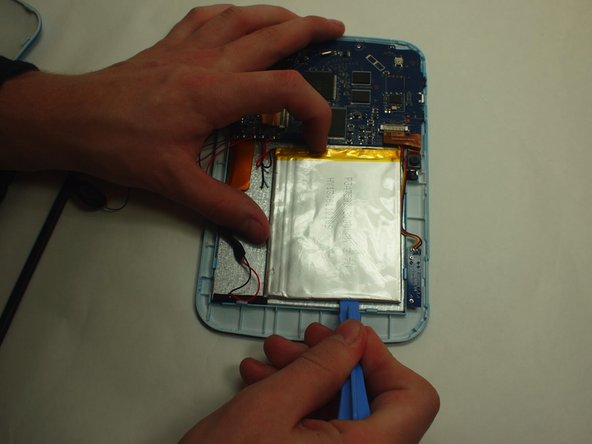
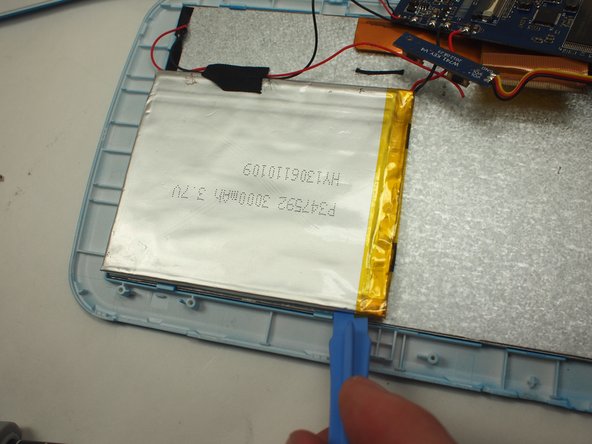
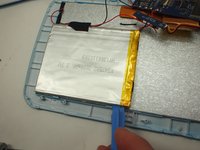
Use the wide plastic opening tool to slowly pry each side of the battery up.
-
-
-
Use the Soldering Iron to disconnect the each cable.
-
-



To reassemble your device, follow these instructions in reverse order.

crwdns2935287:0crwdne2935287:0

UW Tacoma, Team 3-6, Rose Winter 2015 crwdns2935289:0UW Tacoma, Team 3-6, Rose Winter 2015crwdne2935289:0
UWT-ROSE-W15S3G6
crwdns2931471:03crwdne2931471:0
crwdns2935297:084crwdne2935297:0
