crwdns2933423:0crwdne2933423:0
crwdns2947577:0crwdnd2947577:0crwdne2947577:0

Motorola i886 Slide-out Keyboard Replacement

crwdns2942213:0crwdne2942213:0

  1. Motorola i886 Slide-out Keyboard Replacement, Back Cover: crwdns2935265:01crwdnd2935265:01crwdnd2935265:02crwdne2935265:0 Motorola i886 Slide-out Keyboard Replacement, Back Cover: crwdns2935265:01crwdnd2935265:02crwdnd2935265:02crwdne2935265:0
    • Undo the headphone jack and USB port cover with your fingertip. Place your middle finger in the indent on the upper left side of the back of the phone.

    crwdns2952109:0crwdne2952109:0
  2. Motorola i886 Slide-out Keyboard Replacement, Open: crwdns2935265:02crwdnd2935265:01crwdnd2935265:01crwdne2935265:0
    • Pull back until cover is removed. Place cover aside.

    crwdns2952109:0crwdne2952109:0
  3. Motorola i886 Slide-out Keyboard Replacement, Battery: crwdns2935265:03crwdnd2935265:01crwdnd2935265:01crwdne2935265:0
    • Locate battery and use your index finger to grasp the upper left side of the battery and pull back to remove. Set battery aside.

    crwdns2952109:0crwdne2952109:0
  4. Motorola i886 Slide-out Keyboard Replacement, SIM Card: crwdns2935265:04crwdnd2935265:01crwdnd2935265:01crwdne2935265:0
    • Locate and use your thumb to slide the SIM card to the right until it is removed and set it aside.

    crwdns2952109:0crwdne2952109:0
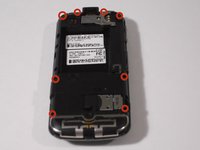
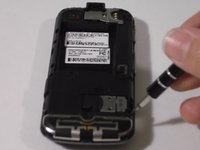
  5. Motorola i886 Slide-out Keyboard Replacement, Screw Removal: crwdns2935265:05crwdnd2935265:01crwdnd2935265:02crwdne2935265:0 Motorola i886 Slide-out Keyboard Replacement, Screw Removal: crwdns2935265:05crwdnd2935265:02crwdnd2935265:02crwdne2935265:0
    • Remove eight black .4 centimeter screws on the top, bottom, and sides of the phone with a T5 Torx screwdriver by inserting it into the screws and turning it to the left. Set screws aside.

    crwdns2952109:0crwdne2952109:0
  6. Motorola i886 Slide-out Keyboard Replacement, Separating: crwdns2935265:06crwdnd2935265:01crwdnd2935265:01crwdne2935265:0
    • Loosen four fastener pieces on the side and bottom with a plastic opening tool to pry them backwards.

    • Insert the plastic opening tool between the loosened casing and the rest of the phone and pry the two pieces apart to remove the casing.

    crwdns2952109:0crwdne2952109:0
  7. Motorola i886 Slide-out Keyboard Replacement: crwdns2935265:07crwdnd2935265:01crwdnd2935265:01crwdne2935265:0
    • Remove the .3 centimeter silver screw with the T5 Torx screwdriver.

    • Use your fingertips to lift up the circuit board and lay it on the side of the phone. Note that the two pieces are attached by a gold and black strip.

    crwdns2952109:0crwdne2952109:0
  8. Motorola i886 Slide-out Keyboard Replacement, Keyboard Removal: crwdns2935265:08crwdnd2935265:01crwdnd2935265:01crwdne2935265:0
    • Locate and grip the black, white, and blue keyboard layer with your fingernail, lift up to remove it.

    crwdns2952109:0crwdne2952109:0
crwdns2915888:0crwdne2915888:0

To reassemble your device, follow these instructions in reverse order.

Felicita Correa

crwdns2935283:009/03/14crwdne2935283:0

418 crwdns2915208:0crwdne2915208:0

crwdns2935297:04crwdne2935297:0

crwdns2935287:0crwdne2935287:0

USF Sarasota-Manatee, Team 1-2, Stewart Fall 2014 crwdns2935289:0USF Sarasota-Manatee, Team 1-2, Stewart Fall 2014crwdne2935289:0

USFSM-STEWART-F14S1G2

crwdns2931471:03crwdne2931471:0

crwdns2935297:017crwdne2935297:0

crwdns2947412:00crwdne2947412:0

crwdns2917038:0crwdne2917038:0

crwdns2936625:0crwdne2936625:0:

crwdns2936751:024crwdne2936751:0 1

crwdns2936753:07crwdne2936753:0 7

crwdns2936753:030crwdne2936753:0 37

crwdns2942667:0crwdne2942667:0 434