crwdns2933423:0crwdne2933423:0
crwdns2947577:0crwdnd2947577:0crwdne2947577:0

Motorola i560 Keypad Replacement

crwdns2942213:0crwdne2942213:0

    1. Motorola i560 Keypad Replacement, Battery: crwdns2935265:01crwdnd2935265:01crwdnd2935265:01crwdne2935265:0
      • Place thumb on the rubber tab on the lower back of the phone.

      • Push away from the phone to release back panel.

      crwdns2952109:0crwdne2952109:0

      crwdns2917038:0crwdne2917038:0

    2. Motorola i560 Keypad Replacement: crwdns2935265:02crwdnd2935265:01crwdnd2935265:01crwdne2935265:0
      • Lift the back panel of the phone to expose battery (not shown here).

      crwdns2952109:0crwdne2952109:0

      crwdns2917038:0crwdne2917038:0

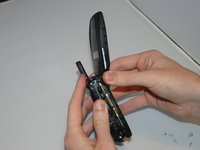
    1. Motorola i560 Keypad Replacement, Motherboard: crwdns2935265:03crwdnd2935265:01crwdnd2935265:01crwdne2935265:0
      • Pull the antenna up to reveal two of the six screws.

      crwdns2952109:0crwdne2952109:0

      crwdns2917038:0crwdne2917038:0

    2. Motorola i560 Keypad Replacement: crwdns2935265:04crwdnd2935265:01crwdnd2935265:01crwdne2935265:0
      • Unscrew all six screws on the back side of the phone using a T-6 bit.

      crwdns2952109:0crwdne2952109:0

      crwdns2917038:0crwdne2917038:0

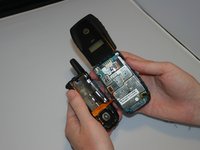
    3. Motorola i560 Keypad Replacement: crwdns2935265:05crwdnd2935265:01crwdnd2935265:02crwdne2935265:0 Motorola i560 Keypad Replacement: crwdns2935265:05crwdnd2935265:02crwdnd2935265:02crwdne2935265:0
      • Gently separate the front and back sides of the phone, as shown in the picture.

      • Be careful not to break or bend the ribbon cables.

      crwdns2952109:0crwdne2952109:0

      crwdns2917038:0crwdne2917038:0

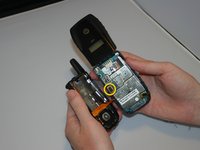
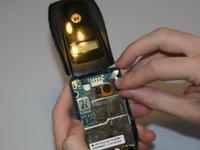
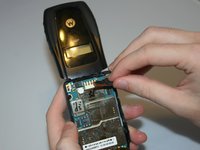
    4. Motorola i560 Keypad Replacement: crwdns2935265:06crwdnd2935265:01crwdnd2935265:02crwdne2935265:0 Motorola i560 Keypad Replacement: crwdns2935265:06crwdnd2935265:02crwdnd2935265:02crwdne2935265:0
      • Detach the first ribbon cable by unplugging it from the motherboard.

      crwdns2952109:0crwdne2952109:0

      crwdns2917038:0crwdne2917038:0

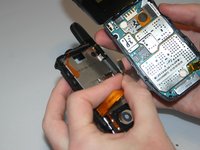
    5. Motorola i560 Keypad Replacement: crwdns2935265:07crwdnd2935265:01crwdnd2935265:02crwdne2935265:0 Motorola i560 Keypad Replacement: crwdns2935265:07crwdnd2935265:02crwdnd2935265:02crwdne2935265:0
      • Detach the speaker ribbon cable from the motherboard.

      crwdns2952109:0crwdne2952109:0

      crwdns2917038:0crwdne2917038:0

    6. Motorola i560 Keypad Replacement: crwdns2935265:08crwdnd2935265:01crwdnd2935265:01crwdne2935265:0
      • Remove the motherboard from the front half of the phone by gently shaking it loose. It should come out with little to no trouble.

      crwdns2952109:0crwdne2952109:0

      crwdns2917038:0crwdne2917038:0

    1. Motorola i560 Keypad Replacement, Keypad: crwdns2935265:09crwdnd2935265:01crwdnd2935265:01crwdne2935265:0
      • Push lightly from the front of the keypad to remove it.

      crwdns2952109:0crwdne2952109:0

      crwdns2917038:0crwdne2917038:0

crwdns2915888:0crwdne2915888:0

To reassemble your device, follow these instructions in reverse order.

crwdns2935221:0crwdne2935221:0

crwdns2935227:0crwdne2935227:0

Haley S

crwdns2935283:003/11/13crwdne2935283:0

10 crwdns2915208:0crwdne2915208:0

crwdns2935297:04crwdne2935297:0

crwdns2935287:0crwdne2935287:0

Clemson, Team 13-6, Benson Spring 2013 crwdns2935289:0Clemson, Team 13-6, Benson Spring 2013crwdne2935289:0

CLEM-BENSON-S13S13G6

crwdns2931471:03crwdne2931471:0

crwdns2935297:096crwdne2935297:0

crwdns2947412:00crwdne2947412:0

crwdns2917038:0crwdne2917038:0

crwdns2936625:0crwdne2936625:0:

crwdns2936751:024crwdne2936751:0 0

crwdns2936753:07crwdne2936753:0 3

crwdns2936753:030crwdne2936753:0 11

crwdns2942667:0crwdne2942667:0 408