crwdns2933423:0crwdne2933423:0
crwdns2947577:0crwdnd2947577:0crwdne2947577:0

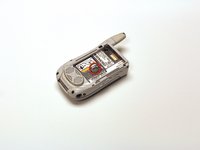
Motorola i450 Boost Mobile Keypad Replacement

crwdns2942213:0crwdne2942213:0

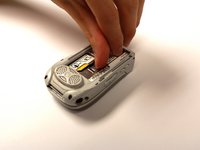
    1. Motorola i450 Boost Mobile Keypad Replacement, Back Cover: crwdns2935265:01crwdnd2935265:01crwdnd2935265:03crwdne2935265:0 Motorola i450 Boost Mobile Keypad Replacement, Back Cover: crwdns2935265:01crwdnd2935265:02crwdnd2935265:03crwdne2935265:0 Motorola i450 Boost Mobile Keypad Replacement, Back Cover: crwdns2935265:01crwdnd2935265:03crwdnd2935265:03crwdne2935265:0
      • Place the phone on a flat surface with the front facing down.

      • Insert your finger under the gray plastic cover at the bottom end of the phone.

      • Lift the cover off the phone.

      crwdns2952109:0crwdne2952109:0

      crwdns2917038:0crwdne2917038:0

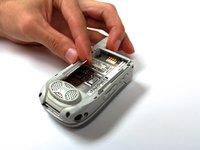
    1. Motorola i450 Boost Mobile Keypad Replacement, Battery: crwdns2935265:02crwdnd2935265:01crwdnd2935265:03crwdne2935265:0 Motorola i450 Boost Mobile Keypad Replacement, Battery: crwdns2935265:02crwdnd2935265:02crwdnd2935265:03crwdne2935265:0 Motorola i450 Boost Mobile Keypad Replacement, Battery: crwdns2935265:02crwdnd2935265:03crwdnd2935265:03crwdne2935265:0
      • Place your thumb in the notch in the lower left corner of the battery compartment.

      • Lift the battery up and away from the phone.

      • Remove the battery.

      crwdns2952109:0crwdne2952109:0

      crwdns2917038:0crwdne2917038:0

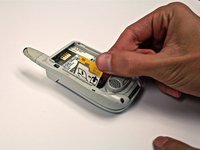
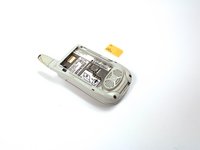
    1. Motorola i450 Boost Mobile Keypad Replacement, SIM Card: crwdns2935265:03crwdnd2935265:01crwdnd2935265:02crwdne2935265:0 Motorola i450 Boost Mobile Keypad Replacement, SIM Card: crwdns2935265:03crwdnd2935265:02crwdnd2935265:02crwdne2935265:0
      • Locate the metal slider that holds the SIM card in place.

      • Push the slider away from the metal flap which contains the SIM card. The flap will pop up.

      crwdns2952109:0crwdne2952109:0

      crwdns2917038:0crwdne2917038:0

    2. Motorola i450 Boost Mobile Keypad Replacement: crwdns2935265:04crwdnd2935265:01crwdnd2935265:03crwdne2935265:0 Motorola i450 Boost Mobile Keypad Replacement: crwdns2935265:04crwdnd2935265:02crwdnd2935265:03crwdne2935265:0 Motorola i450 Boost Mobile Keypad Replacement: crwdns2935265:04crwdnd2935265:03crwdnd2935265:03crwdne2935265:0
      • Lift the metal flap to gain access to the bottom of the SIM card.

      • Remove the SIM card by sliding it out parallel to the bottom of the flap.

      crwdns2952109:0crwdne2952109:0

      crwdns2917038:0crwdne2917038:0

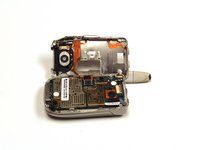
    1. Motorola i450 Boost Mobile Keypad Replacement, Circuit Board: crwdns2935265:05crwdnd2935265:01crwdnd2935265:01crwdne2935265:0
      • Extend the antenna.

      crwdns2952109:0crwdne2952109:0

      crwdns2917038:0crwdne2917038:0

    2. Motorola i450 Boost Mobile Keypad Replacement: crwdns2935265:06crwdnd2935265:01crwdnd2935265:01crwdne2935265:0
      • Remove the four 4.8 mm Torx T6 screws from the corners of the back of the phone.

      • If the antenna is not fully extended, the top left screw will not be accessible.

      crwdns2952109:0crwdne2952109:0

      crwdns2917038:0crwdne2917038:0

    3. Motorola i450 Boost Mobile Keypad Replacement: crwdns2935265:07crwdnd2935265:01crwdnd2935265:03crwdne2935265:0 Motorola i450 Boost Mobile Keypad Replacement: crwdns2935265:07crwdnd2935265:02crwdnd2935265:03crwdne2935265:0 Motorola i450 Boost Mobile Keypad Replacement: crwdns2935265:07crwdnd2935265:03crwdnd2935265:03crwdne2935265:0
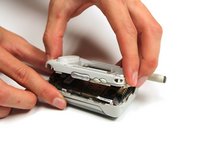
      • Gently lift off the back half of the phone and set to the side.

      • Permanent circuit connections prevent the cover from completely separating from the phone. Do not attempt to disconnect these circuits.

      crwdns2952109:0crwdne2952109:0

      crwdns2917038:0crwdne2917038:0

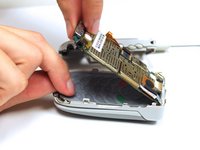
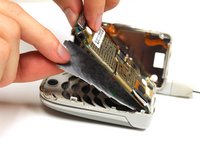
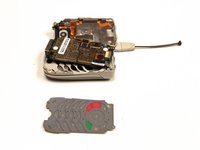
    1. Motorola i450 Boost Mobile Keypad Replacement, Keypad: crwdns2935265:08crwdnd2935265:01crwdnd2935265:03crwdne2935265:0 Motorola i450 Boost Mobile Keypad Replacement, Keypad: crwdns2935265:08crwdnd2935265:02crwdnd2935265:03crwdne2935265:0 Motorola i450 Boost Mobile Keypad Replacement, Keypad: crwdns2935265:08crwdnd2935265:03crwdnd2935265:03crwdne2935265:0
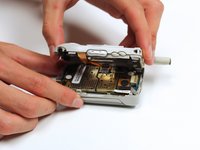
      • Gently lift the end of the circuit board farthest from the phone hinge.

      • The circuit board is permanently connected to the phone casing at the end nearest to the hinge.

      • Grasp the keypad at the bottom of the phone, raise it, and pull it away.

      crwdns2952109:0crwdne2952109:0

      crwdns2917038:0crwdne2917038:0

crwdns2915888:0crwdne2915888:0

To reassemble your device, follow these instructions in reverse order.

crwdns2935221:0crwdne2935221:0

Garrison Stevens

crwdns2935283:010/22/12crwdne2935283:0

1 crwdns2915208:0crwdne2915208:0

crwdns2935297:06crwdne2935297:0

crwdns2935287:0crwdne2935287:0

Clemson, Team 15-2, Benson Fall 2012 crwdns2935289:0Clemson, Team 15-2, Benson Fall 2012crwdne2935289:0

CLEM-BENSON-F12S15G2

crwdns2931471:04crwdne2931471:0

crwdns2935297:0108crwdne2935297:0

crwdns2947412:00crwdne2947412:0

crwdns2917038:0crwdne2917038:0

crwdns2936625:0crwdne2936625:0:

crwdns2936751:024crwdne2936751:0 0

crwdns2936753:07crwdne2936753:0 4

crwdns2936753:030crwdne2936753:0 18

crwdns2942667:0crwdne2942667:0 781