crwdns2933423:0crwdne2933423:0
crwdns2947577:0crwdnd2947577:0crwdne2947577:0

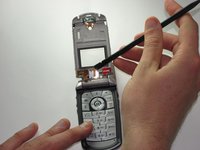
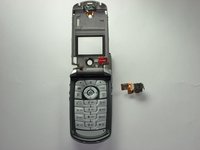
Motorola V710 Camera Replacement

crwdns2942213:0crwdne2942213:0

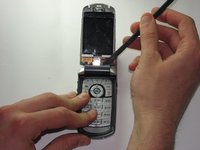
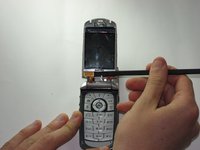
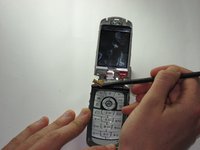
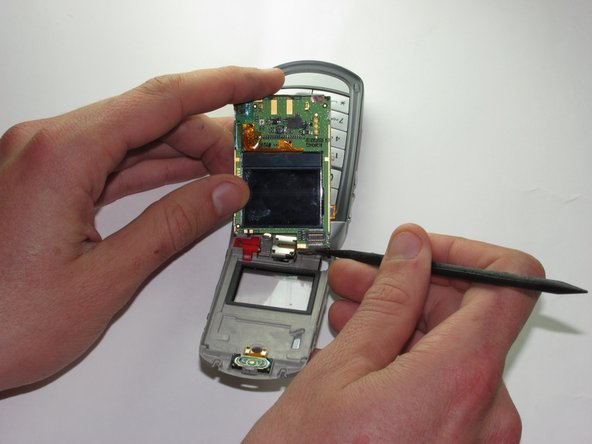
    1. Motorola V710 Camera Replacement, Screen: crwdns2935265:01crwdnd2935265:01crwdnd2935265:03crwdne2935265:0 Motorola V710 Camera Replacement, Screen: crwdns2935265:01crwdnd2935265:02crwdnd2935265:03crwdne2935265:0 Motorola V710 Camera Replacement, Screen: crwdns2935265:01crwdnd2935265:03crwdnd2935265:03crwdne2935265:0
      • Insert the spudger between the gray and black plates of the screen casing.

      • Using a twist and pry motion work your way around the phone slowly prying the two plates apart.

      • Note: this part of the phone is glued and will require re-gluing to return the phone to its original state.

      crwdns2952109:0crwdne2952109:0

      crwdns2917038:0crwdne2917038:0

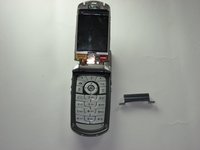
    2. Motorola V710 Camera Replacement: crwdns2935265:02crwdnd2935265:01crwdnd2935265:02crwdne2935265:0 Motorola V710 Camera Replacement: crwdns2935265:02crwdnd2935265:02crwdnd2935265:02crwdne2935265:0
      • If you look at the side of the now exposed screen there should be a metal casing held onto the phone by two tabs.

      • Insert the spudger underneath one of the corners of the metal and bend it out enough to slip it over the tabs.

      • This metal is reasonably resistant to bending and will likely require a good deal of force to get it off the phone.

      crwdns2952109:0crwdne2952109:0

      crwdns2917038:0crwdne2917038:0

    3. Motorola V710 Camera Replacement: crwdns2935265:03crwdnd2935265:01crwdnd2935265:02crwdne2935265:0 Motorola V710 Camera Replacement: crwdns2935265:03crwdnd2935265:02crwdnd2935265:02crwdne2935265:0
      • Orient the phone so that the main screen is facing upward.

      • Locate the hinge casing, a dark gray piece that covers the hinge.

      • Insert the spudger under one of the top corners of this piece and using a twist and pry motion remove from the phone.

      crwdns2952109:0crwdne2952109:0

      crwdns2917038:0crwdne2917038:0

    4. Motorola V710 Camera Replacement: crwdns2935265:04crwdnd2935265:01crwdnd2935265:02crwdne2935265:0 Motorola V710 Camera Replacement: crwdns2935265:04crwdnd2935265:02crwdnd2935265:02crwdne2935265:0
      • Use the spudger to pry upward and remove the plug that connects the screen to the main body of the phone.

      crwdns2952109:0crwdne2952109:0

      crwdns2917038:0crwdne2917038:0

    5. Motorola V710 Camera Replacement: crwdns2935265:05crwdnd2935265:01crwdnd2935265:02crwdne2935265:0 Motorola V710 Camera Replacement: crwdns2935265:05crwdnd2935265:02crwdnd2935265:02crwdne2935265:0
      • Insert the spudger under the screen and pry the screen forward.

      • Remove the plug on the back of the screen that connects it to the camera.

      crwdns2952109:0crwdne2952109:0

      crwdns2917038:0crwdne2917038:0

    6. Motorola V710 Camera Replacement: crwdns2935265:06crwdnd2935265:01crwdnd2935265:02crwdne2935265:0 Motorola V710 Camera Replacement: crwdns2935265:06crwdnd2935265:02crwdnd2935265:02crwdne2935265:0
      • Use the spudger to remove the screen.

      crwdns2952109:0crwdne2952109:0

      crwdns2917038:0crwdne2917038:0

    1. Motorola V710 Camera Replacement, Camera: crwdns2935265:07crwdnd2935265:01crwdnd2935265:03crwdne2935265:0 Motorola V710 Camera Replacement, Camera: crwdns2935265:07crwdnd2935265:02crwdnd2935265:03crwdne2935265:0 Motorola V710 Camera Replacement, Camera: crwdns2935265:07crwdnd2935265:03crwdnd2935265:03crwdne2935265:0
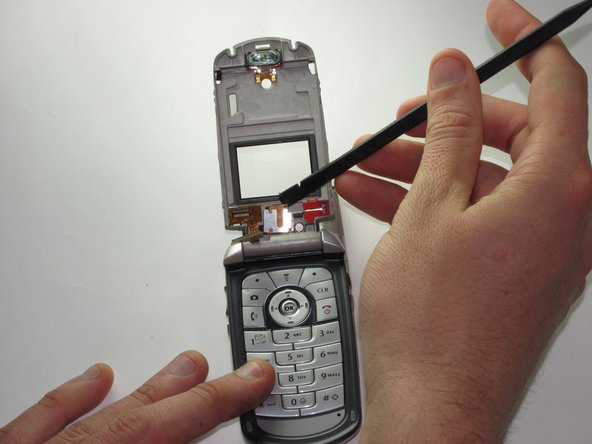
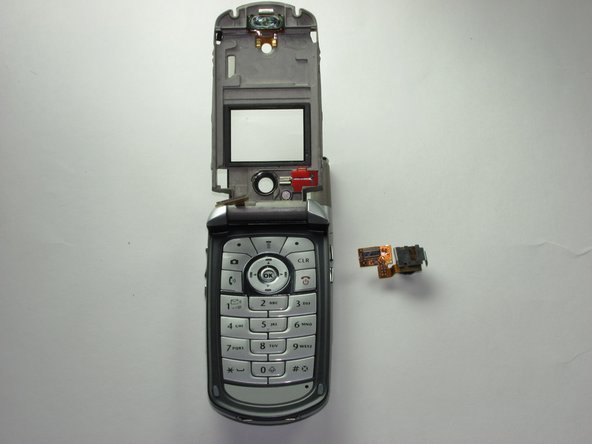
      • Use the spudger to remove the camera module.

      • Note: The camera has an adhesive holding it in place, so a slight force is necessary to remove it.

      crwdns2952109:0crwdne2952109:0

      crwdns2917038:0crwdne2917038:0

crwdns2915888:0crwdne2915888:0

To reassemble your device, follow these instructions in reverse order.

crwdns2935221:0crwdne2935221:0

Karl Sanders

crwdns2935283:001/26/10crwdne2935283:0

8 crwdns2915208:0crwdne2915208:0

crwdns2935297:07crwdne2935297:0

crwdns2935287:0crwdne2935287:0

Cal Poly, Team 8-49, Regan Winter 2010 crwdns2935289:0Cal Poly, Team 8-49, Regan Winter 2010crwdne2935289:0

CPSU-REGAN-W10S8G49

crwdns2931471:05crwdne2931471:0

crwdns2935297:096crwdne2935297:0

crwdns2947412:00crwdne2947412:0

crwdns2917038:0crwdne2917038:0

crwdns2936625:0crwdne2936625:0:

crwdns2936751:024crwdne2936751:0 2

crwdns2936753:07crwdne2936753:0 11

crwdns2936753:030crwdne2936753:0 30

crwdns2942667:0crwdne2942667:0 1,984