crwdns2933423:0crwdne2933423:0
crwdns2947577:0crwdnd2947577:0crwdne2947577:0

Motorola V180 Motherboard Replacement

crwdns2942213:0crwdne2942213:0

    1. Motorola V180 Motherboard Replacement, Battery: crwdns2935265:01crwdnd2935265:01crwdnd2935265:03crwdne2935265:0 Motorola V180 Motherboard Replacement, Battery: crwdns2935265:01crwdnd2935265:02crwdnd2935265:03crwdne2935265:0 Motorola V180 Motherboard Replacement, Battery: crwdns2935265:01crwdnd2935265:03crwdnd2935265:03crwdne2935265:0
      • Completely power off the Motorola V180.

      • Flip the phone over to its back side.

      • Press down the button and slide off the back cover.

      • Remove the old battery.

      crwdns2952109:0crwdne2952109:0

      crwdns2917038:0crwdne2917038:0

    1. Motorola V180 Motherboard Replacement, Motherboard: crwdns2935265:02crwdnd2935265:01crwdnd2935265:03crwdne2935265:0 Motorola V180 Motherboard Replacement, Motherboard: crwdns2935265:02crwdnd2935265:02crwdnd2935265:03crwdne2935265:0 Motorola V180 Motherboard Replacement, Motherboard: crwdns2935265:02crwdnd2935265:03crwdnd2935265:03crwdne2935265:0
      • Power off the Motorola V180.

      • Flip the phone over to its back side.

      • Hold down the button and slide off the back cover.

      • Remove the battery.

      crwdns2952109:0crwdne2952109:0

      crwdns2917038:0crwdne2917038:0

    2. Motorola V180 Motherboard Replacement: crwdns2935265:03crwdnd2935265:01crwdnd2935265:03crwdne2935265:0 Motorola V180 Motherboard Replacement: crwdns2935265:03crwdnd2935265:02crwdnd2935265:03crwdne2935265:0 Motorola V180 Motherboard Replacement: crwdns2935265:03crwdnd2935265:03crwdnd2935265:03crwdne2935265:0
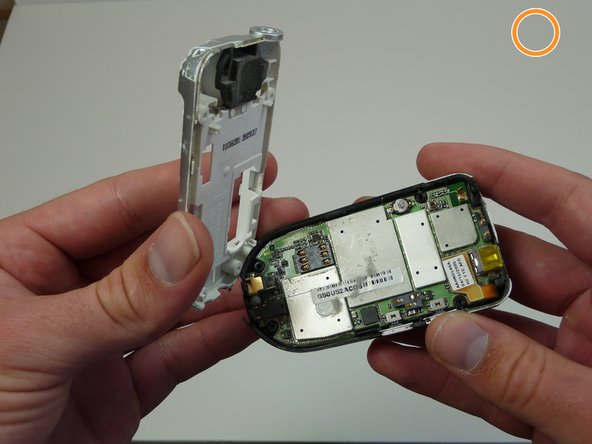
      • Use your T6 Torx Screwdriver to unscrew the four screws located on the back of the phone.

      • Remove the SIM card located on the back of the phone.

      • A ribbon near the antenna is still attached to the motherboard. Do not break this ribbon.

      crwdns2952109:0crwdne2952109:0

      crwdns2917038:0crwdne2917038:0

    3. Motorola V180 Motherboard Replacement: crwdns2935265:04crwdnd2935265:01crwdnd2935265:02crwdne2935265:0 Motorola V180 Motherboard Replacement: crwdns2935265:04crwdnd2935265:02crwdnd2935265:02crwdne2935265:0
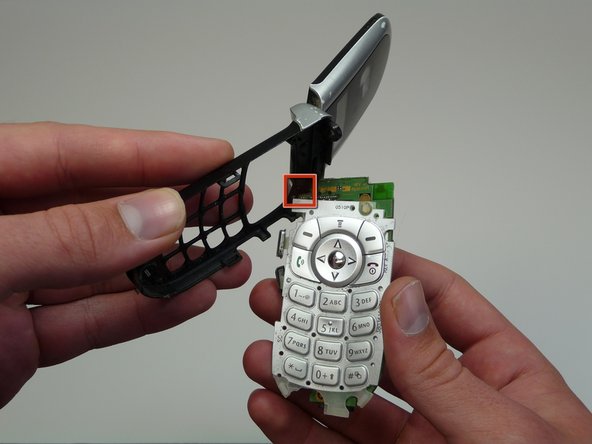
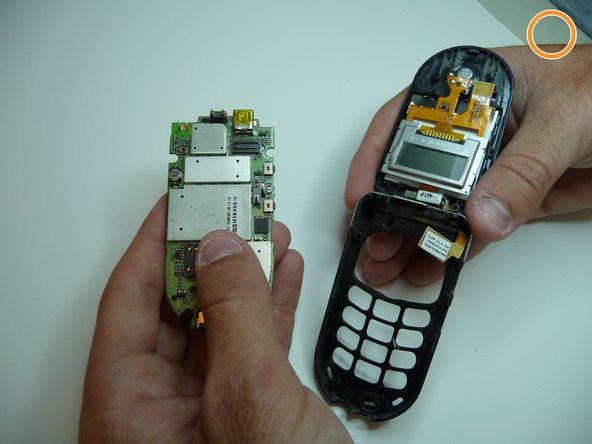
      • Unclip the pronged rectangle connector ribbon attached to the motherboard.

      • Remove the motherboard.

      crwdns2952109:0crwdne2952109:0

      crwdns2917038:0crwdne2917038:0

crwdns2915888:0crwdne2915888:0

To reassemble your device, follow these instructions in reverse order.

crwdns2935221:0crwdne2935221:0

Tyler Knisley

crwdns2935283:005/07/10crwdne2935283:0

1 crwdns2915208:0crwdne2915208:0

crwdns2935297:06crwdne2935297:0

crwdns2935287:0crwdne2935287:0

Cal Poly, Team 6-16, Maness Spring 2010 crwdns2935289:0Cal Poly, Team 6-16, Maness Spring 2010crwdne2935289:0

CPSU-MANESS-S10S6G16

crwdns2931471:04crwdne2931471:0

crwdns2935297:072crwdne2935297:0

crwdns2947412:00crwdne2947412:0

crwdns2917038:0crwdne2917038:0

crwdns2936625:0crwdne2936625:0:

crwdns2936751:024crwdne2936751:0 1

crwdns2936753:07crwdne2936753:0 7

crwdns2936753:030crwdne2936753:0 32

crwdns2942667:0crwdne2942667:0 2,349