crwdns2933423:0crwdne2933423:0
crwdns2947577:0crwdnd2947577:0crwdne2947577:0

Motorola T720c Keypad replacement or cleaning

crwdns2942213:0crwdne2942213:0

  1. Motorola T720c Keypad replacement or cleaning, Antenna: crwdns2935265:01crwdnd2935265:01crwdnd2935265:01crwdne2935265:0
    • At the base of the antenna, use your fingers to unscrew the stem counterclockwise.

    • The antenna will pull out with little effort.

    crwdns2952109:0crwdne2952109:0
  2. Motorola T720c Keypad replacement or cleaning, Battery: crwdns2935265:02crwdnd2935265:01crwdnd2935265:01crwdne2935265:0
    • On the back of the phone, locate the tab with the down arrow.

    • Using your finger, press the tab and slide the back cover down to release it from the phone.

    crwdns2952109:0crwdne2952109:0
  3. Motorola T720c Keypad replacement or cleaning: crwdns2935265:03crwdnd2935265:01crwdnd2935265:01crwdne2935265:0
    • Inserting your finger in the recess at the top edge of the battery, pull the battery away from the housing to remove it.

    crwdns2952109:0crwdne2952109:0
  4. Motorola T720c Keypad replacement or cleaning, keypad: crwdns2935265:04crwdnd2935265:01crwdnd2935265:01crwdne2935265:0
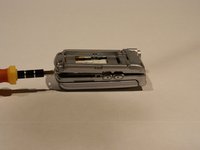
    • Locate the three screws that secure the back battery housing to the phone.

    • Use a Torx T6 screwdriver to unscrew the screws and then remove them with your fingers.

    crwdns2952109:0crwdne2952109:0
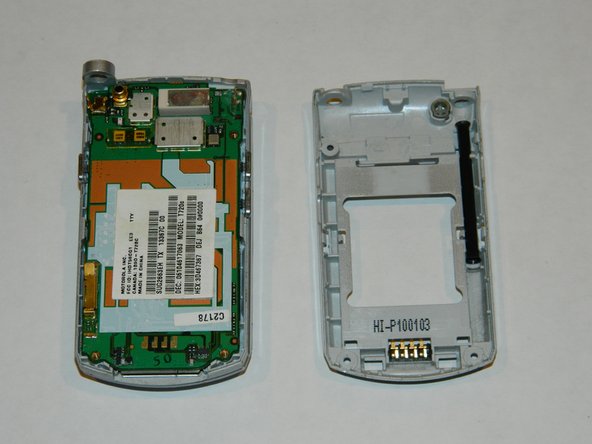
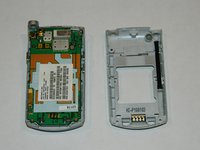
  5. Motorola T720c Keypad replacement or cleaning: crwdns2935265:05crwdnd2935265:01crwdnd2935265:02crwdne2935265:0 Motorola T720c Keypad replacement or cleaning: crwdns2935265:05crwdnd2935265:02crwdnd2935265:02crwdne2935265:0
    • Using a spudger (not shown), separate by gently prying the front from the back of the phone housing.

    • Remove the back.

    crwdns2952109:0crwdne2952109:0
  6. Motorola T720c Keypad replacement or cleaning: crwdns2935265:06crwdnd2935265:01crwdnd2935265:01crwdne2935265:0
    • The fragile wire strip connecting the display housing to the circuit board is located on the right corner of the inner hinge.

    • In the same direction you would flip open the phone, use your finger to gently lift the circuit board from the plastic keypad.

    crwdns2952109:0crwdne2952109:0
  7. Motorola T720c Keypad replacement or cleaning: crwdns2935265:07crwdnd2935265:01crwdnd2935265:01crwdne2935265:0
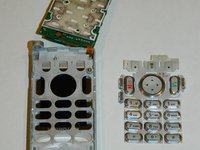
    • While avoiding contact with the inner electronics, use the spudger to lift the plastic keypad from the phone.

    crwdns2952109:0crwdne2952109:0
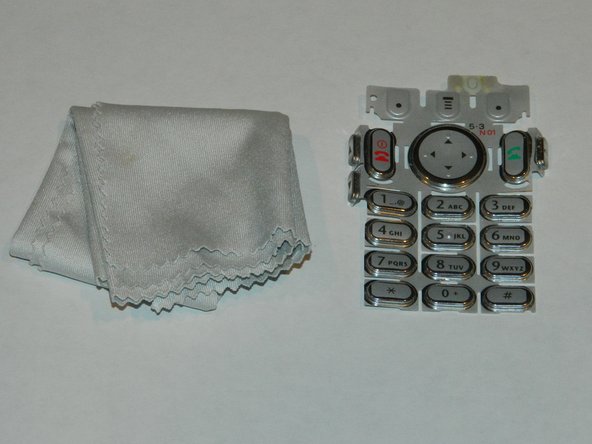
  8. Motorola T720c Keypad replacement or cleaning: crwdns2935265:08crwdnd2935265:01crwdnd2935265:02crwdne2935265:0 Motorola T720c Keypad replacement or cleaning: crwdns2935265:08crwdnd2935265:02crwdnd2935265:02crwdne2935265:0
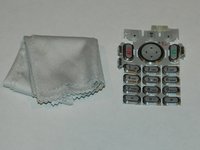
    • Using a lens cloth, wipe away any build-up on or between the keys.

    • Wait for the keypad to dry before reassembling.

    crwdns2952109:0crwdne2952109:0
crwdns2915888:0crwdne2915888:0

To reassemble your device, follow these instructions in reverse order.

Amy

crwdns2935283:010/15/12crwdne2935283:0

1 crwdns2915208:0crwdne2915208:0

crwdns2935297:04crwdne2935297:0

crwdns2935287:0crwdne2935287:0

University of Maine, Team 1-4, Diaz Fall 2012 crwdns2935289:0University of Maine, Team 1-4, Diaz Fall 2012crwdne2935289:0

UMAINE-DIAZ-F12S1G4

crwdns2931471:05crwdne2931471:0

crwdns2935297:06crwdne2935297:0

crwdns2947412:00crwdne2947412:0

crwdns2917038:0crwdne2917038:0

crwdns2936625:0crwdne2936625:0:

crwdns2936751:024crwdne2936751:0 1

crwdns2936753:07crwdne2936753:0 5

crwdns2936753:030crwdne2936753:0 59

crwdns2942667:0crwdne2942667:0 551