crwdns2933423:0crwdne2933423:0
crwdns2947577:0crwdnd2947577:0crwdne2947577:0

Motorola Droid Motherboard Replacement

crwdns2942213:0crwdne2942213:0

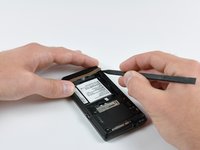
    1. Motorola Droid Motherboard Replacement, Battery: crwdns2935265:01crwdnd2935265:01crwdnd2935265:03crwdne2935265:0 Motorola Droid Motherboard Replacement, Battery: crwdns2935265:01crwdnd2935265:02crwdnd2935265:03crwdne2935265:0 Motorola Droid Motherboard Replacement, Battery: crwdns2935265:01crwdnd2935265:03crwdnd2935265:03crwdne2935265:0
      • Slide the battery cover downwards while applying pressure to the center of the battery cover with your thumb.

      • Lift and remove the battery cover out from the phone.

      crwdns2952109:0crwdne2952109:0

      crwdns2917038:0crwdne2917038:0

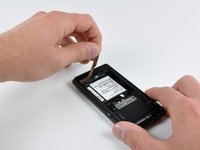
    2. Motorola Droid Motherboard Replacement: crwdns2935265:02crwdnd2935265:01crwdnd2935265:01crwdne2935265:0
      • Grasp the upper left corner of the battery and lift it out of its housing.

      crwdns2952109:0crwdne2952109:0

      crwdns2917038:0crwdne2917038:0

    1. Motorola Droid Motherboard Replacement, Rear Case: crwdns2935265:03crwdnd2935265:01crwdnd2935265:01crwdne2935265:0
      • Use a spudger to lift and remove the black plastic screw cover at the top of the phone near the camera.

      • The cover is attached by adhesive, so some force may be required.

      crwdns2952109:0crwdne2952109:0

      crwdns2917038:0crwdne2917038:0

    2. Motorola Droid Motherboard Replacement: crwdns2935265:04crwdnd2935265:01crwdnd2935265:02crwdne2935265:0 Motorola Droid Motherboard Replacement: crwdns2935265:04crwdnd2935265:02crwdnd2935265:02crwdne2935265:0
      • Using the tip of a spudger, peel up one corner of the gold ribbon beneath the battery compartment.

      • Peel the ribbon up off the phone.

      crwdns2952109:0crwdne2952109:0

      crwdns2917038:0crwdne2917038:0

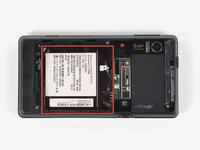
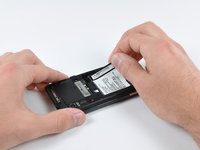
    3. Motorola Droid Motherboard Replacement: crwdns2935265:05crwdnd2935265:01crwdnd2935265:02crwdne2935265:0 Motorola Droid Motherboard Replacement: crwdns2935265:05crwdnd2935265:02crwdnd2935265:02crwdne2935265:0
      • Carefully peel the device information label that covers the motherboard EMI shields.

      • This label contains important information specific to the phone. Remove it with care and keep it in a safe place.

      crwdns2952109:0crwdne2952109:0

      crwdns2917038:0crwdne2917038:0

    4. Motorola Droid Motherboard Replacement: crwdns2935265:06crwdnd2935265:01crwdnd2935265:01crwdne2935265:0
      • Insert the flat end of a spudger and pry the plastic camera cover up off the phone.

      • The thin plastic cover is attached to the phone with an adhesive. Work slowly and carefully.

      crwdns2952109:0crwdne2952109:0

      crwdns2917038:0crwdne2917038:0

    5. Motorola Droid Motherboard Replacement: crwdns2935265:07crwdnd2935265:01crwdnd2935265:01crwdne2935265:0
      • Remove the seven 5.5 mm T5 Torx screws securing the rear case to the inner case.

      crwdns2952109:0crwdne2952109:0

      crwdns2917038:0crwdne2917038:0

    6. Motorola Droid Motherboard Replacement: crwdns2935265:08crwdnd2935265:01crwdnd2935265:01crwdne2935265:0
      • Insert the flat end of a spudger and pry downwards to release the plastic tab holding the rear case to the motherboard screw.

      crwdns2952109:0crwdne2952109:0

      crwdns2917038:0crwdne2917038:0

    7. Motorola Droid Motherboard Replacement: crwdns2935265:09crwdnd2935265:01crwdnd2935265:01crwdne2935265:0
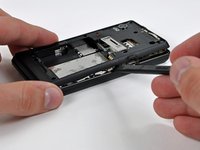
      • Gently insert a spudger between the rear case and front case at the top of the phone, near the audio jack.

      • Carefully pry the top edge of the rear case up from the rest of the phone.

      crwdns2952109:0crwdne2952109:0

      crwdns2917038:0crwdne2917038:0

    8. Motorola Droid Motherboard Replacement: crwdns2935265:010crwdnd2935265:01crwdnd2935265:02crwdne2935265:0 Motorola Droid Motherboard Replacement: crwdns2935265:010crwdnd2935265:02crwdnd2935265:02crwdne2935265:0
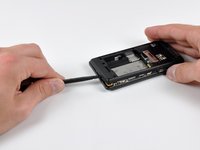
      • With the spudger still inserted between the rear case and front case, slide the spudger along the right edge of the device, moving toward the bottom, prying as you go.

      • Continue prying along the bottom edge of the device from right to left, freeing it from the front panel.

      crwdns2952109:0crwdne2952109:0

      crwdns2917038:0crwdne2917038:0

    9. Motorola Droid Motherboard Replacement: crwdns2935265:011crwdnd2935265:01crwdnd2935265:02crwdne2935265:0 Motorola Droid Motherboard Replacement: crwdns2935265:011crwdnd2935265:02crwdnd2935265:02crwdne2935265:0
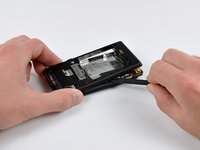
      • Continue prying the rear case from the front case along the left side, moving from bottom to top.

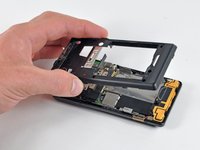
      • Lift the rear case up out of the phone.

      crwdns2952109:0crwdne2952109:0

      crwdns2917038:0crwdne2917038:0

    1. Motorola Droid Motherboard Replacement, Speaker: crwdns2935265:012crwdnd2935265:01crwdnd2935265:01crwdne2935265:0
      • Carefully lift and remove the speaker assembly up out of the phone.

      crwdns2952109:0crwdne2952109:0

      crwdns2917038:0crwdne2917038:0

    1. Motorola Droid Motherboard Replacement, Motherboard: crwdns2935265:013crwdnd2935265:01crwdnd2935265:03crwdne2935265:0 Motorola Droid Motherboard Replacement, Motherboard: crwdns2935265:013crwdnd2935265:02crwdnd2935265:03crwdne2935265:0 Motorola Droid Motherboard Replacement, Motherboard: crwdns2935265:013crwdnd2935265:03crwdnd2935265:03crwdne2935265:0
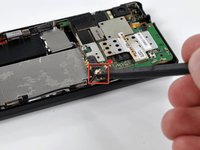
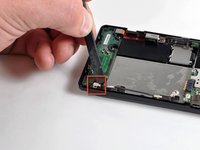
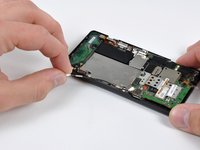
      • Use a spudger to pry the antenna cable connectors from their respective sockets on the motherboard and the speaker/antenna board.

      • De-route the antenna cable by pulling it out of the metal clips along the side of the front case.

      crwdns2952109:0crwdne2952109:0

      crwdns2917038:0crwdne2917038:0

    2. Motorola Droid Motherboard Replacement: crwdns2935265:014crwdnd2935265:01crwdnd2935265:01crwdne2935265:0
      • Peel the black tape covering the side button and display ribbon connectors on the motherboard.

      crwdns2952109:0crwdne2952109:0

      crwdns2917038:0crwdne2917038:0

    3. Motorola Droid Motherboard Replacement: crwdns2935265:015crwdnd2935265:01crwdnd2935265:01crwdne2935265:0
      • Disconnect the power button/volume button connector from its socket on the motherboard using the flat end of a spudger.

      crwdns2952109:0crwdne2952109:0

      crwdns2917038:0crwdne2917038:0

    4. Motorola Droid Motherboard Replacement: crwdns2935265:016crwdnd2935265:01crwdnd2935265:01crwdne2935265:0
      • Disconnect the display ribbon connector from its socket on the motherboard using the flat end of a spudger.

      crwdns2952109:0crwdne2952109:0

      crwdns2917038:0crwdne2917038:0

    5. Motorola Droid Motherboard Replacement: crwdns2935265:017crwdnd2935265:01crwdnd2935265:01crwdne2935265:0
      • Remove three 3.8 mm T5 Torx screws securing the motherboard to the front case.

      • Don't attempt to remove the motherboard yet, it is still attached by the keypad ribbon connector.

      crwdns2952109:0crwdne2952109:0

      crwdns2917038:0crwdne2917038:0

    6. Motorola Droid Motherboard Replacement: crwdns2935265:018crwdnd2935265:01crwdnd2935265:02crwdne2935265:0 Motorola Droid Motherboard Replacement: crwdns2935265:018crwdnd2935265:02crwdnd2935265:02crwdne2935265:0
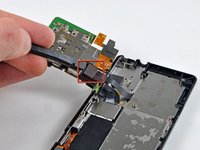
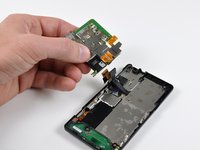
      • Carefully lift the motherboard from the front case and lay it next to the Droid, minding the keypad connector that is still attached.

      • Disconnect the keypad connector by prying it straight up off its socket on the motherboard.

      • Remove the motherboard from the phone.

      crwdns2952109:0crwdne2952109:0

      crwdns2917038:0crwdne2917038:0

crwdns2915888:0crwdne2915888:0

To reassemble your device, follow these instructions in reverse order.

crwdns2935221:0crwdne2935221:0

crwdns2935229:08crwdne2935229:0

Brett Hartt

crwdns2935283:004/12/10crwdne2935283:0

132.286 crwdns2915208:0crwdne2915208:0

crwdns2935297:0144crwdne2935297:0

crwdns2935287:0crwdne2935287:0

iFixit crwdns2935289:0iFixitcrwdne2935289:0

Staff

crwdns2931471:0123crwdne2931471:0

crwdns2935297:037.210crwdne2935297:0

crwdns2947410:01crwdne2947410:0

Hi all,

Can anyone please suggest me should I dump my motorola droid. I have taken it to fix-it shops and they all have the same answer the mother board is gone

So, is it better to buy a new mother board which would cost me as much as a new phone or just sell it for nickels on Ebay

please reply pbansal1@jhu.edu

prateek - crwdns2934203:0crwdne2934203:0 crwdns2950251:0crwdne2950251:0

crwdns2917038:0crwdne2917038:0

crwdns2936625:0crwdne2936625:0:

crwdns2936751:024crwdne2936751:0 3

crwdns2936753:07crwdne2936753:0 9

crwdns2936753:030crwdne2936753:0 36

crwdns2942667:0crwdne2942667:0 29,678