crwdns2933423:0crwdne2933423:0
crwdns2947577:0crwdnd2947577:0crwdne2947577:0

Motorola Droid 4 MicroSD/SIM Card Reader Replacement

crwdns2942213:0crwdne2942213:0

    1. Motorola Droid 4 MicroSD/SIM Card Reader Replacement, Removing Rear Panel: crwdns2935265:01crwdnd2935265:01crwdnd2935265:03crwdne2935265:0 Motorola Droid 4 MicroSD/SIM Card Reader Replacement, Removing Rear Panel: crwdns2935265:01crwdnd2935265:02crwdnd2935265:03crwdne2935265:0 Motorola Droid 4 MicroSD/SIM Card Reader Replacement, Removing Rear Panel: crwdns2935265:01crwdnd2935265:03crwdnd2935265:03crwdne2935265:0
      • Insert the rear cover removal tool, or a paper clip, in the hole near the back camera lens.

      • Slide the cover down to remove.

      crwdns2952109:0crwdne2952109:0

      crwdns2917038:0crwdne2917038:0

    1. Motorola Droid 4 MicroSD/SIM Card Reader Replacement, Battery: crwdns2935265:02crwdnd2935265:01crwdnd2935265:01crwdne2935265:0
      • Remove the sticker on the rear compartment to reveal the battery.

      • Hold the battery with your thumb while removing the sticker or you might end up ripping the battery out of the phone, damaging the flex cable.

      crwdns2952109:0crwdne2952109:0

      crwdns2917038:0crwdne2917038:0

    2. Motorola Droid 4 MicroSD/SIM Card Reader Replacement: crwdns2935265:03crwdnd2935265:01crwdnd2935265:02crwdne2935265:0 Motorola Droid 4 MicroSD/SIM Card Reader Replacement: crwdns2935265:03crwdnd2935265:02crwdnd2935265:02crwdne2935265:0
      crwdns2935267:0crwdne2935267:0
      T5 Torx Screwdriver
      $5.49
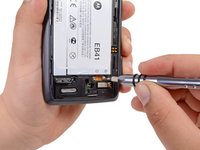
      • Use the T5 Torx Screwdriver to remove both 2.5 mm screws from the battery cable.

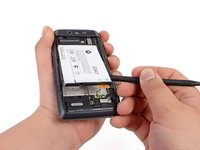
      • Use the Spudger to unstick the battery.

      • It's difficult to remove the battery without a pry tool like the spudger because of the strong adhesive. If you try removing it with just your fingers, the battery may bend.

      crwdns2952109:0crwdne2952109:0

      crwdns2917038:0crwdne2917038:0

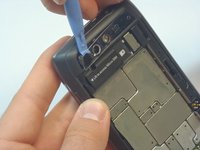
    1. Motorola Droid 4 MicroSD/SIM Card Reader Replacement, Camera Cover Removal: crwdns2935265:04crwdnd2935265:01crwdnd2935265:03crwdne2935265:0 Motorola Droid 4 MicroSD/SIM Card Reader Replacement, Camera Cover Removal: crwdns2935265:04crwdnd2935265:02crwdnd2935265:03crwdne2935265:0 Motorola Droid 4 MicroSD/SIM Card Reader Replacement, Camera Cover Removal: crwdns2935265:04crwdnd2935265:03crwdnd2935265:03crwdne2935265:0
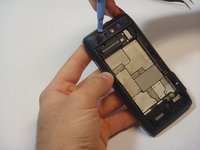
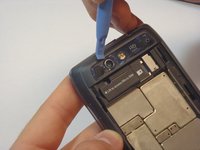
      • Using the blue plastic opening tool, pry off the thin plastic camera cover.

      • The plastic cover is fragile, so proceed carefully.

      crwdns2952109:0crwdne2952109:0

      crwdns2917038:0crwdne2917038:0

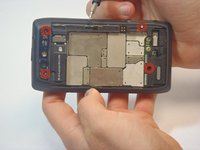
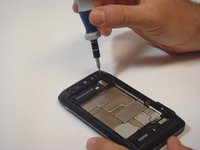
    2. Motorola Droid 4 MicroSD/SIM Card Reader Replacement, Remove Screws: crwdns2935265:05crwdnd2935265:01crwdnd2935265:02crwdne2935265:0 Motorola Droid 4 MicroSD/SIM Card Reader Replacement, Remove Screws: crwdns2935265:05crwdnd2935265:02crwdnd2935265:02crwdne2935265:0
      • Remove the four screws, indicated by the red circles, with the screwdriver and T5 Torx bit.

      • The screws are philips 2.5mm. One screw is a different color (silver) from the others (black).

      crwdns2952109:0crwdne2952109:0

      crwdns2917038:0crwdne2917038:0

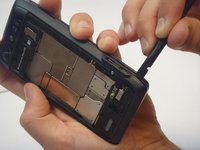
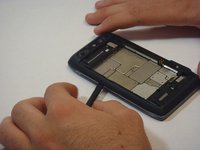
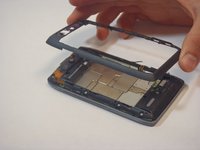
    3. Motorola Droid 4 MicroSD/SIM Card Reader Replacement, Remove Bezel: crwdns2935265:06crwdnd2935265:01crwdnd2935265:03crwdne2935265:0 Motorola Droid 4 MicroSD/SIM Card Reader Replacement, Remove Bezel: crwdns2935265:06crwdnd2935265:02crwdnd2935265:03crwdne2935265:0 Motorola Droid 4 MicroSD/SIM Card Reader Replacement, Remove Bezel: crwdns2935265:06crwdnd2935265:03crwdnd2935265:03crwdne2935265:0
      • Insert the spudger between the rear bezel and the main housing.

      • The bezel is fragile, so proceed carefully.

      • Slide the spudger around all sides of the phone to separate the bezel from the housing.

      • Pry the bezel free.

      • Be careful of the adhesive that holds the bezel to the main housing. Prying too hard may damage your phone.

      crwdns2952109:0crwdne2952109:0

      crwdns2917038:0crwdne2917038:0

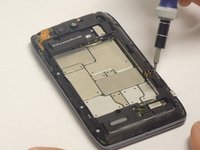
    1. Motorola Droid 4 MicroSD/SIM Card Reader Replacement, Removing screws: crwdns2935265:07crwdnd2935265:01crwdnd2935265:02crwdne2935265:0 Motorola Droid 4 MicroSD/SIM Card Reader Replacement, Removing screws: crwdns2935265:07crwdnd2935265:02crwdnd2935265:02crwdne2935265:0
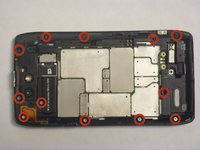
      • Remove the 12 screws holding the housing in place using a T5 Torx screwdriver.

      • Follow the red circles, indicated in the picture, to locate the screws.

      • The 12 screws are (silver) philips 2.5mm

      crwdns2952109:0crwdne2952109:0

      crwdns2917038:0crwdne2917038:0

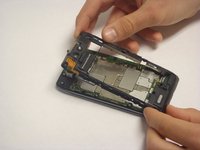
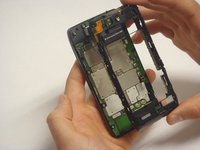
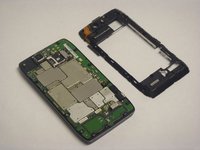
    2. Motorola Droid 4 MicroSD/SIM Card Reader Replacement, Separation of the Housing from the Motherboard: crwdns2935265:08crwdnd2935265:01crwdnd2935265:03crwdne2935265:0 Motorola Droid 4 MicroSD/SIM Card Reader Replacement, Separation of the Housing from the Motherboard: crwdns2935265:08crwdnd2935265:02crwdnd2935265:03crwdne2935265:0 Motorola Droid 4 MicroSD/SIM Card Reader Replacement, Separation of the Housing from the Motherboard: crwdns2935265:08crwdnd2935265:03crwdnd2935265:03crwdne2935265:0
      • Separate the housing from the motherboard.

      • Be careful while separating the housing. The power and volume buttons are easily separated from the housing and can be damaged.

      crwdns2952109:0crwdne2952109:0

      crwdns2917038:0crwdne2917038:0

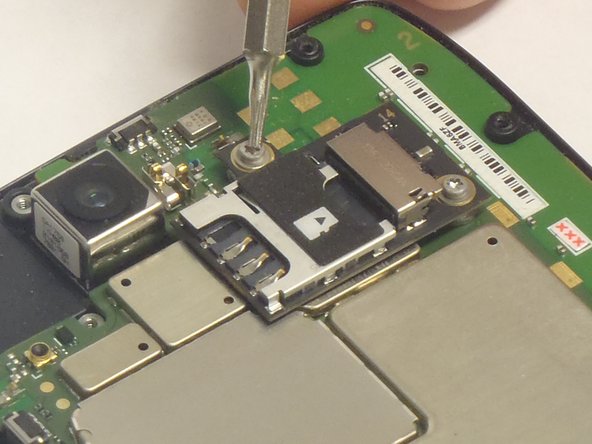
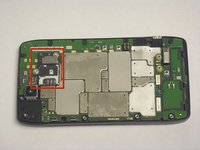
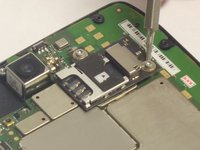
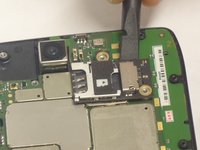
    1. Motorola Droid 4 MicroSD/SIM Card Reader Replacement, MicroSD/SIM Card Reader: crwdns2935265:09crwdnd2935265:01crwdnd2935265:03crwdne2935265:0 Motorola Droid 4 MicroSD/SIM Card Reader Replacement, MicroSD/SIM Card Reader: crwdns2935265:09crwdnd2935265:02crwdnd2935265:03crwdne2935265:0 Motorola Droid 4 MicroSD/SIM Card Reader Replacement, MicroSD/SIM Card Reader: crwdns2935265:09crwdnd2935265:03crwdnd2935265:03crwdne2935265:0
      • Once the Motherboard Housing is removed the complete Micro SD/SIM card reader is exposed, as indicated by the picture.

      • Remove the two screws that attach the reader to the Motherboard. The locations of the screws are indicated in the picture.

      crwdns2952109:0crwdne2952109:0

      crwdns2917038:0crwdne2917038:0

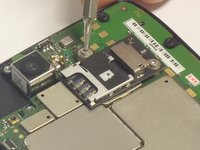
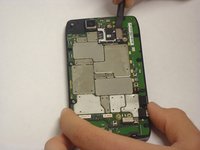
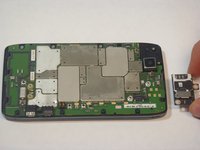
    2. Motorola Droid 4 MicroSD/SIM Card Reader Replacement, Separate the reader from the motherboard: crwdns2935265:010crwdnd2935265:01crwdnd2935265:03crwdne2935265:0 Motorola Droid 4 MicroSD/SIM Card Reader Replacement, Separate the reader from the motherboard: crwdns2935265:010crwdnd2935265:02crwdnd2935265:03crwdne2935265:0 Motorola Droid 4 MicroSD/SIM Card Reader Replacement, Separate the reader from the motherboard: crwdns2935265:010crwdnd2935265:03crwdnd2935265:03crwdne2935265:0
      • Using the spudger, pry off the Reader.

      • Be careful while removing the Reader. The connection to the motherboard is composed of small pins.

      crwdns2952109:0crwdne2952109:0

      crwdns2917038:0crwdne2917038:0

crwdns2915888:0crwdne2915888:0

To reassemble your device, follow these instructions in reverse order.

crwdns2935221:0crwdne2935221:0

crwdns2935227:0crwdne2935227:0

Javier

crwdns2935283:009/29/14crwdne2935283:0

533 crwdns2915208:0crwdne2915208:0

crwdns2935297:04crwdne2935297:0

crwdns2935287:0crwdne2935287:0

USF Tampa, Team 5-1, Mcgee Fall 2014 crwdns2935289:0USF Tampa, Team 5-1, Mcgee Fall 2014crwdne2935289:0

USFT-MCGEE-F14S5G1

crwdns2931471:05crwdne2931471:0

crwdns2935297:060crwdne2935297:0

crwdns2947412:00crwdne2947412:0

crwdns2917038:0crwdne2917038:0

crwdns2936625:0crwdne2936625:0:

crwdns2936751:024crwdne2936751:0 7

crwdns2936753:07crwdne2936753:0 16

crwdns2936753:030crwdne2936753:0 35

crwdns2942667:0crwdne2942667:0 2,121