crwdns2933423:0crwdne2933423:0
crwdns2947577:0crwdnd2947577:0crwdne2947577:0

Motorola Defy Rear Facing Camera Replacement

crwdns2942213:0crwdne2942213:0

    1. Motorola Defy Rear Facing Camera Replacement, Rear Case: crwdns2935265:01crwdnd2935265:01crwdnd2935265:01crwdne2935265:0
      • Using the screwdriver and the T-5 bit, unscrew the seven 5 mm screws around the outside of the phone.

      crwdns2952109:0crwdne2952109:0

      crwdns2917038:0crwdne2917038:0

    2. Motorola Defy Rear Facing Camera Replacement: crwdns2935265:02crwdnd2935265:01crwdnd2935265:02crwdne2935265:0 Motorola Defy Rear Facing Camera Replacement: crwdns2935265:02crwdnd2935265:02crwdnd2935265:02crwdne2935265:0
      • Remove the back cover of the phone by sliding the bottom black button to the unlock position and lifting it up.

      crwdns2952109:0crwdne2952109:0

      crwdns2917038:0crwdne2917038:0

    1. Motorola Defy Rear Facing Camera Replacement, Battery: crwdns2935265:03crwdnd2935265:01crwdnd2935265:01crwdne2935265:0
      • Use a plastic opening tool to pry the battery out of the phone.

      crwdns2952109:0crwdne2952109:0

      crwdns2917038:0crwdne2917038:0

    1. Motorola Defy Rear Facing Camera Replacement, Midframe: crwdns2935265:04crwdnd2935265:01crwdnd2935265:01crwdne2935265:0
      • Unscrew the two silver screws located at the top of the back of the phone.

      crwdns2952109:0crwdne2952109:0

      crwdns2917038:0crwdne2917038:0

    2. Motorola Defy Rear Facing Camera Replacement: crwdns2935265:05crwdnd2935265:01crwdnd2935265:01crwdne2935265:0
      • Use a plastic opening tool to gently pry the midframe from the rest of the phone.

      crwdns2952109:0crwdne2952109:0

      crwdns2917038:0crwdne2917038:0

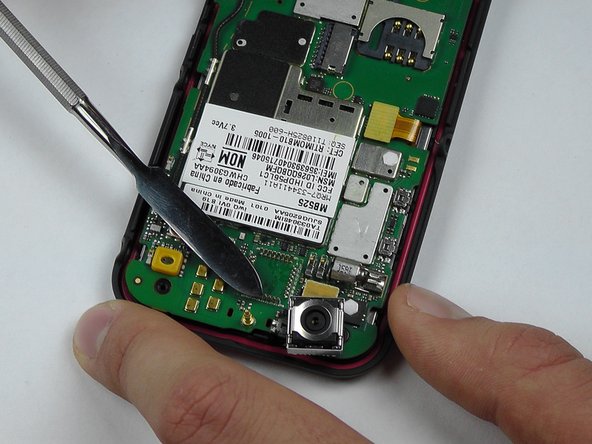
    1. Motorola Defy Rear Facing Camera Replacement, Rear Facing Camera: crwdns2935265:06crwdnd2935265:01crwdnd2935265:02crwdne2935265:0 Motorola Defy Rear Facing Camera Replacement, Rear Facing Camera: crwdns2935265:06crwdnd2935265:02crwdnd2935265:02crwdne2935265:0
      • Start to pry around the bottom of the camera module with the metal spudger and replace with the new camera module.

      • Be careful of the pins that are connected to the camera module on the bottom.

      crwdns2952109:0crwdne2952109:0

      crwdns2917038:0crwdne2917038:0

crwdns2915888:0crwdne2915888:0

To reassemble your device, follow these instructions in reverse order.

crwdns2935221:0crwdne2935221:0

Morgan Roark

crwdns2935283:010/08/14crwdne2935283:0

325 crwdns2915208:0crwdne2915208:0

crwdns2935297:03crwdne2935297:0

crwdns2935287:0crwdne2935287:0

USF Tampa, Team 14-2, Leahy Fall 2014 crwdns2935289:0USF Tampa, Team 14-2, Leahy Fall 2014crwdne2935289:0

USFT-LEAHY-F14S14G2

crwdns2931471:04crwdne2931471:0

crwdns2935297:072crwdne2935297:0

crwdns2947412:00crwdne2947412:0

crwdns2917038:0crwdne2917038:0

crwdns2936625:0crwdne2936625:0:

crwdns2936751:024crwdne2936751:0 0

crwdns2936753:07crwdne2936753:0 9

crwdns2936753:030crwdne2936753:0 29

crwdns2942667:0crwdne2942667:0 701