crwdns2933423:0crwdne2933423:0
crwdns2947577:0crwdnd2947577:0crwdne2947577:0

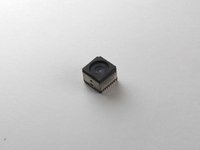
Motorola Cliq Camera Replacement

crwdns2942213:0crwdne2942213:0

  1. Motorola Cliq Camera Replacement, Battery: crwdns2935265:01crwdnd2935265:01crwdnd2935265:02crwdne2935265:0 Motorola Cliq Camera Replacement, Battery: crwdns2935265:01crwdnd2935265:02crwdnd2935265:02crwdne2935265:0
    • Turning over your phone, place two fingers on the back cover and apply pressure away from the camera to slide the back cover off.

    crwdns2952109:0crwdne2952109:0

    crwdns2917038:0crwdne2917038:0

  2. Motorola Cliq Camera Replacement: crwdns2935265:02crwdnd2935265:01crwdnd2935265:02crwdne2935265:0 Motorola Cliq Camera Replacement: crwdns2935265:02crwdnd2935265:02crwdnd2935265:02crwdne2935265:0
    • Pinch the battery pull tab located below the camera, pull it upwards, and remove the battery.

    • The pull tab may be tucked under the battery.

    crwdns2952109:0crwdne2952109:0

    crwdns2917038:0crwdne2917038:0

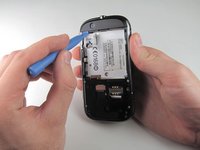
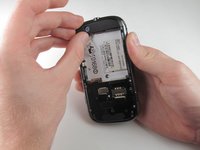
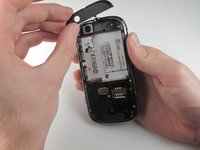
  3. Motorola Cliq Camera Replacement, Rear Casing: crwdns2935265:03crwdnd2935265:01crwdnd2935265:03crwdne2935265:0 Motorola Cliq Camera Replacement, Rear Casing: crwdns2935265:03crwdnd2935265:02crwdnd2935265:03crwdne2935265:0 Motorola Cliq Camera Replacement, Rear Casing: crwdns2935265:03crwdnd2935265:03crwdnd2935265:03crwdne2935265:0
    • Wedge a plastic opening tool behind the panel covering the camera, pry it up, and remove it using your fingers.

    • The panel is held down by adhesive and may require you to wedge and pry the right side of the panel before it can be easily removed.

    crwdns2952109:0crwdne2952109:0

    crwdns2917038:0crwdne2917038:0

  4. Motorola Cliq Camera Replacement: crwdns2935265:04crwdnd2935265:01crwdnd2935265:01crwdne2935265:0
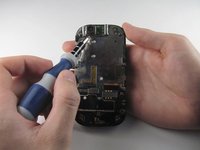
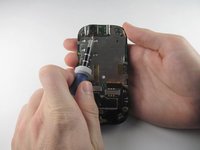
    • Remove the six 4.0 mm T4 Torx screws which line the edge of the back of the phone.

    crwdns2952109:0crwdne2952109:0

    crwdns2917038:0crwdne2917038:0

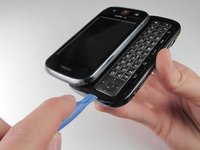
  5. Motorola Cliq Camera Replacement: crwdns2935265:05crwdnd2935265:01crwdnd2935265:03crwdne2935265:0 Motorola Cliq Camera Replacement: crwdns2935265:05crwdnd2935265:02crwdnd2935265:03crwdne2935265:0 Motorola Cliq Camera Replacement: crwdns2935265:05crwdnd2935265:03crwdnd2935265:03crwdne2935265:0
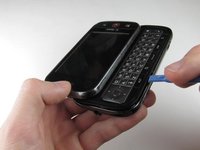
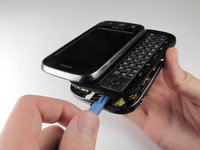
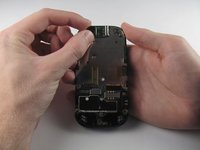
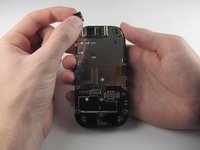
    • Turn the phone over and slide out the keyboard.

    • Wedge a plastic opening tool where the keyboard meets the back casing of the phone next to the headphone jack.

    • Carefully pry open the back casing along the keyboard's edge until at least two corners of the back casing are separated from the keyboard.

    • Do not fully separate the rear panel from the phone. A cable is connecting the two parts together.

    crwdns2952109:0crwdne2952109:0

    crwdns2917038:0crwdne2917038:0

  6. Motorola Cliq Camera Replacement: crwdns2935265:06crwdnd2935265:01crwdnd2935265:01crwdne2935265:0
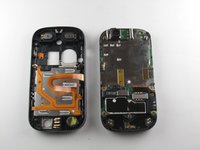
    • Carefully separate the back casing from the rest of the phone.

    crwdns2952109:0crwdne2952109:0

    crwdns2917038:0crwdne2917038:0

  7. Motorola Cliq Camera Replacement: crwdns2935265:07crwdnd2935265:01crwdnd2935265:02crwdne2935265:0 Motorola Cliq Camera Replacement: crwdns2935265:07crwdnd2935265:02crwdnd2935265:02crwdne2935265:0
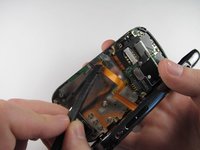
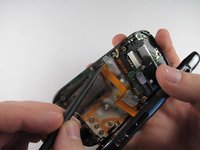
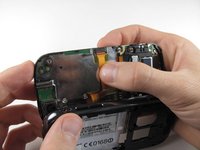
    • Gently pry ZIF connector upwards using the flat end of a spudger tool.

    • The ZIF connector is glued down. Be gentle! Ripping it off or breaking it will make your phone inoperable.

    • You may need adhesive to keep your power cable in place when reassembling your phone.

    crwdns2952109:0crwdne2952109:0

    crwdns2917038:0crwdne2917038:0

  8. Motorola Cliq Camera Replacement: crwdns2935265:08crwdnd2935265:01crwdnd2935265:03crwdne2935265:0 Motorola Cliq Camera Replacement: crwdns2935265:08crwdnd2935265:02crwdnd2935265:03crwdne2935265:0 Motorola Cliq Camera Replacement: crwdns2935265:08crwdnd2935265:03crwdnd2935265:03crwdne2935265:0
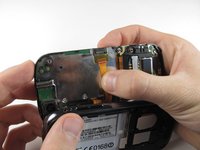
    • Press your thumb against the orange power cable and pull it down slowly to disconnect the power cable from the bottom of the keyboard.

    • The rear casing and the rest of the phone should now be completely separated.

    crwdns2952109:0crwdne2952109:0

    crwdns2917038:0crwdne2917038:0

  9. Motorola Cliq Camera Replacement, Camera: crwdns2935265:09crwdnd2935265:01crwdnd2935265:03crwdne2935265:0 Motorola Cliq Camera Replacement, Camera: crwdns2935265:09crwdnd2935265:02crwdnd2935265:03crwdne2935265:0 Motorola Cliq Camera Replacement, Camera: crwdns2935265:09crwdnd2935265:03crwdnd2935265:03crwdne2935265:0
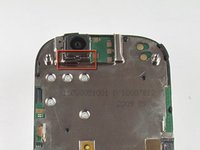
    • Insert a 1.5mm flat head screw in the slit in between the camera housing and the bottom of the camera.

    • Lightly pry upwards and the camera should come loose from the housing.

    crwdns2952109:0crwdne2952109:0

    crwdns2917038:0crwdne2917038:0

  10. Motorola Cliq Camera Replacement: crwdns2935265:010crwdnd2935265:01crwdnd2935265:03crwdne2935265:0 Motorola Cliq Camera Replacement: crwdns2935265:010crwdnd2935265:02crwdnd2935265:03crwdne2935265:0 Motorola Cliq Camera Replacement: crwdns2935265:010crwdnd2935265:03crwdnd2935265:03crwdne2935265:0
    • Carefully grab the sides of the camera with your fingers and remove the camera.

    • The foam cover on the top of the camera deforms and tears easily, so handle it with care.

    crwdns2952109:0crwdne2952109:0

    crwdns2917038:0crwdne2917038:0

crwdns2915888:0crwdne2915888:0

To reassemble your device, follow these instructions in reverse order.

crwdns2935221:0crwdne2935221:0

crwdns2935229:02crwdne2935229:0

Tony Tran

crwdns2935283:004/14/13crwdne2935283:0

84 crwdns2915208:0crwdne2915208:0

crwdns2935297:08crwdne2935297:0

crwdns2935287:0crwdne2935287:0

Cal Poly, Team 10-42, Amido Spring 2013 crwdns2935289:0Cal Poly, Team 10-42, Amido Spring 2013crwdne2935289:0

CPSU-AMIDO-S13S10G42

crwdns2931471:04crwdne2931471:0

crwdns2935297:016crwdne2935297:0

crwdns2947412:00crwdne2947412:0

crwdns2917038:0crwdne2917038:0

crwdns2936625:0crwdne2936625:0:

crwdns2936751:024crwdne2936751:0 0

crwdns2936753:07crwdne2936753:0 2

crwdns2936753:030crwdne2936753:0 46

crwdns2942667:0crwdne2942667:0 670