crwdns2933423:0crwdne2933423:0
crwdns2947577:0crwdnd2947577:0crwdne2947577:0

Motorola Atrix 4G Antenna Replacement

crwdns2942213:0crwdne2942213:0

    1. Motorola Atrix 4G Antenna Replacement, Battery: crwdns2935265:01crwdnd2935265:01crwdnd2935265:01crwdne2935265:0
      • Pry the back cover off the back of the phone.

      crwdns2952109:0crwdne2952109:0

      crwdns2917038:0crwdne2917038:0

    2. Motorola Atrix 4G Antenna Replacement: crwdns2935265:02crwdnd2935265:01crwdnd2935265:02crwdne2935265:0 Motorola Atrix 4G Antenna Replacement: crwdns2935265:02crwdnd2935265:02crwdnd2935265:02crwdne2935265:0
      crwdns2935267:0crwdne2935267:0
      Spudger
      $3.99
      • Insert a spudger into the small notch at the base of the battery.

      • Lift the battery out of the phone.

      crwdns2952109:0crwdne2952109:0

      crwdns2917038:0crwdne2917038:0

    1. Motorola Atrix 4G Antenna Replacement, Antenna: crwdns2935265:03crwdnd2935265:01crwdnd2935265:02crwdne2935265:0 Motorola Atrix 4G Antenna Replacement, Antenna: crwdns2935265:03crwdnd2935265:02crwdnd2935265:02crwdne2935265:0
      crwdns2935267:0crwdne2935267:0
      T5 Torx Screwdriver
      $5.49
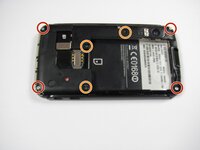
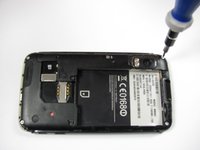
      • Remove the four 5.0 mm T5 Torx screws using a T5 Torx Screwdriver.

      • Remove the three 5.5 mm T5 Torx screws using a T5 Torx Screwdriver.

      • Use gentle force while unscrewing to avoid stripping the screws.

      crwdns2952109:0crwdne2952109:0

      crwdns2917038:0crwdne2917038:0

    2. Motorola Atrix 4G Antenna Replacement: crwdns2935265:04crwdnd2935265:01crwdnd2935265:01crwdne2935265:0
      crwdns2935267:0crwdne2935267:0
      iFixit Opening Tool
      $1.99
      crwdns2952109:0crwdne2952109:0

      crwdns2917038:0crwdne2917038:0

    3. Motorola Atrix 4G Antenna Replacement: crwdns2935265:05crwdnd2935265:01crwdnd2935265:02crwdne2935265:0 Motorola Atrix 4G Antenna Replacement: crwdns2935265:05crwdnd2935265:02crwdnd2935265:02crwdne2935265:0
      crwdns2935267:0crwdne2935267:0
      iFixit Opening Tool
      $1.99
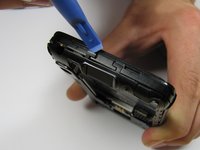
      • Gently lift the tabs located at the top of the phone using an opening tool.

      • Gently lift the tab located at the bottom of the phone with the same tool.

      • Use an opening tool, not your fingers, because the plastic tabs are easily broken.

      crwdns2952109:0crwdne2952109:0

      crwdns2917038:0crwdne2917038:0

    4. Motorola Atrix 4G Antenna Replacement: crwdns2935265:06crwdnd2935265:01crwdnd2935265:02crwdne2935265:0 Motorola Atrix 4G Antenna Replacement: crwdns2935265:06crwdnd2935265:02crwdnd2935265:02crwdne2935265:0
      crwdns2935267:0crwdne2935267:0
      iFixit Opening Tool
      $1.99
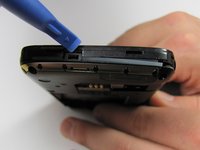
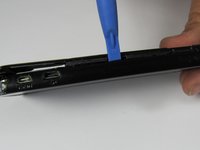
      • Insert an opening tool between the front and back of the case.

      • Slide the tool down the side of the phone.

      • Repeat the same process for the other side.

      • There should be a noticeable gap between the front and back cases. If not, repeat this step.

      crwdns2952109:0crwdne2952109:0

      crwdns2917038:0crwdne2917038:0

    5. Motorola Atrix 4G Antenna Replacement: crwdns2935265:07crwdnd2935265:01crwdnd2935265:01crwdne2935265:0
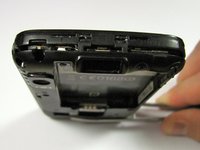
      • Carefully lift the back case off the phone.

      • Do not completely separate the back case from the phone. The antenna is connected to both cases.

      crwdns2952109:0crwdne2952109:0

      crwdns2917038:0crwdne2917038:0

    6. Motorola Atrix 4G Antenna Replacement: crwdns2935265:08crwdnd2935265:01crwdnd2935265:01crwdne2935265:0
      crwdns2935267:0crwdne2935267:0
      iFixit Opening Tool
      $1.99
      • Slide an opening tool beneath the antenna and lift straight up from the motherboard.

      • Lift straight upwards, not at an angle, to avoid damaging the socket underneath.

      crwdns2952109:0crwdne2952109:0

      crwdns2917038:0crwdne2917038:0

    7. Motorola Atrix 4G Antenna Replacement: crwdns2935265:09crwdnd2935265:01crwdnd2935265:01crwdne2935265:0
      • Ease the antenna from out of its guide along the side of the phone

      • Remove the back case and the antenna from the phone.

      • The antenna is soldered to the back case. When reassembling, do not pull it with too much force.

      crwdns2952109:0crwdne2952109:0

      crwdns2917038:0crwdne2917038:0

crwdns2915888:0crwdne2915888:0

To reassemble your device, follow these instructions in reverse order.

crwdns2935221:0crwdne2935221:0

crwdns2935229:05crwdne2935229:0

Derek Walker

crwdns2935283:004/19/12crwdne2935283:0

297 crwdns2915208:0crwdne2915208:0

crwdns2935297:04crwdne2935297:0

crwdns2935287:0crwdne2935287:0

Cal Poly, Team 9-42, Regan Spring 2012 crwdns2935289:0Cal Poly, Team 9-42, Regan Spring 2012crwdne2935289:0

CPSU-REGAN-S12S9G42

crwdns2931471:06crwdne2931471:0

crwdns2935297:084crwdne2935297:0

crwdns2947412:00crwdne2947412:0

crwdns2917038:0crwdne2917038:0

crwdns2936625:0crwdne2936625:0:

crwdns2936751:024crwdne2936751:0 2

crwdns2936753:07crwdne2936753:0 9

crwdns2936753:030crwdne2936753:0 35

crwdns2942667:0crwdne2942667:0 6,017