crwdns2933423:0crwdne2933423:0
crwdns2947577:0crwdnd2947577:0crwdne2947577:0

Microsoft Surface Pro 2 Camera Replacement

crwdns2869540:0crwdne2869540:0: 1,7 тыс.

crwdns2959988:0crwdne2959988:0

crwdns2959990:0crwdne2959990:0
7
crwdns2959992:0crwdne2959992:0
24
crwdns2959994:0crwdne2959994:0
99
crwdns2959996:0crwdne2959996:0
1 691
crwdns2955950:0crwdne2955950:0: 0

crwdns2959998:0crwdne2959998:0

crwdns2960000:0crwdne2960000:0
crwdns2959984:0crwdne2959984:0: 0

crwdns2959956:0crwdne2959956:0

crwdns2959986:0crwdne2959986:0: 1

crwdns2959980:01crwdne2959980:0

crwdns2955944:0crwdne2955944:0: crwdns2931273:0crwdne2931273:0
crwdns2955970:0crwdne2955970:0: crwdns2937801:0crwdne2937801:0
crwdns2862633:0crwdne2862633:0

crwdns2862634:0crwdne2862634:0

Microsoft Surface Pro 2 Camera Replacement

crwdns2959930:0crwdne2959930:0

crwdns2943215:0crwdne2943215:0

    1. Microsoft Surface Pro 2 Camera Replacement, LCD Display: crwdns2935265:01crwdnd2935265:01crwdnd2935265:02crwdne2935265:0 Microsoft Surface Pro 2 Camera Replacement, LCD Display: crwdns2935265:01crwdnd2935265:02crwdnd2935265:02crwdne2935265:0
      • To avoid electrical shocks, unplug and turn off your Surface Pro 2 before proceeding.

      crwdns2952109:0crwdne2952109:0

      crwdns2917038:0crwdne2917038:0

    2. Microsoft Surface Pro 2 Camera Replacement: crwdns2935265:02crwdnd2935265:01crwdnd2935265:01crwdne2935265:0
      • Avoid any skin or eye contact with the heating pad or heating gun because they may cause bodily harm.

      • Using a heating pad or heating gun, heat the edges of the screen to soften the glue. This area extends roughly one inch from the edge of the device.

      • The glue is under the darker border of the device display.

      crwdns2952109:0crwdne2952109:0

      crwdns2917038:0crwdne2917038:0

    3. Microsoft Surface Pro 2 Camera Replacement: crwdns2935265:03crwdnd2935265:01crwdnd2935265:01crwdne2935265:0
      • Using a plastic opening tool and a suction cup as needed for leverage, gently insert one edge of the opening tool under the corner of the screen.

      • If the tool does not easily slide under the screen, return to heating before proceeding.

      • Slowly work the tool around the entire edge of the screen.

      crwdns2952109:0crwdne2952109:0

      crwdns2917038:0crwdne2917038:0

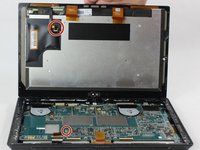
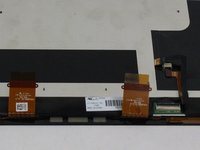
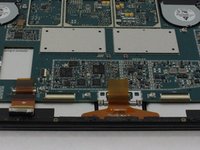
    4. Microsoft Surface Pro 2 Camera Replacement: crwdns2935265:04crwdnd2935265:01crwdnd2935265:03crwdne2935265:0 Microsoft Surface Pro 2 Camera Replacement: crwdns2935265:04crwdnd2935265:02crwdnd2935265:03crwdne2935265:0 Microsoft Surface Pro 2 Camera Replacement: crwdns2935265:04crwdnd2935265:03crwdnd2935265:03crwdne2935265:0
      • Detach the orange cables that connect the screen to the motherboard by pulling on the small tabs. Using the nylon spudger, release these cables.

      • Please note the third small connector in red.

      • Allow the glue to cool before letting it come into contact with any other surface.

      crwdns2952109:0crwdne2952109:0

      crwdns2917038:0crwdne2917038:0

    1. Microsoft Surface Pro 2 Camera Replacement, Motherboard: crwdns2935265:05crwdnd2935265:01crwdnd2935265:03crwdne2935265:0 Microsoft Surface Pro 2 Camera Replacement, Motherboard: crwdns2935265:05crwdnd2935265:02crwdnd2935265:03crwdne2935265:0 Microsoft Surface Pro 2 Camera Replacement, Motherboard: crwdns2935265:05crwdnd2935265:03crwdnd2935265:03crwdne2935265:0
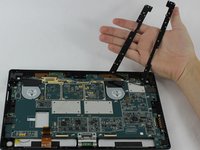
      • Make sure that the front-facing camera is completely disconnected, and then remove the plastic bracket.

      • Remove the 22 screws on the bezel.

      • Remove the left and right brackets; the left has 16 screws and the right has 15 screws.

      • The three different torx screws used are T3, T4, and T5.

      crwdns2952109:0crwdne2952109:0

      crwdns2917038:0crwdne2917038:0

    2. Microsoft Surface Pro 2 Camera Replacement: crwdns2935265:06crwdnd2935265:01crwdnd2935265:03crwdne2935265:0 Microsoft Surface Pro 2 Camera Replacement: crwdns2935265:06crwdnd2935265:02crwdnd2935265:03crwdne2935265:0 Microsoft Surface Pro 2 Camera Replacement: crwdns2935265:06crwdnd2935265:03crwdnd2935265:03crwdne2935265:0
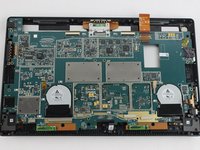
      • Once the brackets are removed, set them aside.

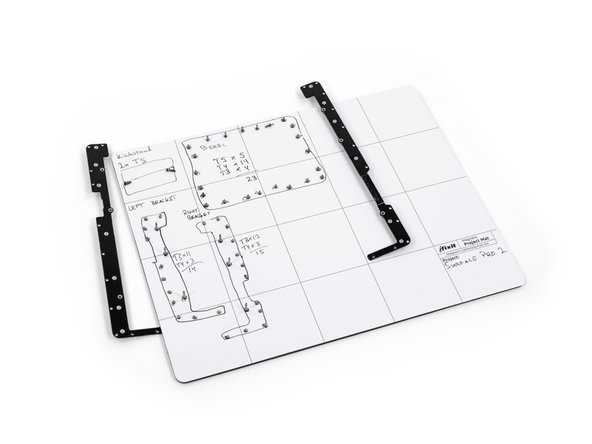
      • The motherboard itself also has screws.

      • Remove the 25 screws of varying sizes that attach the motherboard to the back plate.

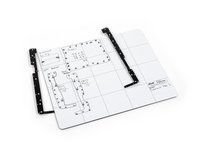
      • View the attached photo of a screw diagram to help keep track of your screws.

      crwdns2952109:0crwdne2952109:0

      crwdns2917038:0crwdne2917038:0

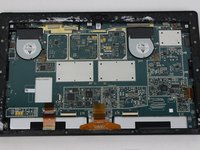
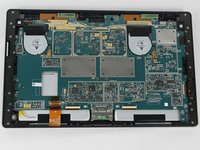
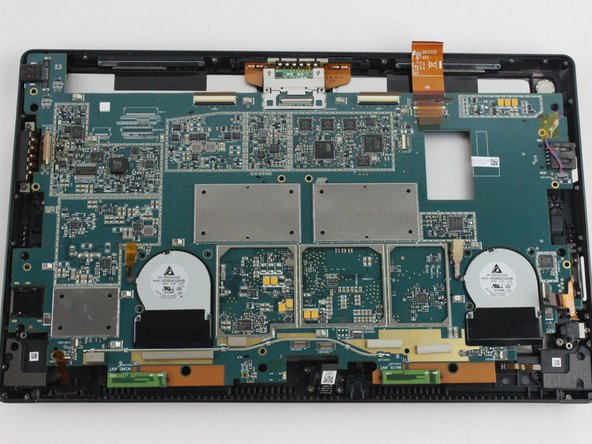
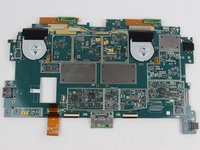
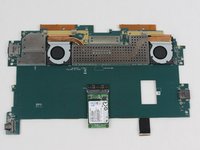
    3. Microsoft Surface Pro 2 Camera Replacement: crwdns2935265:07crwdnd2935265:01crwdnd2935265:03crwdne2935265:0 Microsoft Surface Pro 2 Camera Replacement: crwdns2935265:07crwdnd2935265:02crwdnd2935265:03crwdne2935265:0 Microsoft Surface Pro 2 Camera Replacement: crwdns2935265:07crwdnd2935265:03crwdnd2935265:03crwdne2935265:0
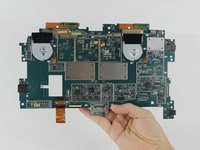
      • You have now completely removed the motherboard, and it should look like the pictures shown.

      • Be sure to be cautious with all the connections with the cables on the motherboard.

      crwdns2952109:0crwdne2952109:0

      crwdns2917038:0crwdne2917038:0

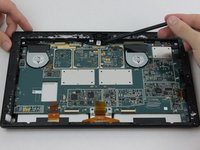
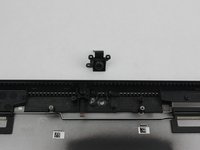
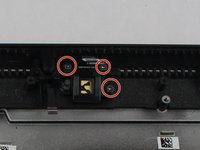
    1. Microsoft Surface Pro 2 Camera Replacement, Camera: crwdns2935265:08crwdnd2935265:01crwdnd2935265:01crwdne2935265:0
      • Remove the ribbon that the spudger is touching in the picture.

      • Remove the front-facing camera.

      crwdns2952109:0crwdne2952109:0

      crwdns2917038:0crwdne2917038:0

    2. Microsoft Surface Pro 2 Camera Replacement: crwdns2935265:09crwdnd2935265:01crwdnd2935265:01crwdne2935265:0
      crwdns2952109:0crwdne2952109:0

      crwdns2917038:0crwdne2917038:0

    3. Microsoft Surface Pro 2 Camera Replacement: crwdns2935265:010crwdnd2935265:01crwdnd2935265:02crwdne2935265:0 Microsoft Surface Pro 2 Camera Replacement: crwdns2935265:010crwdnd2935265:02crwdnd2935265:02crwdne2935265:0
      crwdns2952109:0crwdne2952109:0

      crwdns2917038:0crwdne2917038:0

crwdns2915888:0crwdne2915888:0

To reassemble your device, follow these instructions in reverse order.

crwdns2935221:0crwdne2935221:0

crwdns2862417:0crwdne2862417:0

crwdns2935293:0crwdne2935293:0

abdulhameeda

crwdns2935283:009/07/16crwdne2935283:0

108 crwdns2915208:0crwdne2915208:0

crwdns2935295:0crwdne2935295:0

crwdns2935287:0crwdne2935287:0

USF Tampa, Team 6-2, Remmell Fall 2016 crwdns2935289:0USF Tampa, Team 6-2, Remmell Fall 2016crwdne2935289:0

USFT-REMMELL-F16S6G2

crwdns2931471:04crwdne2931471:0

crwdns2935297:048crwdne2935297:0

crwdns2947412:00crwdne2947412:0

crwdns2917038:0crwdne2917038:0

crwdns2936625:0crwdne2936625:0:

crwdns2936751:024crwdne2936751:0 7

crwdns2936753:07crwdne2936753:0 24

crwdns2936753:030crwdne2936753:0 99

crwdns2959996:0crwdne2959996:0 1,691