crwdns2933423:0crwdne2933423:0
crwdns2947577:0crwdnd2947577:0crwdne2947577:0

Macintosh PowerBook 165c Lower Case Replacement

crwdns2942213:0crwdne2942213:0

    1. Macintosh PowerBook 165c Lower Case Replacement, Battery: crwdns2935265:01crwdnd2935265:01crwdnd2935265:01crwdne2935265:0
      • Orient the computer so the battery is facing you.

      • Slide the gray plastic battery cover to the right.

      crwdns2952109:0crwdne2952109:0

      crwdns2917038:0crwdne2917038:0

    2. Macintosh PowerBook 165c Lower Case Replacement: crwdns2935265:02crwdnd2935265:01crwdnd2935265:01crwdne2935265:0
      • Pull the battery toward yourself until it is fully detached.

      crwdns2952109:0crwdne2952109:0

      crwdns2917038:0crwdne2917038:0

    1. Macintosh PowerBook 165c Lower Case Replacement, Input/Output Door: crwdns2935265:03crwdnd2935265:01crwdnd2935265:01crwdne2935265:0
      • Orient the computer right side up with the rear facing you.

      • Open the Input/Output (I/O) door.

      crwdns2952109:0crwdne2952109:0

      crwdns2917038:0crwdne2917038:0

    2. Macintosh PowerBook 165c Lower Case Replacement: crwdns2935265:04crwdnd2935265:01crwdnd2935265:01crwdne2935265:0
      • Carefully bend the door into an arch until one of the pins releases from its slot.

      • Once one of the pins is free, remove the I/O door from the computer.

      crwdns2952109:0crwdne2952109:0

      crwdns2917038:0crwdne2917038:0

    1. Macintosh PowerBook 165c Lower Case Replacement, Lower Case: crwdns2935265:05crwdnd2935265:01crwdnd2935265:01crwdne2935265:0
      • Orient the computer with the bottom facing up and rear facing you. You should be able to read the Macintosh label in this position.

      crwdns2952109:0crwdne2952109:0

      crwdns2917038:0crwdne2917038:0

    2. Macintosh PowerBook 165c Lower Case Replacement: crwdns2935265:06crwdnd2935265:01crwdnd2935265:01crwdne2935265:0
      • Use a T8 torx screwdriver to remove the 6.8mm long screw above and to the right of the modem jack.

      • Twist counter clockwise to remove the screw.

      crwdns2952109:0crwdne2952109:0

      crwdns2917038:0crwdne2917038:0

    3. Macintosh PowerBook 165c Lower Case Replacement: crwdns2935265:07crwdnd2935265:01crwdnd2935265:01crwdne2935265:0
      • Use a T10 torx screwdriver to remove the four, 18mm long screws from the lower case.

      crwdns2952109:0crwdne2952109:0

      crwdns2917038:0crwdne2917038:0

    4. Macintosh PowerBook 165c Lower Case Replacement: crwdns2935265:08crwdnd2935265:01crwdnd2935265:02crwdne2935265:0 Macintosh PowerBook 165c Lower Case Replacement: crwdns2935265:08crwdnd2935265:02crwdnd2935265:02crwdne2935265:0
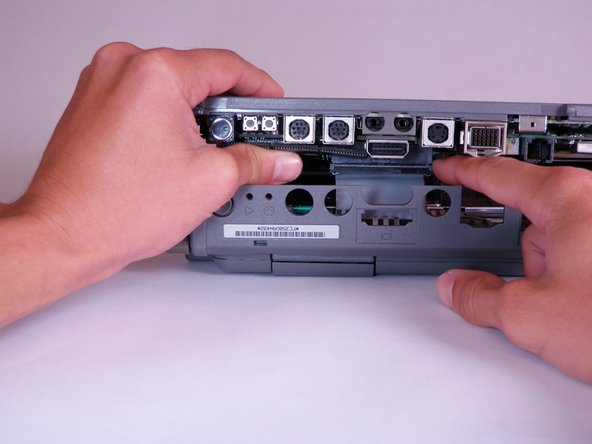
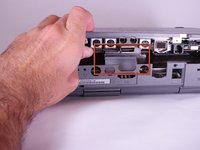
      • Place your hands on the lower case, just above the I/O panel, and slowly lift the lower case a few inches above the main body of the computer.

      • Release the large, gray interconnect ribbon cable just behind the I/O panel.

      • Caution: Lower case cannot be fully removed until two plastic clips in the front corners are released. See the following step for details.

      crwdns2952109:0crwdne2952109:0

      crwdns2917038:0crwdne2917038:0

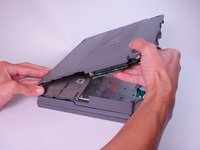
    5. Macintosh PowerBook 165c Lower Case Replacement: crwdns2935265:09crwdnd2935265:01crwdnd2935265:02crwdne2935265:0 Macintosh PowerBook 165c Lower Case Replacement: crwdns2935265:09crwdnd2935265:02crwdnd2935265:02crwdne2935265:0
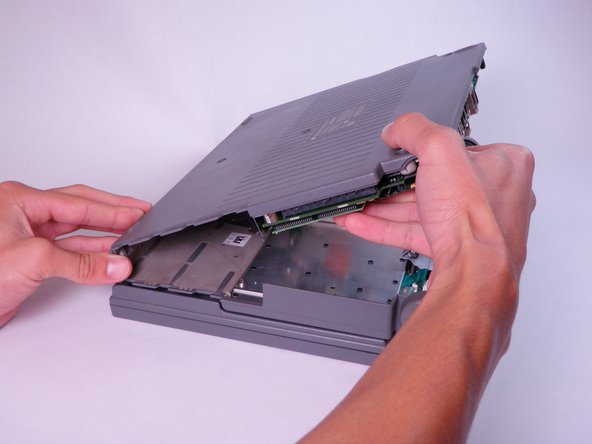
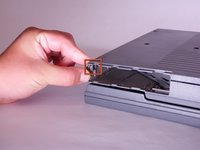
      • Place your thumb on the upper case, inside the empty battery slot, and your index finger near your thumb on the left side of the lower case.

      • Pinch your thumb and index finger towards each other to release the clip. Without releasing pressure on the pinch grip, use your index finger to push the lower case upwards.

      • Lift the lower case to remove it.

      crwdns2952109:0crwdne2952109:0

      crwdns2917038:0crwdne2917038:0

crwdns2915888:0crwdne2915888:0

To reassemble your device, follow these instructions in reverse order.

crwdns2935221:0crwdne2935221:0

Jason

crwdns2935283:010/12/11crwdne2935283:0

110 crwdns2915208:0crwdne2915208:0

crwdns2935297:04crwdne2935297:0

crwdns2935287:0crwdne2935287:0

Cal Poly, Team 6-3, Regan Fall 2011 crwdns2935289:0Cal Poly, Team 6-3, Regan Fall 2011crwdne2935289:0

CPSU-REGAN-F11S6G3

crwdns2931471:04crwdne2931471:0

crwdns2935297:024crwdne2935297:0

crwdns2947412:00crwdne2947412:0

crwdns2917038:0crwdne2917038:0

crwdns2936625:0crwdne2936625:0:

crwdns2936751:024crwdne2936751:0 0

crwdns2936753:07crwdne2936753:0 9

crwdns2936753:030crwdne2936753:0 29

crwdns2942667:0crwdne2942667:0 1,513